No Extra Headcount: TMS Booking Confirmation Automation for Forwarders
Booking confirmation automation means your transport management system submits carrier booking messages (FWB/XFWB, FHL/XFHL), listens for FMA, FNA and FSU status replies, and resolves or retries exceptions on its own so shipments get tendered on time. The direct payoff is fewer manual retransmits and faster carrier acknowledgement, without a person chasing status updates by phone or e-mail. Agentic transport management systems now build this logic natively rather than bolting it on.
TL;DR:
- Automating message validation and re-transmissions reduces manual work and speeds up carrier acknowledgment during peak booking periods.
- Effective automation requires support for specific message standards like FWB, FHL, FMA, FNA, FSU, and RCS, with seamless integration into the TMS.
- Maintaining high data quality at document intake and supporting digital bill of lading formats are critical for quick, error-free bookings.
- Proper exception management, including queues and escalation rules, prevents delays caused by rejected messages and ensures timely resolution.
- Using a fully integrated, agentic system like FreightSuite enables real-time status updates, minimizes re-transmits, and streamlines billing integration.
Table of Contents
- Why booking confirmation automation matters for your margins
- The message standards your automation has to speak
- Implementation checklist inside your TMS: step-by-step
- Exception management, monitoring, and fallbacks
- How to evaluate or configure a TMS for reliable automation
- FreightSuite: built for booking confirmation automation
- FAQ
- Sources
Why booking confirmation automation matters for your margins
Every manual retransmit costs time an operations team rarely has during peak tender windows. When a forwarder waits on a carrier acknowledgement instead of tracking it automatically, cutoffs slip and shipments get rebooked at a worse rate or a later flight. The fix is not more headcount. It is tighter control over the handful of metrics that actually predict a clean tender.
Track these to know whether your automation is working:
- Time-to-acknowledgement: the gap between FWB/FHL submission and the FMA or FNA reply.
- FOH/RCS latency: how long after physical handover the status message actually posts.
- Exception rate: the share of bookings that generate an FNA reject instead of a clean FMA.
- Re-transmit count: how many corrected messages a single shipment requires before acceptance.
The fastest ROI lever is unglamorous: accurate document capture paired with automated re-transmit rules. If the data entering your FWB is clean, most FNA rejects never happen. The IATA e-AWB global SOP requires shipment records to be transmitted and archived before cargo is tendered, which means a forwarder’s data quality directly gates how fast cargo can move, not just how clean the paperwork looks later.
The message standards your automation has to speak
Reliable booking confirmation automation depends on a small set of standardized messages, and a TMS either handles all of them or leaves gaps your team has to patch manually.
- FWB/XFWB: the forwarder’s waybill data, submitted to the carrier before tender.
- FHL/XFHL: house waybill details, linking individual shipments to the master.
- FMA: the carrier’s acknowledgement that the FWB or FHL was accepted cleanly.
- FNA: the carrier’s rejection notice, flagging a business-data or formatting error that needs correction and re-transmission.
- FSU/FOH: freight-on-hand status, confirming physical receipt at the carrier’s warehouse.
- FSU/RCS: received-from-shipper status, confirming the cargo is now in the carrier’s custody.
The IATA e-AWB global SOP lays out this full sequence, from forwarder-submitted FWB and FHL messages through carrier acknowledgement and status updates, and specifies that forwarders must re-transmit a corrected FWB or XFWB whenever an FNA flags a data error. Alongside e-AWB, the electronic bill of lading matters just as much for ocean and multimodal moves: a secured digital FIATA Bill of Lading lets a TMS issue a verifiable negotiable document without re-entering data a second time, which keeps the downstream paperwork as automated as the booking itself.
| Message | Purpose | Expected timing |
|---|---|---|
| FWB/XFWB | Forwarder waybill submission | Before tender |
| FHL/XFHL | House waybill detail | Before tender |
| FMA | Carrier acceptance acknowledgement | Shortly after FWB/FHL |
| FNA | Carrier rejection notice | Shortly after FWB/FHL, triggers re-transmit |
| FSU/FOH | Freight-on-hand confirmation | At physical handover |
| FSU/RCS | Received-from-shipper confirmation | At custody transfer |
Implementation checklist inside your TMS: step-by-step
Building this inside a transport management system is a sequence, not a single switch. Skip a step and the automation looks fine until a busy week exposes the gap.
- Capture documents cleanly first. Use OCR or document AI to pull shipper instructions, commercial invoices and packing lists into structured shipment records before anything touches the carrier.
- Map fields to FWB/FHL formats. Validate against carrier rule sets, including character limits and mandatory elements, so a malformed field never leaves your system.
- Confirm Cargo-XML or Cargo-IMP support. Most carriers now expect Cargo-XML; legacy Cargo-IMP still exists on some lanes, so your mapping layer needs to handle both without manual rework.
- Connect to carriers. Choose host-to-host APIs, EDI agreements, or portal automation depending on the carrier relationship, and get the bilateral EDI agreement signed before go-live.
- Automate submission and listening. Send FWB/FHL automatically and have the system listen continuously for FMA, FNA and FSU replies rather than polling on a schedule.
- Build re-transmit and escalation rules. Automated correction for common FNA reasons, with a hard rule that routes anything unresolved after a set number of attempts to a human.
- Pilot before you scale. Run a sandbox test, then pick one or two live lanes to validate against real carrier behavior before rolling the workflow out network-wide.
Pro Tip: Pick a pilot lane with a single carrier and high shipment volume first; it surfaces mapping errors fast without multiplying the variables you’re debugging.
Once submission and listening are running cleanly, the same orchestration layer can extend into milestone-driven status automation across the rest of the shipment lifecycle, not just at booking.
Exception management, monitoring, and fallbacks
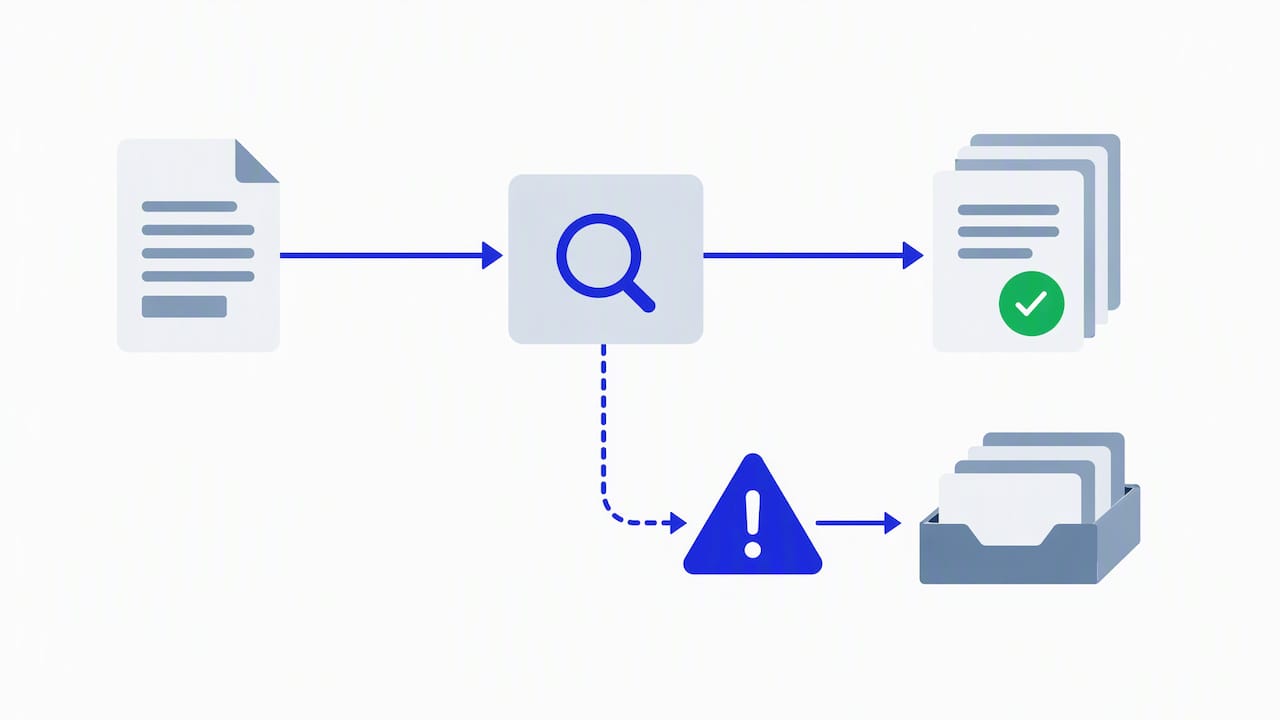
Automation that cannot handle a rejected message is not automation, it is a faster way to get stuck. Most FNA rejects trace back to a handful of causes: mismatched piece counts, invalid routing codes, or a field that exceeds the carrier’s allowed character count. The IATA BLR implementation notes recommend specific message versions and tie message quality directly to how often a forwarder sees clean FMA replies instead of rejects.
A well-designed exception workflow includes:
- An exception queue that separates auto-correctable rejects from ones that need a person.
- SLAs for human intervention, so nothing sits unresolved past a defined cutoff window.
- Fallback procedures, including paper AWB handling for lanes where e-AWB is not yet supported or where a bilateral single-process exception applies.
- A full audit trail of every FWB, FSU, FMA and FNA tied to a shipment, for carrier disputes and internal review.
Our exception management breakdown goes deeper into how queue design and escalation rules should work together inside a TMS.
How to evaluate or configure a TMS for reliable automation
Not every platform marketed as a TMS actually automates booking confirmation end to end, and the gaps usually show up under volume rather than in a demo.
- Native standards support: confirm EDI, Cargo-XML and carrier API integrations are built in, not dependent on a third-party connector.
- Workflow orchestration: look for agentic automation that manages exception routing and keeps an audit log without manual configuration per lane.
- Document standards: verify support for current e-AWB message versions and the ability to issue and verify an eFBL where multimodal moves require it.
- Finance integration: check that booking confirmation connects directly to billing, so a confirmed shipment flows into invoicing without a second data entry.
- Cutover readiness: a documented sandbox test, a pilot lane, and clear rollback steps before the full network goes live.
Pro Tip: Ask any TMS vendor to show you an actual FNA reject and the automated correction path, not just the happy-path booking flow; that single test reveals more than a feature list.
A broader walkthrough of how these pieces fit together lives in our freight forwarding TMS overview, and forwarders new to the booking sequence itself can start with ForwarderOne’s booking process explainer.
FreightSuite: built for booking confirmation automation
We built FreightSuite as an agentic transport management system, which means document capture, message mapping, carrier connectivity and exception handling run as one connected workflow instead of four separate tools stitched together. Our air freight management system and ocean freight TMS and automation both include this orchestration natively, with no add-on modules required to get there.
Forwarders running booking confirmation automation inside this TMS can expect:
- Fewer manual re-transmits, because field validation happens before a message ever reaches the carrier.
- Faster FOH and RCS visibility, since status listening runs continuously rather than on a polling schedule.
- Booking data that flows straight into billing, closing the gap between a confirmed shipment and an accurate invoice.
If customs documentation is part of your workflow, our customs brokerage TMS software connects the same way. Request a FreightSuite demo to see the exception workflow run against a real booking.

FAQ
What is booking confirmation automation in a TMS?
It is a TMS feature set that submits carrier booking messages such as FWB and FHL automatically, then listens for carrier replies like FMA, FNA and FSU without a person checking manually. The system retries or escalates failed bookings based on preset rules, so shipments move toward tender without waiting on someone to notice a problem.
What causes an FNA reject, and how is it fixed?
An FNA typically flags a business-data error such as a mismatched piece count, an invalid routing field, or data that exceeds the carrier’s allowed character limits, as described in the IATA BLR implementation notes. A properly configured TMS can auto-correct common formatting issues and re-transmit, escalating only the cases that need a human to review.
How does the FIATA eFBL fit into booking automation?
The electronic FIATA Multimodal Bill of Lading lets a TMS issue a verifiable digital document directly from booking data instead of re-entering shipment details in a separate system. The FIATA Practical Guide published in 2026 walks through onboarding, digital identity and verification steps for forwarders adopting it.
Does FreightSuite support e-AWB and eFBL message standards?
Air and ocean freight modules are built to handle carrier message standards and electronic documentation as part of native workflow automation, including FWB/FHL submission and status listening. Specific message version support and configuration details are best confirmed during a product demo.
What is the fastest way to reduce booking re-transmits?
Clean document capture at intake is the highest-leverage fix, since most re-transmits trace back to a data error that could have been caught before submission. Pairing accurate OCR capture with automated field validation against carrier rule sets, as outlined in the IATA e-AWB global SOP, prevents most FNA rejects before they happen.

