Best Ocean Tracking Software for Freight Forwarders in 2026
The best ocean tracking software for a freight forwarder is the one that puts clean container milestones where your team already works, not the one with the prettiest map. For some forwarders that is an enterprise visibility network, for others an API feeding a custom tool, and for a growing number it is a transport management system with ocean tracking built in, so a delayed container updates the shipment, the customer notice and the cost estimate in one place. Below we compare the main options, explain where tracking data actually comes from, and show how to pick for your size and workflow.
TL;DR
- Ocean tracking tools fall into four tiers: enterprise visibility networks, intelligence platforms, data and API providers, and basic trackers.
- Container milestones are discrete events published by carriers and terminals, not live GPS, and they can lag, so the best tools cross-check carrier data against AIS and terminal feeds.
- Network breadth and data quality matter more than dashboard design when you compare vendors.
- A standalone tracker only shows you where a box is. A TMS with native tracking, like FreightSuite, also acts on it through workflows, finance and customer updates.
- Match the tool to your scale, budget and the specific problem, such as detention and demurrage, customer inquiries or API integration.
Table of Contents
- What ocean tracking software actually does
- Where tracking data comes from, and why it matters
- The container milestones worth tracking
- Four tiers of ocean tracking tools
- How the options compare
- Where FreightSuite fits
- How to choose for your business
- What to ask every vendor
- See ocean tracking inside your TMS
- FAQ
- Sources
What ocean tracking software actually does
At its simplest, ocean tracking software takes a container number, booking number or bill of lading and returns a timeline: gate-out at origin, loaded on vessel, departure, transshipment, arrival, discharge, available for pickup, gate-out at destination, empty return. Everything else is built on top of that timeline.
The useful layer is what happens next. A forwarder does not need to know that a container moved; it needs to know that the last free day is Thursday, that the vessel slipped two days, and that the customer should hear about it before they ask. That gap between data and action is where the products in this guide differ most.
It also helps to separate two jobs that often get blurred. Visibility platforms are, in the words of Supply Chain Research’s 2026 buyer’s guide, sensing layers rather than execution systems: they collect and normalize carrier, EDI and API data, then produce ETAs and alerts for other systems. Execution systems, such as a TMS, are where quotes, bookings, documents and invoices live. The strongest setups connect the two tightly. The ground is shifting here, because the line between sensing and executing is blurring as agentic automation moves into the TMS itself.
Where tracking data comes from, and why it matters
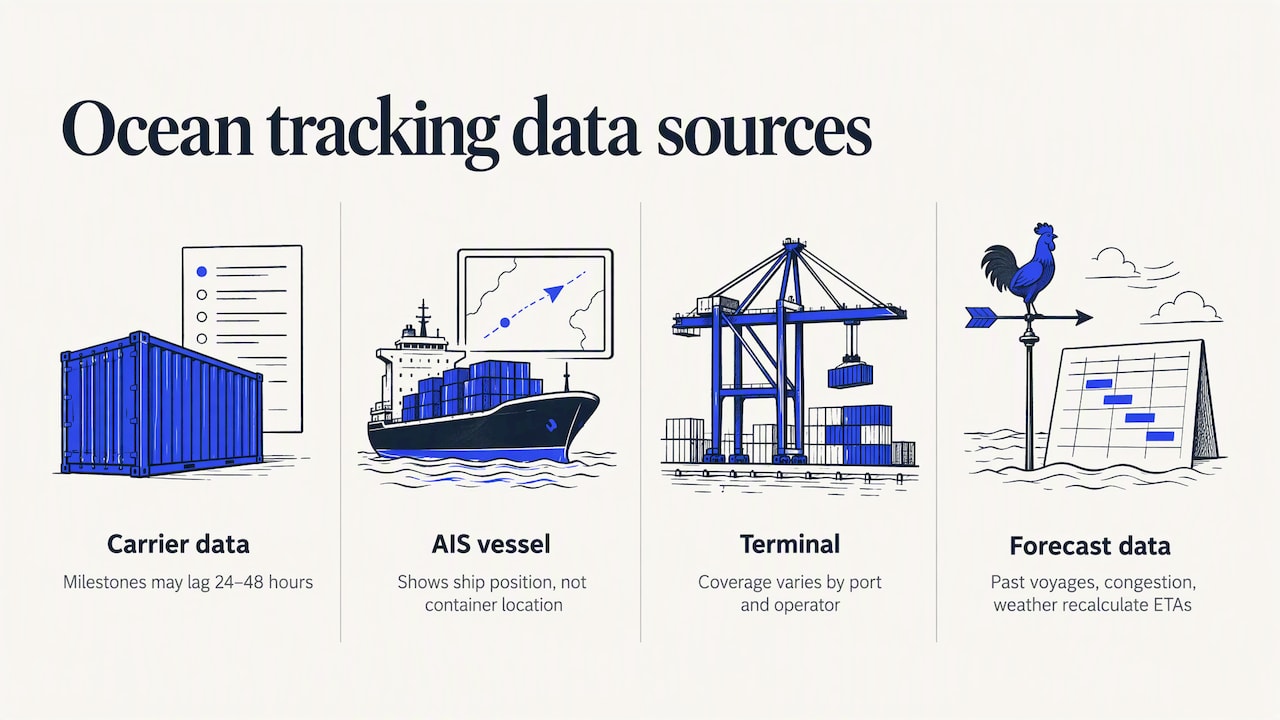
Before comparing vendors, understand the raw material. Every platform draws on some mix of four sources, and each has blind spots.
Carrier data arrives through EDI messages and APIs. It is authoritative for events the carrier controls, but it is only as fast as the carrier publishes it. Standardized container milestones are not live coordinates; they are events that reach a platform after the carrier or terminal records them, and as of 2026 they can lag by 24 to 48 hours in some cases. We mention this not to be alarmist but to set expectations: a timeline that looks quiet may simply be waiting for the carrier.
AIS vessel data shows where the ship is, independent of what the carrier says. It is excellent for ETAs and for catching a vessel that has quietly changed course, but it says nothing about a specific container inside the ship.
Terminal data covers the last-mile events that cost forwarders money: discharge, holds, last free day and pickup availability. Coverage varies by port and by terminal operator.
Schedule and historical data feed the predictive layer. Platforms use past voyages, port congestion and weather to recalculate ETAs rather than trust the original sailing schedule.
The practical lesson is the one most vendors now agree on: no single source is reliable enough alone. When you evaluate a platform, ask which sources it blends, how it resolves conflicts between them, and how quickly new events reach your screen. Per Supply Chain Research, network breadth and data quality, not dashboard design, are the main practical differentiators between visibility vendors.
The container milestones worth tracking
Not every milestone earns its place on your dashboard. The ones that drive cost or customer communication are these.
| Milestone | Why it matters to a forwarder |
|---|---|
| Gate-in at origin terminal | Confirms the cargo made the cut-off before vessel loading |
| Loaded on vessel and departure | Starts the transit clock and triggers the customer’s departure notice |
| Transshipment arrival and departure | The most common place for rolled containers and silent delays |
| Vessel arrival and ETA changes | Drives drayage booking, customs timing and warehouse planning |
| Discharge | Starts the free-time clock at many terminals |
| Holds and customs release | Blocks pickup and creates storage exposure |
| Last free day | The date that decides whether detention and demurrage start |
| Available for pickup and gate-out | Confirms the box is moving to the consignee |
| Empty return | Closes out per diem exposure |
Milestone mapping is the quiet technical detail behind this table. Every carrier names and codes events differently, so a tracking platform has to translate them into one consistent schema. That is why data normalization is often named the most important differentiator for forwarders: if gate-out means three different things across your top carriers, your reports and alerts cannot be trusted. When you trial any tool, pick five containers across different carriers and compare how each event is labeled and timed.
Four tiers of ocean tracking tools
The market is easier to navigate when you sort it by what the product is built to do. A 2026 buyer’s guide from one vendor groups container tracking software into four tiers: enterprise visibility, intelligence, data and API providers, and basic trackers. We use the same broad shape, and we add a fifth category, because it is the one forwarders most often overlook.
Enterprise multimodal visibility
Project44, FourKites and Shippeo sit here. They track across ocean, rail, truck and more, and they sell mainly to large shippers and global logistics providers. FourKites says its ocean offering combines direct EDI and API links with carriers, AIS, schedule data and North American terminal data, and reported in 2024 95 percent or better final-destination ETA accuracy for its Dynamic Ocean product. Shippeo is known for European depth and data-quality commitments, and project44 for the breadth of its carrier network, which Supply Chain Research puts at roughly 140,000 carriers.
The trade-off is scope and cost. These platforms are built for enterprise programs, enterprise pricing generally means a sales conversation rather than a published rate, and implementations tend to be measured in months. For a mid-sized forwarder whose main need is ocean, that can be more platform than the problem requires.
Ocean intelligence platforms
CargoPilot, Portcast, Windward and Gnosis Freight focus on ocean and container lifecycle intelligence. Their pitch is predictive: recalculating ETAs from many data sources, flagging congestion and surfacing terminal events such as last free day. Gnosis, for instance, says it cross-references feeds from carriers, ports, terminals, rail, U.S. Customs and AIS satellite data to fill gaps and resolve conflicts. These tools are a strong fit when exception management and demurrage avoidance are the main goals.
Data and API providers
Terminal49, Vizion and MarineTraffic supply tracking data that you or your software vendor build on. They suit teams with engineering resources who want to embed tracking in their own portal or system. Several of them publish transparent or self-serve pricing, which makes them easy to test. Terminal49 also describes milestones such as holds and last free day, with alerts and dashboards for teams that do not want to build their own.
Basic carrier-milestone trackers
ShipsGo, SeaRates and Tradlinx lean on carrier milestones and are the usual answer to the question of how to track a container for free. Some offer a free allowance or a pay-per-shipment credit model. They are fine for occasional lookups. They are not designed to run a forwarding operation, because the tracking lives apart from your quotes, bookings, documents and invoices.
TMS with native ocean tracking
The fifth option is not a tracker at all. It is a transport management system where tracking is one capability among many, which is where FreightSuite sits.
How the options compare
| Option type | Examples | Best for | Main limitation |
|---|---|---|---|
| Enterprise visibility | project44, FourKites, Shippeo | Large shippers and global 3PLs needing multimodal coverage | Heavy implementation, sales-led pricing |
| Ocean intelligence | Portcast, Gnosis Freight, CargoPilot, Windward | Predictive ETAs and exception management | Still a separate system from operations and finance |
| Data and API | Terminal49, Vizion, MarineTraffic | Teams building their own tools or portals | Needs engineering effort to become a workflow |
| Basic trackers | ShipsGo, SeaRates, Tradlinx | Occasional lookups and small volumes | Limited automation and integration |
| TMS with native tracking | FreightSuite | Forwarders who want tracking tied to operations, rates and finance | Best value when you adopt the TMS, not only the tracker |
Where FreightSuite fits
FreightSuite is an agentic TMS built for freight forwarders and logistics companies, with air and ocean tracking, rate management, finance, operations and AI agent orchestration built natively into one cloud platform. For ocean, that means the container timeline is not a separate screen you check. It is part of the shipment record.
Here is the difference in practice. In a standalone tracker, a vessel delay is a notification. In a TMS built around automation, the same event can update the shipment, trigger a customer update, adjust cost tracking and flag the file for follow-up through your configured workflows, without someone re-keying details across systems. Our ocean freight capabilities page walks through how this works for ocean forwarders, and our guide to real-time logistics tracking covers the wider tracking picture for supply chain teams.
There are other things a forwarder gets in the same system: automated document management, invoice recognition, dynamic FX and cost tracking, credit control, customer dashboards and connections to accounting software. All core features are included out of the box, without add-ons. That matters because the real cost of a tracker is rarely the subscription. It is the hours spent moving data between the tracker, the operations system and the accounting package.
FreightSuite is the alternative to legacy platforms such as CargoWise, Magaya, Descartes, Multifreight, Logi-Sys and Logitude. If you are weighing it against one of them, our comparison page and CargoWise comparison lay out the differences. Pricing is not published on our site, so the way to see fit and cost for your volumes is a demo.
Is FreightSuite the right answer for everyone? If you only need to look up the occasional container for a shipper, a free basic tracker will do. If you are a large shipper building a control tower across thousands of trucking lanes, an enterprise visibility network is built for that. If you run a forwarding business and want tracking, operations and finance to work as one system, that is the case we built for.
How to choose for your business
Start with the problem, not the product category. Four questions sort most decisions.
First, what are you trying to prevent? If it is detention and demurrage, prioritize terminal-level events and last free day alerts. FourKites frames predictive ocean visibility as a cost-avoidance and exception-management tool rather than simple location tracking, and that framing is useful whichever vendor you choose. If it is customer inquiries, prioritize customer-facing dashboards and automated notices.
Second, where does the data need to go? If tracking has to land in your TMS, ERP or customer portal, check for APIs or webhooks and test how cleanly events map to your own status codes. A tracker that cannot feed your operations system will create manual work.
Third, what is your scale? Enterprise platforms can be overkill for mid-market teams, while API providers suit technology teams building custom tools. For a structured way to weigh fit, cost and implementation effort by company size, software reviews by fleet size show the same kind of comparison logic, even though the product category differs.
Fourth, how will you test it? Run a two-week pilot with real containers across your top carriers and ports. Measure how soon each milestone appears compared with the carrier’s own site, how often ETAs change and whether they converge on reality, and how many touches your team needs per shipment. The right tool is the one that reduces touches.

What to ask every vendor
Bring the same questions to every demo so the answers are comparable. Which carriers and terminals are covered at the milestone level, not just the vessel level? Which sources feed the ETA, and what happens when two sources disagree? How quickly does a new carrier event reach the screen, and can you see the timestamp of the original event versus the time of receipt? What are the API limits, and who owns the data if you leave? Is pricing per shipment, per container, per user or per module, and which features are add-ons? Vague answers on any of these are a signal in themselves.
One more point for forwarders: ask how the tool handles the work around the milestone. A tracking event only creates value when someone acts on it. The more of that action your system automates, from customer notification to cost updates, the faster your team can grow volume without growing headcount in step. That is the logic behind our AI agent orchestration, and it is the opportunity the next few years of forwarding technology will reward. The window is real, and it has a timeline.
See ocean tracking inside your TMS
If you want tracking that drives your operations rather than sitting beside them, see how FreightSuite handles ocean freight, or start from the FreightSuite platform overview to book a demo and see your own shipments in the system.
FAQ
What is the best app for container tracking?
It depends on the job. For occasional lookups, a free carrier-milestone tracker is enough. For daily forwarding operations, a platform that ties tracking to your shipment records, documents and finance will save more time than any standalone app.
How can I track a container for free?
Start with the carrier’s own website using the container, booking or bill of lading number. Several third-party trackers also offer a limited free allowance, but free access usually covers a small number of shipments and rarely includes integrations or API use.
How often do container tracking updates arrive?
It varies by provider and by source. Milestones are published by carriers and terminals, so an update can only arrive after the event is recorded, and delays of up to a day or two are possible. Ask each vendor how quickly events reach your screen and test it on live containers.
Do I need a separate tracker if I already use a TMS?
Not necessarily. If your TMS includes native ocean tracking, you avoid duplicate data entry and keep events connected to operations and finance. If your current TMS lacks it, you need either a tracking integration through APIs or a TMS that includes it.
Sources
- Supply Chain Visibility and Control Towers: 2026 Buyer’s Guide
- Updates to FourKites’ Dynamic Ocean, Supply Chain Xchange
- FourKites Adds New Customers, Improves Time to Value for Real-Time Ocean Visibility
- Container Tracking: Live Vessel and Container Lookup, AiDeliv
- Container Tracking Software: The Complete Buyer’s Guide, CargoPilot

