Preserve Load, Lane, and Carrier Detail in Xero for Forwarders
Connecting Xero to a transport management system removes manual rekeying and attaches shipment context to every financial record it creates. Finance teams, dispatch operators, and outside accountants all gain from it: fewer reconciliation exceptions, invoices that sync with payments automatically, and a general ledger that reflects what actually moved, not just what got typed in later.
TL;DR:
- Using API or middleware integration supports real-time syncing of invoices and payments, significantly reducing manual reconciliation and error-prone data entry.
- Proper setup requires validating tax codes, permission levels, and data quality, with phased testing to avoid duplicate invoices and incorrect postings.
- Integration success is verified by tracing individual transactions from load to invoice and maintaining daily reconciliation checklists during initial months.
- Major issues during setup include tax mismatches, permission errors, and currency inconsistencies, all solvable through documentation and careful testing prior to go-live.
- FreightSuite offers a native solution that embeds shipment context into financial records, speeding up reconciliation and reducing manual work compared to disconnected systems.
Table of Contents
- What Does Xero Logistics Integration Actually Fix?
- Direct API, Middleware, or Batch Export: Which Fits Your Operation?
- How Do You Set Up a Xero Logistics Integration Step by Step?
- What Goes Wrong During Setup, and How Do You Fix It?
- How Do You Verify the Integration Is Actually Working?
- FreightSuite: A TMS Built to Keep Xero in Sync
- Where to Find Deeper Technical Guidance
- Sources
- FAQ
What Does Xero Logistics Integration Actually Fix?
Freight forwarders that run Xero alongside a disconnected TMS end up rebuilding the same transaction twice: once when the load is booked, and again when someone in accounting keys the invoice into Xero from a PDF or a spreadsheet export. That second step is where errors creep in, and it’s where month-end reconciliation turns into a multi-day hunt for mismatched totals.
Integration closes that gap. Invoices, carrier bills, and payments post to Xero the moment they’re generated in the TMS, already coded to the right accounts and tax rates.
The business case comes down to four gains:
- Eliminating duplicate entry, which shrinks month-end close from days to hours for most mid-size forwarders
- Faster invoice generation and payment matching, which shortens the invoice-to-cash cycle
- Load-level detail (shipment, lane, carrier) staying attached to every posted transaction instead of getting lost in a generic ledger line
- Fewer bookkeeping errors for internal accountants and outside advisors, since the numbers in Xero trace directly back to the operational event that created them
A logistics case study on NetSuite and WMS/TMS integration found that a phased rollout with rigorous testing cut manual data entry by roughly 30 hours a week, dropped shipping errors by 78%, and improved inventory accuracy by 89%. Those numbers came from a different platform stack, but the pattern holds for Xero integrations too: the bigger the manual workload before go-live, the bigger the payoff after.
Direct API, Middleware, or Batch Export: Which Fits Your Operation?
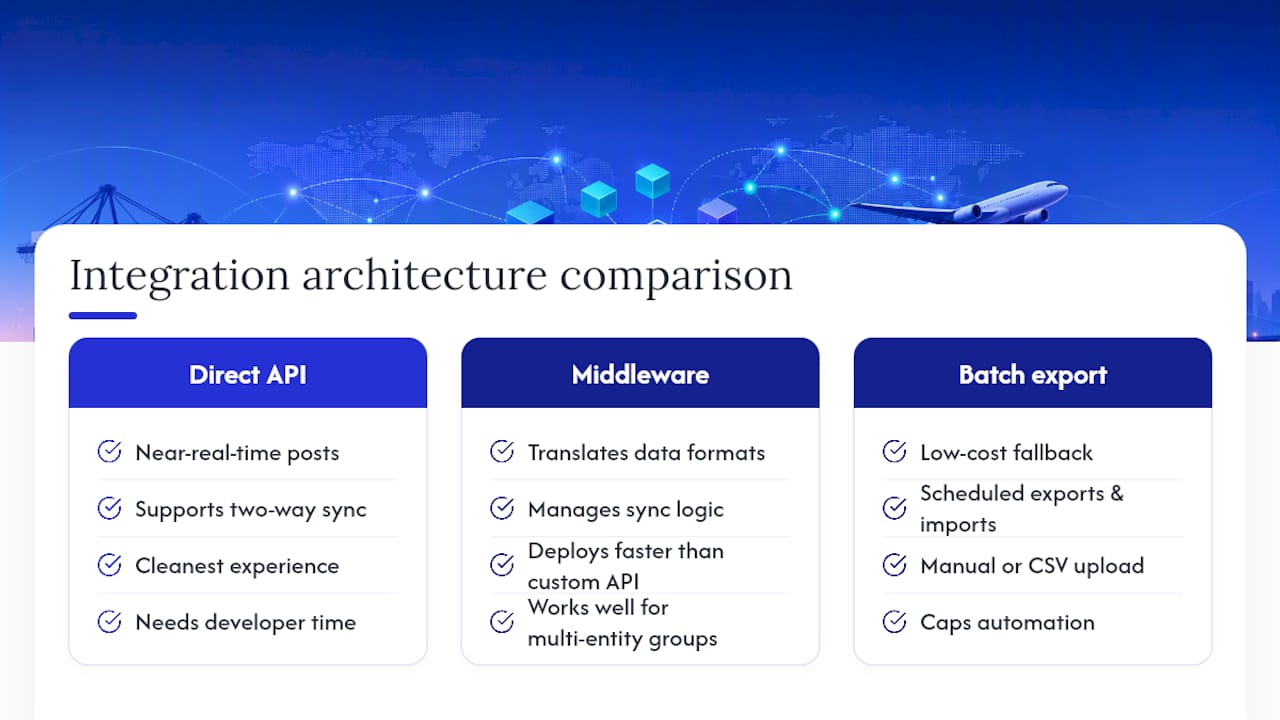
Three architectures dominate how logistics companies connect their TMS to Xero, and the right one depends on transaction volume, technical resources, and how many entities you’re posting for.
Direct API integration posts data in near real time and supports two-way sync, meaning payment status updates in Xero can flow back into the TMS automatically. It delivers the cleanest experience but usually needs developer time to build and maintain, particularly around error handling and retries.
Middleware or connector-based integration sits between the TMS and Xero, translating data formats and managing the sync logic for you. This route deploys faster than a custom API build and works well for forwarders running multiple entities or juggling more than one accounting system across a group structure.
Batch export and import is the low-cost fallback. Someone exports invoices from the TMS on a schedule and imports them into Xero manually or through a CSV upload. It costs almost nothing to set up, but it caps how much automation you actually get, and it leaves reconciliation heavier because nothing is validated in real time.
Each approach changes what records sync automatically and how much manual reconciliation you’re stuck doing afterward. Connecting transportation workflows to Xero means invoices arrive already tied to loads, lanes, and carriers rather than getting rebuilt from a spreadsheet at month-end, but only the API and middleware routes deliver that link without extra manual work.
How Do You Set Up a Xero Logistics Integration Step by Step?
A rushed integration is how forwarders end up with duplicate invoices and a chart of accounts nobody trusts. Work through these steps in order and you’ll avoid most of the pain.
- Precheck your foundation. Confirm your Xero subscription tier supports the API features you need, audit user roles, and clean up your chart of accounts before you map anything to it.
- Build the mapping table. Match TMS fields (shipment charges, carrier bills, fuel surcharges) to Xero nominal codes, tax codes, and analytic segments. This single document is the most valuable artifact you’ll produce during the entire project, according to integration guidance from NinjaTMS.
- Authorize the API connection. Qargo’s Xero integration documentation notes that only a Super Admin or an equivalent elevated role can authorize the connection, so confirm who holds that permission before you schedule the go-live date.
- Configure field mappings and idempotency keys. Set up how invoices, credit notes, carrier bills, and payments post, and assign unique transaction keys so retries or partial failures never create duplicate entries in Xero.
- Run sandbox tests. Push a small batch of sample transactions through and validate every journal entry in Xero manually, checking that the audit trail links back to the original load.
- Go live with a rollback plan. Set a controlled start date, monitor for failed posts daily during the first two weeks, and keep a documented rollback procedure ready in case something breaks.
Pro Tip: Run your sandbox test with real historical invoices, not made-up sample data. Fake test transactions rarely surface the tax code mismatches and rounding errors that show up with actual carrier bills.
What Goes Wrong During Setup, and How Do You Fix It?
Most integration headaches trace back to five recurring issues, and each has a straightforward fix if you catch it early.
- Tax code mismatches: keep a living mapping table and validate it against sample invoices before full rollout, not after.
- Duplicate or missing invoices: idempotency keys prevent duplicates on retry; a documented backfill procedure catches anything that failed to post the first time.
- Permission errors: write down exactly which Xero roles are required for each step, and confirm the right person holds Super Admin access before authorization day.
- Currency and multi-entity postings: test multi-currency flows separately from single-currency ones, and confirm intercompany rules before you post anything across entities.
- Data quality gaps: run a data-cleaning pass on open invoices and outstanding carrier bills, and limit your go-live window to a controlled date range rather than flipping the switch on everything at once.
None of these are exotic problems. They’re the same five issues that show up in nearly every accounting-to-operations integration, logistics or otherwise, and they’re all solvable with documentation and a slower rollout than you’d like.
How Do You Verify the Integration Is Actually Working?
Verification comes down to tracing one transaction end to end and checking that nothing dropped along the way. Pick a single load and follow it from quote to dispatch to invoice, then confirm it posted correctly in Xero and matched against the incoming payment.
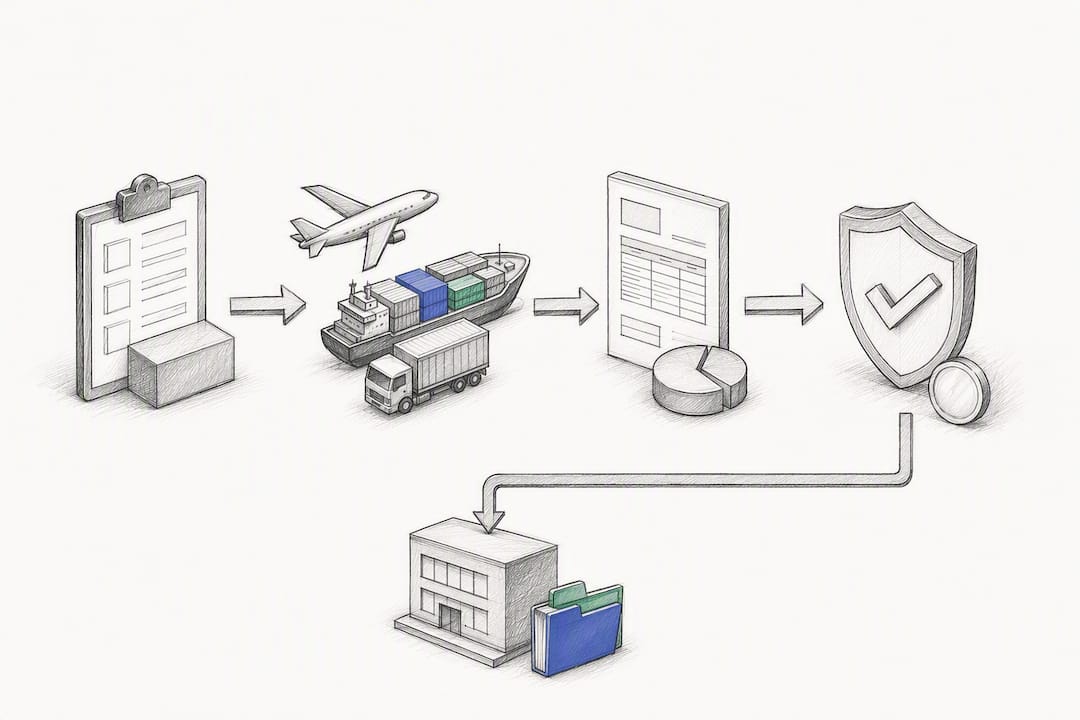
Build a daily reconciliation checklist for the first month, with automated alerts for any transaction that fails to post. That catches problems while they’re still small.
Four KPIs tell you whether the integration is paying off:
- Reduction in manual journal entries per week
- Time saved during month-end close
- Number of reconciliation exceptions per billing cycle
- Improvement in days sales outstanding (DSO)
Preserving the load as the source of truth lets finance run reports tied directly to the shipment that generated the revenue, rather than reconstructing profitability from exports after the fact. If exceptions climb instead of falling after 30 days, escalate to your accounting partner or the TMS vendor’s technical support before the backlog grows.
FreightSuite: A TMS Built to Keep Xero in Sync
Most integration headaches come from treating the TMS and the accounting system as two separate records of truth that need constant reconciliation. FreightSuite is the alternative to that setup: rate management, shipment-linked invoicing, and carrier pay all live inside one platform, so the financial postings that reach Xero already carry the load, lane, and carrier context finance actually needs.

Because that context is native to the platform rather than bolted on, accounting handoffs shrink and reconciliation moves faster. Freight forwarders juggling ocean, air, and road freight get the same benefit across every mode, whether they’re running ocean freight operations, managing air freight capabilities, or coordinating road freight transport. Forwarders weighing FreightSuite against legacy platforms can also review a direct comparison against CargoWise to see how the automation stacks up.
If your Xero reconciliation process still eats a week every month, the fix isn’t more spreadsheets. It’s a TMS that was built with accounting sync in mind from day one. Request a FreightSuite demo and see how a pilot Xero connection performs against your current invoice-to-cash timeline.
Where to Find Deeper Technical Guidance
For the exact field-mapping and authorization steps, Qargo’s Xero integration help article walks through invoice sync, credit notes, and the Super Admin requirement in detail. Xero’s own logistics page outlines the app ecosystem and accounting features built for freight operators. For architecture patterns beyond freight, the B2B wholesale portal pattern offers a useful comparison point on middleware design.
Sources
FAQ
What Does Xero Integrate With?
Xero connects with hundreds of third-party apps across payroll, inventory, payments, and industry-specific platforms, including transport management systems built for freight forwarders. Most TMS integrations sync invoices, credit notes, carrier bills, and payment status directly into Xero’s ledger, as Qargo’s integration documentation describes.
What Are the Downsides of Using Xero for Logistics Finance?
Xero itself doesn’t natively track shipment-level detail like loads, lanes, or carrier assignments, so without a connected TMS, financial records lose that operational context. Forwarders relying on manual entry or spreadsheet exports also face higher error rates and slower month-end closes than those running a direct or middleware integration.
Can Xero and NetSuite Both Connect to a TMS?
Yes. Xero and NetSuite are both common accounting targets for TMS integrations, and the underlying approach, direct API, middleware, or batch export, works similarly across either platform. A logistics case study using NetSuite showed measurable gains in processing speed and inventory accuracy after a phased integration, a pattern that applies to Xero-connected setups as well.
Does FreightSuite Support Xero Integration for Freight Forwarders?
FreightSuite is built to keep shipment-linked invoicing, carrier pay, and rate management connected to accounting workflows, reducing the manual handoffs that typically slow down Xero reconciliation. Current pricing and setup details are available directly on the FreightSuite site.
How Long Does a Typical Xero Logistics Integration Take?
Timelines depend on scope: a direct API build with custom field mapping generally takes longer than a middleware connector, which can deploy in days rather than weeks. Testing and sandbox validation should never be skipped regardless of architecture, since that stage is what catches tax code mismatches before they reach live invoices.

