F&O or Business Central? 6 Step Dynamics 365 TMS Decision Plan
Yes, Dynamics 365 supports transportation management, and the choice is not whether to integrate but how. Use the built-in Supply Chain Management TMS when your routing needs are simple and ERP-native. Choose a direct API or a managed connector like Azure Logic Apps or an AppSource gateway when you need multi-carrier rate shopping and real freight execution. Business Central users skip the built-in option entirely: there is none, so a third-party TMS is the only path forward.
TL;DR:
- Native supply chain management tools are suitable for simple routing needs, but complex freight operations require multi-carrier integration for real-time rate shopping and automation.
- A third-party TMS integration reduces manual data entry, improves freight audit accuracy, and enhances customer visibility through automatic synchronization with Dynamics 365.
- Options like direct API, middleware platforms, or productized connectors vary in deployment speed, flexibility, and maintenance, with each suited to different technical capacities and operation sizes.
- Proper project scoping, including lane selection and KPI setting, is essential to prevent delays and ensure smooth, staged go-lives with minimal rework.
- FreightSuite offers built-in, native integration features for Dynamics 365, streamlining a complex process and eliminating the need for extensive custom development.
Table of Contents
- What Does Dynamics 365 Transportation Management Cover?
- Why Integrate a Full TMS With Dynamics 365?
- Direct API, Middleware, or Native Connector: Which Fits?
- How Does Shipment Data Flow Between Dynamics and a TMS?
- What Does the Implementation Checklist Look Like?
- What Are the Biggest Integration Pitfalls?
- How Does FreightSuite Handle Dynamics 365 Integration?
- How Do You Optimize Performance After Integration?
- What Do Successful Dynamics 365 TMS Integrations Look Like?
- What Trends Will Shape Dynamics 365 TMS Integration Next?
- Ready to Connect Your TMS to Dynamics 365?
- Where to Read the Technical Documentation
- Sources
- FAQ
What Does Dynamics 365 Transportation Management Cover?
The Transportation Management module lives inside Dynamics 365 Supply Chain Management, formerly Finance & Operations. It handles route planning, load building, and shipment processing natively, according to Microsoft Learn’s transportation management documentation. If you are running Business Central, this module simply does not exist in your environment, full stop.
That distinction shapes every decision downstream. Supply Chain Management customers get a genuine choice between native tools and outside software. Business Central customers face a different question entirely: which third-party TMS or connector fits their volume and carrier mix, since Business Central has no built-in transportation module to fall back on, per the same Microsoft documentation.
The native module inside Supply Chain Management works well for straightforward internal logistics, but it has real ceilings:
- Rate tables are largely static and require manual updates as carrier pricing shifts.
- Carrier connectivity is limited compared to dedicated freight platforms built around live API feeds.
- Multi-modal freight forwarding (ocean, air, and road together) stretches the module past its original design intent.
If you move small volumes on a handful of contracted lanes, the native tools may cover you. If you broker freight across modes, manage dozens of carrier relationships, or need live rate shopping, you are looking at integration, not customization. Mid-market and enterprise freight forwarders almost always land in the second category, because their margin depends on carrier flexibility the native module was never built to provide.
Why Integrate a Full TMS With Dynamics 365?
The financial case for integration comes down to one word: friction. Every manual re-entry of a shipment record between your TMS and your ERP is a chance for a typo, a missed accessorial charge, or a delayed invoice. Third-party integrations eliminate that friction by writing shipment data, rate confirmations, and freight costs directly back into Dynamics 365, according to AlphaVima’s analysis of Dynamics 365 TMS integration.
Pro Tip: Track your freight audit exception rate before and after integration. A drop in flagged discrepancies is one of the clearest signals that your data sync is actually working, not just running.
The measurable benefits tend to fall into four buckets:
- Single source of truth. Order, warehouse, and finance teams stop reconciling three versions of the same shipment.
- Live rate shopping. Carrier selection happens against current rates instead of a table someone updated last quarter, which directly affects freight spend.
- Automated freight audit. Estimated and final carrier charges get compared automatically, and discrepancies above a set tolerance get flagged before a vendor payment goes out.
- Better customer visibility. Tracking milestones sync back into Dynamics dashboards, so customer service is not calling a carrier hotline to answer a basic “where is my shipment” question.
Freight forwarders running lean back offices feel this most acutely. A team of three people processing hundreds of shipments a month cannot afford to manually reconcile freight invoices against quotes. Integration turns that reconciliation into a background process instead of a full-time job.
Direct API, Middleware, or Native Connector: Which Fits?
Three architectural paths lead to a working Dynamics 365 TMS integration, and each one trades speed of deployment against long-term flexibility.
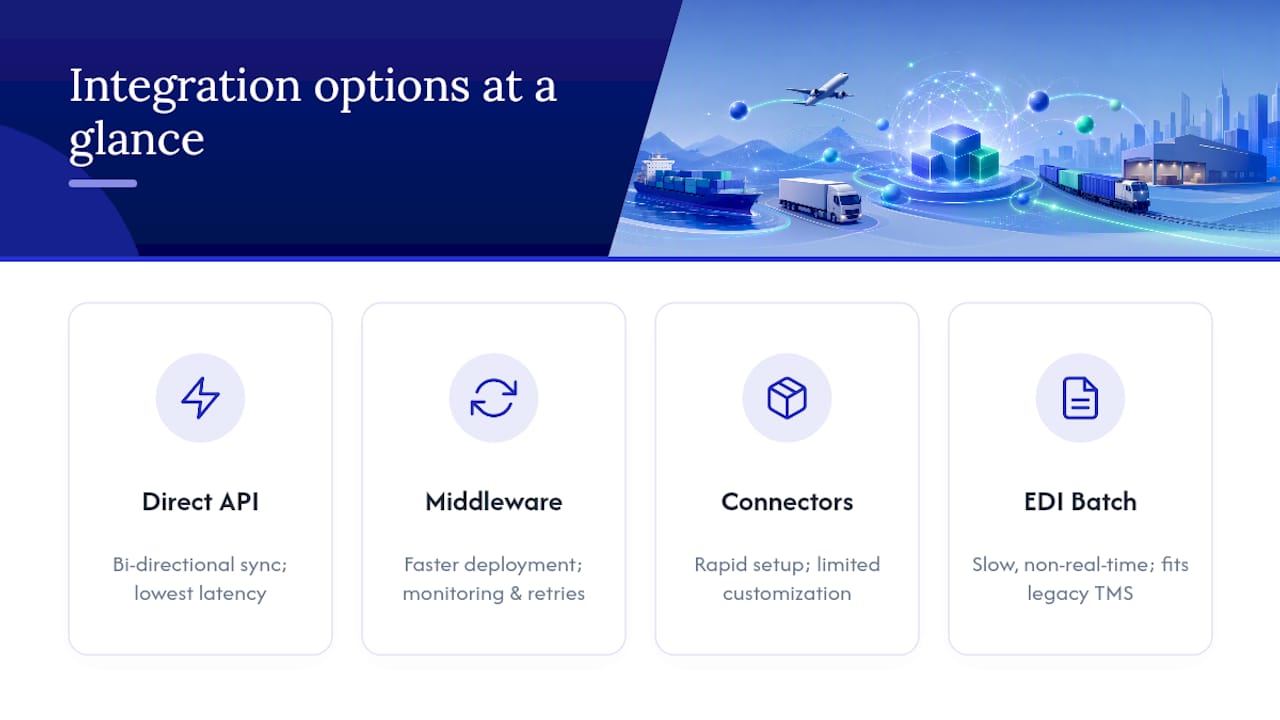
Direct API integration connects your TMS and Dynamics 365 point to point, with no middle layer translating data between them. This approach gives you tight bi-directional sync and lower latency, which matters if your operations team needs shipment status changes to appear in Dynamics within seconds, not minutes. Modern best-of-breed TMS platforms increasingly ship with direct, bi-directional APIs that reduce both implementation time and ongoing maintenance compared to heavier middleware setups, according to ACS Logco’s analysis of TMS benefits. The trade-off: you need engineering capacity to build and maintain that connection, including handling authentication tokens, retries, and schema changes on both sides.
Middleware and iPaaS platforms, most commonly Azure Logic Apps, sit between Dynamics 365 and your TMS and handle the translation work centrally. Logic Apps ships with prebuilt connectors for Dynamics 365 and native Azure Active Directory security, which is a major reason it has become the default recommendation for teams that want faster deployment without sacrificing monitoring or retry logic, per Microsoft Azure’s Logic Apps documentation. For many mid-market shippers, Logic Apps hits the best balance between deployment speed and long-term maintainability, largely because you are not building connector logic from scratch.
Productized connectors and gateways, like the NMB Gateway for TMS listed on Microsoft AppSource, centralize multi-modal transportation workflows and expose shipment events directly inside Dynamics. These gateways get you to a working state faster than a custom build, but they can limit how much you customize specific flows, particularly around advanced freight audit or customs brokerage logic.
EDI and batch transfers remain relevant for legacy on-premise TMS platforms that were never built with modern API layers. It is slower and less real-time than any of the three options above, but it still beats manual data entry for teams stuck on older infrastructure. Understanding how integration architecture connects ERP and logistics systems more broadly helps clarify where EDI still fits inside a modern stack.
How Does Shipment Data Flow Between Dynamics and a TMS?
Every Dynamics 365 TMS integration follows a similar sequence, whether you build it with a direct API, Azure Logic Apps, or a productized gateway. Understanding this flow before scoping the project prevents the single most common cause of rework: discovering halfway through implementation that a data object was never mapped.
- Order creation. A sales or purchase order gets created in Dynamics 365, triggering the need for a shipment.
- Shipment request. The order data (weight, dimensions, origin, destination, service level) passes to the TMS as a shipment request.
- Rate and carrier selection. The TMS shops rates across connected carriers and returns options, often including accessorial charges for fuel surcharges or liftgate service.
- Execution. Once a carrier is selected, the TMS generates labels, booking confirmations, and dispatch instructions.
- Tracking and proof of delivery. Milestone updates and proof-of-delivery documents flow back through the integration layer as the shipment moves.
- Cost sync and freight audit. Final carrier charges reconcile against the original quote, and the confirmed cost posts back into Dynamics finance records for accounts payable.
The objects moving through that sequence, sales and purchase order headers, shipment header and line records, carrier service codes, rate and accessorial data, tracking milestones, and invoice records, need a home somewhere in your architecture. Dataverse entities, OData or REST API endpoints, and F&O data entities are the three most common hosting points for these mappings. Multi-modal forwarders should keep carrier code and accessorial mapping tables centralized in the TMS or middleware layer rather than scattered across ERP customizations, since duplicating that logic in two places is a maintenance trap waiting to happen.
What Does the Implementation Checklist Look Like?
A Dynamics 365 TMS integration project succeeds or fails based on decisions made before a single line of code gets written. Rushing past pre-project alignment is the most common reason go-lives slip by months.
Start with scope. Define exactly which lanes, transportation modes, and carrier contracts the integration will cover in phase one, and set concrete KPIs (freight audit exception rate, on-time tracking update percentage, invoice cycle time) so you know whether the project actually worked once it is live.
Pro Tip: Resist the urge to integrate every carrier and mode on day one. Launch with your highest-volume lane, prove the data flow works end to end, then expand. A narrow, working integration beats a broad, half-tested one.
From there, the technical and testing work breaks down into four stages:
- Authentication setup. Choose OAuth through Azure Active Directory for identity management, and document token refresh and rotation procedures before go-live, not after.
- Field mapping documentation. Every carrier code, accessorial charge type, and status milestone needs a documented mapping to its Dynamics equivalent.
- Sandbox and lane testing. Run test shipments through sandbox carrier environments, then move to real test lanes with reconciliation scenarios that intentionally include discrepancies, to confirm your freight audit logic actually catches them.
- User acceptance testing. Operations, finance, and customer service teams need to sign off on the full end-to-end flow, not just the technical team.
Go-live should be staged, not a single cutover. Roll out one lane or carrier group at a time, run monitoring dashboards to catch failures early, and have a documented rollback plan and change control process before you flip the switch on lane two.
What Are the Biggest Integration Pitfalls?
Schema drift is the quiet killer of most Dynamics 365 TMS integrations. A carrier updates their API, a field that used to return a two-letter status code now returns three letters, and suddenly your freight audit job is flagging every shipment as an exception. Contract testing and versioned endpoints catch this before it hits production, according to Microsoft’s Logic Apps documentation on integration best practices.
The maintenance trade-off between approaches deserves honest attention before you commit. Custom point-to-point integrations give you full control but put the maintenance burden entirely on your team. Managed connectors and middleware shift some of that burden to the platform vendor, at the cost of some customization flexibility.
A few other risks show up often enough to plan for explicitly:
- PII exposure in shipment data. Names, addresses, and contact details flow through every shipment record, so token rotation and secure storage practices matter as much for a TMS integration as for any other customer-facing system.
- Carrier code mismatches. A carrier’s internal service code rarely matches the code your TMS or ERP expects out of the box, and mapping errors here cause silent misroutes.
- Accessorial handling gaps. Fuel surcharges, liftgate fees, and residential delivery charges often get missed in initial mapping, which shows up later as freight audit discrepancies nobody can explain.
- Data latency assumptions. Not every integration path delivers true real-time updates. Confirm what “real-time” actually means for your chosen architecture before promising customers live tracking.
How Does FreightSuite Handle Dynamics 365 Integration?
FreightSuite was built as an Agentic TMS from the ground up, which changes the integration conversation compared to older platforms. Rate management, air and ocean tracking, finance, operations, and workflow automation are native features, not add-ons layered onto a legacy core, and AI agent orchestration runs underneath all of it.
That native design matters directly for Dynamics 365 integration work. The touchpoints that typically cause the most friction, order sync, live rate shopping, tracking writeback, and freight cost sync to finance, are built into the platform rather than bolted on through custom development. Because FreightSuite’s ocean freight capabilities and air freight workflows share the same underlying data model, a forwarder running multi-modal freight is not maintaining three separate integration logics into Dynamics, just one.
Here is what that looks like in practice for a forwarder scoping this kind of project:
- Order and shipment data sync bi-directionally without a custom-built translation layer.
- Rate shopping pulls live carrier data instead of relying on static tables.
- Tracking milestones and proof-of-delivery documents write back automatically.
- Freight costs and audit reconciliation flow directly into finance records.
If you are researching how a TMS tracks air shipments and syncs milestones into an ERP, the same automation logic applies whether the shipment moves by air, ocean, or road.
How Do You Optimize Performance After Integration?
An integration that works on day one can slow to a crawl by month six if nobody watches the right signals. Performance problems in Dynamics 365 TMS integrations rarely announce themselves loudly. They show up as a report that takes twenty seconds longer to load, or a tracking update that arrives ten minutes late instead of instantly.
Batch processing intervals are the first lever worth checking. If your integration polls for tracking updates every five minutes when the business only needs updates hourly, you are burning API calls and processing overhead for no operational benefit. Match the polling frequency to the actual decision-making cadence of your team, not to what feels technically impressive.
Payload size matters more than most teams expect. Sending full shipment records with every update, instead of delta changes showing only what moved, multiplies data volume unnecessarily as shipment counts grow. Trimming payloads to changed fields only keeps sync times manageable as you scale from hundreds to thousands of monthly shipments.
Indexing on the Dynamics side deserves attention too. Custom fields added during mapping work sometimes get created without proper indexing, which turns a fast lookup into a slow table scan once shipment volume climbs. A quick database review during a quarterly health check catches this before it becomes a visible slowdown.
Finally, separate your monitoring from your transaction processing. A dashboard that queries live production tables for every refresh competes with the actual freight transactions for the same database resources. Route monitoring queries to a read replica or a cached reporting layer instead, and your core integration keeps running at full speed regardless of how often someone checks the dashboard.
What Do Successful Dynamics 365 TMS Integrations Look Like?
The pattern across successful projects is less about the technology chosen and more about the sequencing. Teams that phase their rollout by lane or carrier group, rather than attempting a full cutover, consistently report smoother go-lives.
A mid-sized freight forwarder moving from manual carrier booking to an integrated rate-shopping workflow typically sees the clearest early win in freight audit accuracy. Before integration, discrepancies between quoted and billed carrier charges often go unnoticed until month-end reconciliation, when finance discovers the gap and has to chase it down after the fact. After integration, automated reconciliation flags those discrepancies within a day or two of invoice receipt, while the shipment details are still fresh and easy to trace back to a cause.
Customs brokerage integrations follow a similar arc but with a longer initial mapping phase, since customs data requirements (harmonized tariff codes, country-of-origin documentation, entry filings) add complexity beyond standard domestic freight. Forwarders handling customs brokerage workflows alongside standard freight tend to scope that portion of the integration separately from core transportation execution, precisely because the compliance requirements move at a different pace than day-to-day shipment tracking.
The common thread across working integrations is restraint at launch. Projects that tried to connect every carrier, every mode, and every reporting dashboard simultaneously took the longest to stabilize. Projects that proved one lane worked end to end, then expanded methodically, reached full production stability faster and with fewer emergency fixes along the way.
What Trends Will Shape Dynamics 365 TMS Integration Next?
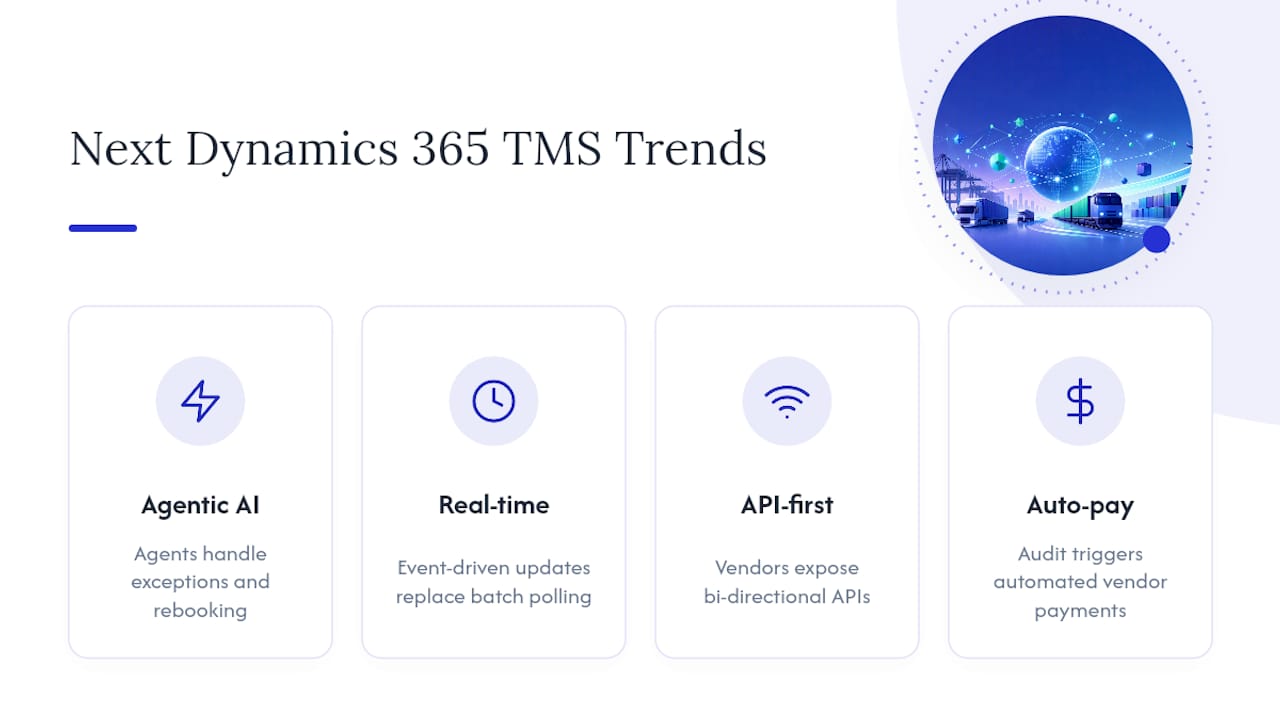
Agentic AI is moving from a buzzword to an actual architectural layer inside transportation management, and that shift changes what “integration” means. Instead of a static rule set deciding which carrier gets a shipment, AI agents are increasingly handling exception management, carrier selection, and even proactive rebooking when a carrier misses a pickup window, without a human triggering each step manually.
Real-time visibility expectations keep tightening. Customers who once accepted a tracking update once a day now expect near-instant status changes, which puts pressure on integration architectures to move away from batch polling toward event-driven updates wherever the carrier’s API supports it.
API-first design is becoming the default expectation rather than a nice-to-have feature. Vendors that once positioned middleware as the only sane path to integration are increasingly building direct, bi-directional APIs as a core product feature, which continues to shift the cost-benefit calculation away from heavy custom middleware for teams with moderate technical capacity.
Microsoft’s own roadmap for Supply Chain Management continues to expand native transportation capabilities incrementally, though the module remains focused on planning and load-building rather than full multi-carrier execution. That gap is exactly where third-party TMS integration keeps its relevance, and it is unlikely to close entirely given how differently Microsoft and dedicated freight platforms prioritize their development.
Watch for tighter integration between AI-driven freight audit and automated payment release, too. As reconciliation logic gets smarter about catching discrepancies, the next logical step is releasing approved vendor payments automatically once a shipment clears audit, cutting days out of the accounts payable cycle.
Ready to Connect Your TMS to Dynamics 365?
If you have read this far, you already know the honest trade-offs between direct API builds, middleware, and productized connectors. FreightSuite exists for forwarders who want the benefits of that integration work without carrying the full engineering burden themselves, since rate management, tracking, finance, and workflow automation are already built natively into the platform rather than requiring separate modules stitched together after the fact.

That native design is the practical difference for teams evaluating this project right now. Instead of scoping a custom API build or negotiating a middleware contract just to get order sync and freight cost reconciliation working, FreightSuite ships those flows built in from day one, with AI agent orchestration handling exception management in the background. Whether your operation runs ocean, air, road, or a mix of all three, the underlying integration logic into Dynamics 365 stays consistent instead of fragmenting into separate systems per mode.
If you are scoping a Dynamics 365 TMS integration project this quarter, the most useful next step is a direct look at how the platform handles your specific lanes and carrier mix. Visit FreightSuite to request a demo, or review the FreightSuite case study to see how a comparable forwarder structured their rollout before committing to an architecture.
Where to Read the Technical Documentation
Before you scope a project, read the architecture material first, then the API references, then the connector configuration guides. That order saves you from mapping fields against documentation that gets superseded by an architectural decision made later.
- Start with Microsoft Learn’s Transportation Management overview to understand what Supply Chain Management includes natively before you scope anything external.
- Review Azure Logic Apps documentation for connector patterns, retry logic, and Azure Active Directory security setup if middleware is your likely path.
- Check the NMB Gateway for TMS listing on AppSource for configuration details if a productized connector fits your standard flows.
- Read AlphaVima’s breakdown of third-party TMS integration for a practical view of what integrated rate shopping and freight audit look like in production.
Sources
- Transportation management overview - Supply Chain Management | Dynamics 365 | Microsoft Learn
- 11 reasons to use a transportation management system (ACS Logco blog)
FAQ
What Are TMS Integrations?
A TMS integration connects a transportation management system to your ERP, most commonly Dynamics 365, so shipment data, rates, and costs sync automatically instead of requiring manual re-entry. This typically covers order sync, carrier rate shopping, tracking updates, and freight cost reconciliation flowing back into finance.
What Is Replacing Microsoft Dynamics for Transportation Management?
Nothing is replacing Dynamics 365 itself. Freight forwarders instead pair Dynamics with a dedicated TMS, either through direct API connections, Azure Logic Apps, or a productized connector like the NMB Gateway for TMS, because Dynamics remains the financial and operational system of record while the TMS handles multi-carrier execution.
What Integration Tools Are Available for Microsoft Dynamics 365?
The main options are direct API integrations built by your team, middleware platforms like Azure Logic Apps, AppSource marketplace connectors, and EDI or batch transfers for legacy systems. Each trades deployment speed against long-term customization flexibility, and the right choice depends on your technical capacity and shipping complexity.
What Are the Three Most Common Custom Integration Types for Dynamics 365?
The three most common types are direct point-to-point API integrations, middleware-based integrations using platforms like Azure Logic Apps, and productized connector integrations through AppSource. Direct APIs favor teams with engineering capacity, middleware favors centralized monitoring and retry logic, and productized connectors favor faster deployment for standard flows.
How Does FreightSuite Approach Dynamics 365 Integration Differently?
FreightSuite is built as an Agentic TMS with rate management, tracking, finance, and workflow automation native to the platform rather than added through separate modules. That means order sync, rate shopping, tracking writeback, and freight cost sync to Dynamics finance records are supported as built-in touchpoints rather than custom development projects. Current pricing details are available directly on the FreightSuite site.

