2-Minute Lookups: Ops-First Customer Rate Visibility for Forwarders
Make customer rates and rating signals unambiguous and auditable. Show rate amounts with full context, publish rating averages alongside review counts, and enforce role-based view and edit controls before scaling any dashboard. Add rate history and audit trails from day one. A modern rate management module includes these features natively, providing forwarders a working model to compare against.
TL;DR:
- Showing both the review count and the rating average significantly increases customer trust and reduces disputes, especially when the number of reviews is high.
- Displaying clear rate details, including charges, currency, effective dates, and context, minimizes customer confusion and shortens invoice dispute resolution times.
- Limiting rate editing rights to a small, authorized team and enforcing an audit trail prevents unauthorized changes and supports dispute resolution.
- Automated systems that flag discrepancies, rate below cost, or outliers help catch margin leaks early and improve reconciliation efficiency.
- FreightSuite’s platform integrates essential rate visibility features, such as rate floors, role-based permissions, and audit trails, as standard components.
Table of Contents
- What Is Customer Rate Visibility and Why Does It Matter?
- What Should a Visible Rate and Feedback Display Include?
- How Do You Build a Rate Visibility System Step by Step?
- Who Should See and Edit Customer Rates?
- Which Metrics Actually Show Whether Visibility Is Working?
- What Mistakes Undermine Customer Rate Visibility?
- How FreightSuite Puts This Playbook to Work
- Sources
- FAQ
What Is Customer Rate Visibility and Why Does It Matter?
Customer rate visibility is the practice of surfacing pricing data, rate context, and feedback signals so both clients and internal teams can see, verify, and trust what a rate actually represents. For a freight forwarder, that means a customer looking at a quote can see the rate, the currency, what it includes, and how it compares to past shipments, without calling ops for clarification.
The payoff shows up fastest in disputes. When a rate’s history and inclusions are visible, a client questioning a surcharge can check the record instead of escalating to a manager. That shortens the invoice cycle and cuts the back-and-forth that eats a controller’s week.
Trust follows a similar pattern with ratings. Research from the Baymard Institute found that customers weigh a 4-star rating backed by many reviews more heavily than a perfect 5-star rating built on a single review. Sample size changes how people read a number. A forwarder showing “4.6 average, 340 shipments rated” earns more confidence than one showing “4.6” alone, because the count tells the reader the average is not a fluke.
What Should a Visible Rate and Feedback Display Include?
Good visibility design starts with what you choose to put on screen, not how you decorate it. Every customer-facing rate view should carry enough context that a reader never has to guess what a number means or where it came from.
At minimum, display:
- Rate amount and currency, stated clearly, never assumed from context
- Effective dates, so a customer knows whether they’re looking at a current or expired quote
- Included charges, itemized enough to explain what the base rate covers versus what’s added
- Rating average and review count together, never the average alone
- Component scores where feedback covers multiple dimensions, like on-time performance versus communication
Transparency extends past the display itself. Publish a plain-language explanation of how ratings get calculated and moderated. The FTC’s guidance for platforms recommends clearly disclosing how ratings are collected and displayed, and maintaining real procedures for catching fake or suspicious feedback. Give clients advance notice before changing your rating algorithm or weighting. A silent change that shifts someone’s score erodes the same trust you built by showing counts in the first place.
One design rule holds regardless of how your dashboard evolves: never show an aggregate number without its sample size and a trend indicator. A rating that jumped from three reviews to thirty tells a different story than one static number ever could.
How Do You Build a Rate Visibility System Step by Step?
Turning these principles into a working system means wiring the right data sources together and building automations that catch problems before customers do.
- Integrate your quoting engine with carrier cost feeds. Rate visibility falls apart when quoted prices and actual carrier costs live in separate systems that reconcile manually once a month.
- Connect CRM and invoicing data. A customer’s rate history should pull from the same record their invoices come from, not a parallel spreadsheet someone updates by hand.
- Validate incoming rate data at the point of entry. Flag anomalies (a rate that’s 40% below the trailing average for that lane, for instance) before they reach a quote.
- Build rate detail drilldowns into the dashboard. A customer or account manager should be able to click a total and see every line item that built it.
- Add a rate history timeline per customer. This is what turns a dispute call into a two-minute lookup instead of a half-day investigation.
- Set default sorting on feedback displays deliberately. Baymard’s research on rating sorts shows that default order changes which reviews people actually read, so choose “most recent” or “most helpful” on purpose, not by accident.
- Automate reconciliation triggers. Have the system flag mismatches between quoted and invoiced rates automatically, rather than waiting for a client to notice first.
Pro Tip: Set an automated alert for any rate that falls below your cost-plus-margin floor, and route it to a named approver with a required reason field. That single control catches more silent margin leakage than any manual spot-check ever will.
A freight quote management system built for this kind of validation removes most of the manual reconciliation work described above.
Who Should See and Edit Customer Rates?
Visibility without governance creates a different problem: pricing leaks, accidental edits, and no clear record of who changed what. The fix is a deliberate split between who can view a rate and who can change it.
Give broad view access to operational teams that need margin context to make sourcing decisions, but restrict edit rights to a small group with pricing authority. The Alvys Help Center’s documentation on rate permissions treats “View Customer Rate” and “Edit Customer Rate” as separate, distinct permissions for exactly this reason. A dispatcher who can see the customer rate to judge a lane’s profitability doesn’t need the ability to change it.
Layer governance on top of that split:
- Set a rate floor below cost-plus-margin, with a mandatory escalation channel for anything under it
- Require a recorded reason for every rate change, not just the new number
- Keep an immutable audit history that timestamps who changed what and when
- Make that history reportable, so a disputed invoice can be resolved by pulling the record instead of relying on memory
Operations teams get the same role-based control model applied to shipment tracking data, which keeps rate governance and operational visibility consistent across the platform.
Which Metrics Actually Show Whether Visibility Is Working?
Visibility only matters if you’re tracking whether it changes behavior. Split your dashboard into operational and customer-facing metrics, because they measure different things.
On the operational side, watch:
- Dispute rate, tracked as a percentage of invoices contested per month
- Invoice reconciliation time, from issue to resolution
- Rate leakage incidents, meaning rates that cleared below floor without escalation
- Quote-to-book time, which tends to shorten once customers trust the numbers they’re seeing
On the customer-facing side, track the distribution of ratings (not just the average), review volume over time, and helpful-vote or read-rate patterns on published feedback. A study of nearly 60,000 reviews found that visibility strongly predicts whether a review gets read or marked helpful at all, especially under “most helpful” sorting. That’s a strong signal that where feedback sits in the display matters as much as what it says.
Build low-sample warnings directly into your dashboard. Flag any average computed from a small pool of reviews with a visible note, and default your feedback view to either the most recent or most helpful entries rather than an arbitrary order.
What Mistakes Undermine Customer Rate Visibility?
Most visibility failures trace back to a handful of repeat mistakes. Showing an average rating without the count behind it is the most common one, and it’s also the easiest to fix immediately.
Hiding your moderation rules is another. If customers don’t know how you handle disputed or suspicious feedback, they’ll assume the worst about the numbers they can’t verify. Unrestricted edit access on customer rates is a third, quieter risk. It looks fine until a rate changes with no record of why. And exposing carrier costs to customers who never asked for that detail creates negotiating leverage you didn’t intend to hand over.
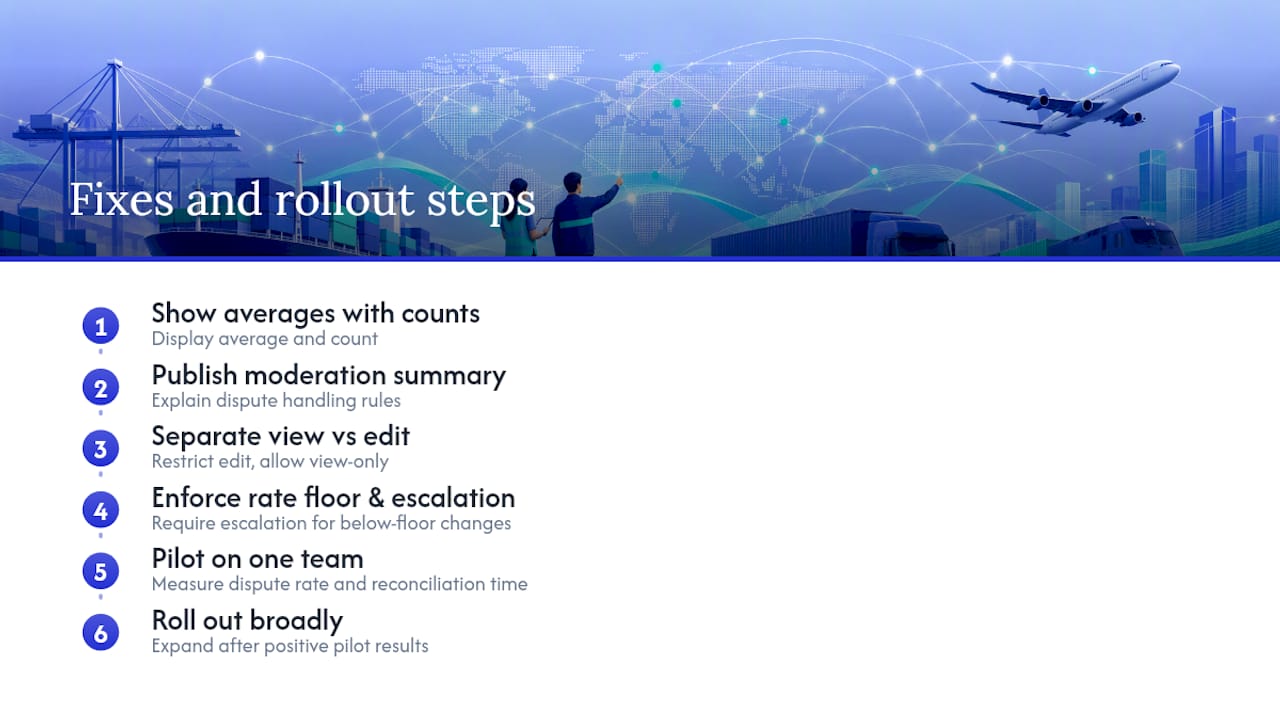
The fixes are fast: pair every average with its count, publish a short moderation summary, split view and edit permissions, and enforce a rate floor with mandatory escalation. Roll the changes out to one team first, measure the effect on dispute rate and reconciliation time, then expand.
How FreightSuite Puts This Playbook to Work
Every practice in this guide maps directly to features built into a comprehensive freight forwarder platform natively, not as add-on modules you have to configure from scratch.

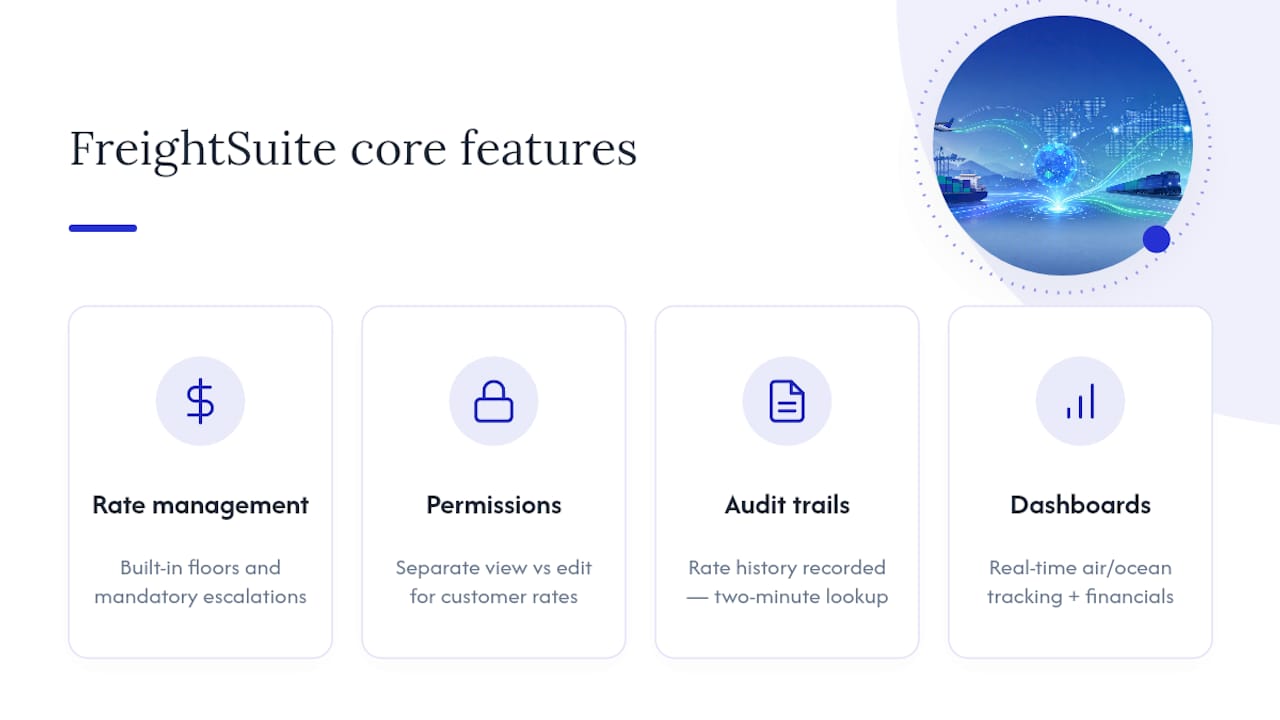
Rate management with built-in floors and mandatory escalation channels means underpriced quotes get caught before they reach a customer, not after the invoice ships. Role-based permissions separate who can view a customer rate from who can edit it, matching the governance split this guide recommends. Rate history and audit trails are recorded automatically, so a disputed invoice becomes a two-minute lookup instead of a week of email threads. Dashboards surface real-time tracking across air and ocean shipments alongside the financial detail your team needs to spot rate leakage early.
This platform positions itself as the alternative to legacy TMS platforms, with automation and AI agent orchestration built in from the start rather than bolted on. Every core feature, including rate management for sales teams and audit-ready operational controls, ships out of the box.
If your current rate visibility runs on spreadsheets and manual reconciliation, start by looking at FreightSuite’s platform overview and see how the rate management and dashboard features line up against the checklist in this guide.
Sources
- Featuring online customer reviews: A guide for platforms — FTC
- User perception of product ratings — Baymard Institute
- Is review visibility fostering helpful votes? — Computers in Human Behavior
FAQ
What Does Customer Rate Visibility Mean in Freight Forwarding?
It means making customer-facing rates, their context, and any related feedback signals clear, complete, and auditable for both clients and internal teams. That includes showing rate amounts with currency and inclusions, plus pairing any rating average with its review count.
Why Should I Show Rating Counts Alongside Averages?
Because customers judge credibility using both numbers together, not the average alone. Baymard Institute’s research found people trust a lower-rated item with hundreds of reviews more than a perfect score with just one.
Who Should Have Edit Access to Customer Rates?
Edit access should stay limited to a small group with pricing authority, while view access can extend broadly to operations and sales teams who need margin context. This split, recommended in Alvys’s rate permissions documentation, prevents accidental changes while keeping teams informed.
How Do I Handle a Disputed Rate or Rating?
Pull the immutable audit trail first: it should show every change, the reason behind it, and who approved it. If your system logs rate history automatically, resolving a dispute becomes a lookup rather than an investigation.
Does FreightSuite Include Rate Visibility Features Out of the Box?
Yes. FreightSuite’s rate management includes rate floors, role-based permissions, and audit trails as native features, not paid add-ons. Pricing details are available directly on the FreightSuite website.

