TMS for Freight Operations Managers: How to Compare Your Options
The best TMS for a freight operations manager is the one that keeps jobs, documents, costs and customer updates in a single system of record, so your team stops retyping data between tools. For freight forwarders and logistics companies, that means comparing platforms on ocean, air and road workflows, customs and accounting connections, and how much automation comes built in. We built FreightSuite for exactly this buyer, and this guide shows how to compare it against the other systems on your shortlist.
TL;DR
- A forwarding TMS should act as the system of record for jobs, bookings, house and master documents, costs, invoices and customs data, not only as a shipment tracker.
- Compare vendors with scripted scenarios from your own operation: FCL and LCL ocean, air legs, consolidations, multimodal handoffs and supplier cost entry.
- Decide up front which system owns each master record, because integration and custom development can account for a quarter to a third of total TMS cost.
- FreightSuite is a cloud, agentic TMS with rate management, air and ocean tracking, finance, workflows and AI agent orchestration included out of the box.
- FreightSuite does not publish prices, so the practical next step is a demo built around your own shipments.
Table of Contents
- What a TMS actually does for an operations manager
- The capabilities that separate a good fit from a poor one
- The options on a typical forwarder shortlist
- A scoring grid you can use in your next vendor call
- How to assess integrations and fit before you sign
- Where the return shows up
- Where FreightSuite fits
- A simple decision path
- FAQ
- Sources
What a TMS actually does for an operations manager
A transportation management system is software that plans, coordinates and tracks the movement of freight. In general terms, it lets users size loads or redirect orders to maximize carrier resources in LTL shipments, and plan multileg trips that avoid empty miles. That description fits carriers and shippers well.
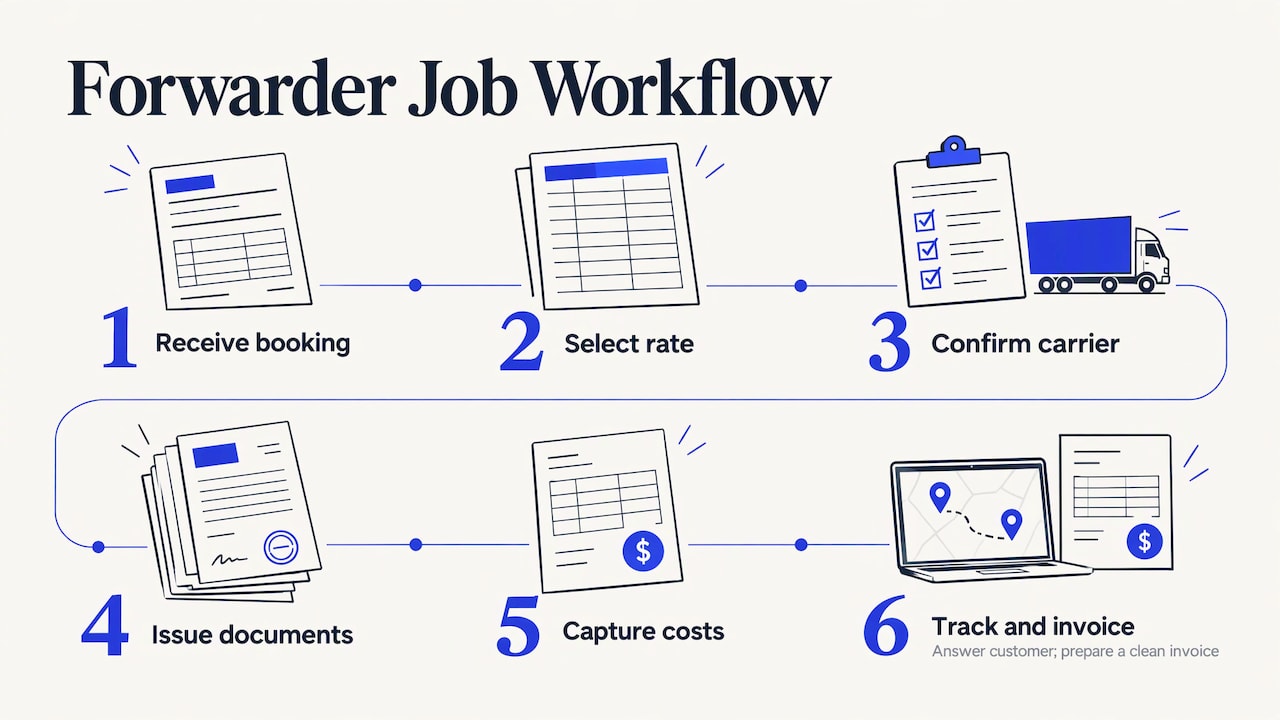
Freight forwarders need more. For a forwarder, a TMS is the system of record for jobs, bookings, house and master documents, costs, invoices and customs data. If you run operations, that is your working day: a booking comes in, a rate is selected, a carrier is confirmed, documents are issued, costs are captured, the customer asks where the container is, and finance wants a clean invoice at the end.
The operations manager feels every gap in that chain. A rate sitting in a spreadsheet, a milestone sitting in an inbox and a supplier invoice sitting in a PDF all turn into manual work for your team. The point of the right TMS is to collapse those gaps so people spend time on exceptions and customers instead of admin.
The capabilities that separate a good fit from a poor one
Generic TMS lists all sound alike. The difference shows up in the details of how a forwarder actually works. One buyer’s guide suggests forwarders should test ocean FCL, LCL and equipment workflows, air shipment references and transport legs, consolidation, multimodal handoffs, document and customs-system connections, supplier costs, accounting handoffs and customer visibility. That is a useful checklist, and we will turn it into a scoring grid below.
Another selection guide groups the core requirements into ocean, air, road and multimodal support, shipment tracking, documentation such as bills of lading and customs forms, and accounting integrations. Read those as the minimum. If a vendor needs a separate add-on for any of them, price that add-on into your comparison.
Ocean and air depth
Ocean and air are different animals. Ocean work revolves around containers, equipment types, free time and consolidation of LCL cargo. Air revolves around master and house air waybills, flight legs and tight milestone updates. A system built mainly for trucking tends to treat both as an afterthought. Ask each vendor to walk through a real FCL job and a real air job from quote to final invoice. Our Ocean Freight TMS & Automation and Air Freight Management System pages show how FreightSuite handles each mode, and our guide on how a TMS tracks air shipments explains the tracking logic in detail.
Road, customs and multimodal handoffs
Most forwarders touch trucking at both ends of the move, even when the core business is ocean or air. The handoff from a vessel or flight to a drayage or linehaul leg is where data tends to break. Check that the system keeps one job record across modes rather than creating a new file for each leg. Our Road Freight Transport Management page covers the road side, and Customs Brokerage TMS Software covers the brokerage workflow for teams that clear their own freight.
Customer visibility
A large share of operations time goes to answering “where is my shipment?” Customer-facing portals and automated delay notifications can turn status inquiries into self-service updates. The same logic applies in parcel and courier networks, where a clear express freight tracking guide is part of how a carrier cuts down on status calls. In a forwarding TMS, you want those updates to flow from the same data your team already maintains, not from a second tool someone has to feed.
Finance and cost control
Operations and finance share the same shipment, and margin leaks where they disagree. Look for supplier cost capture against the job, invoice recognition, dynamic FX handling, credit control and a clean handoff to your accounting package. Our guide to TMS accounting integration covers what a clean audit trail looks like for US operators, and our solutions for finance teams page shows the finance side of FreightSuite.
The options on a typical forwarder shortlist
Current comparisons of forwarding systems cover CargoWise, Descartes Forwarder TMS, Magaya, GoFreight, Logitude, ShipThis and Scope, each with a different mix of forwarding, customs, operations and finance functions. Multifreight and Logi-Sys are also names forwarders commonly weigh. Broker-focused lists, by contrast, tend to feature systems built around load matching and carrier management, which is a different job from running house and master documents.
The long-established platforms in this group are broad and proven in many operations, and some teams value that depth. FreightSuite positions itself as the alternative to those legacy systems, with native automation and AI agent orchestration, and with core features included without add-ons. That is our claim about our own design, and the way to judge it is the scenario testing described in the next section.
How the shortlist differs by operating model
Forwarders, brokers and small carriers buy different things. A broker’s day is about matching freight to capacity and settling with carriers. A small carrier’s day is about dispatch, drivers and equipment. A forwarder’s day is about documents, multimodal jobs, costs on both sides of the shipment and customer visibility. If a comparison article lumps all three together, treat its ranking cautiously and filter for forwarding functions first. FreightSuite is built for freight forwarders and logistics companies, so it is not aimed at the small-carrier dispatch use case.
On deployment, cloud platforms make up most new deployments, driven by lower upfront cost, faster rollout and no need for an in-house IT team. FreightSuite is cloud-based, so your team gets access without servers to maintain.
A scoring grid you can use in your next vendor call
The table below turns the capability lists above into questions you can ask every vendor, including us. Score each one from 0 to 3 after watching a live walkthrough of your own shipment data, not a canned demo.
| Capability | What to ask the vendor to show | How FreightSuite approaches it |
|---|---|---|
| Ocean workflows | A full FCL and an LCL job from quote to invoice, including equipment and consolidation | Ocean TMS and automation built into the core platform |
| Air workflows | A job with master and house references and multiple legs | Air freight management with built-in air tracking |
| Road and multimodal | One job record spanning ocean or air plus a truck leg | Road freight management within the same system |
| Rate management | Loading, updating and selecting carrier rates for a live quote | Rate management included natively |
| Documents | Generating and storing bills of lading and customs forms | Automated document management |
| Finance | Supplier cost entry, invoice recognition, FX and credit control | Dynamic FX and cost tracking, credit control, invoice recognition |
| Accounting handoff | Posting to your accounting package without retyping | Integrated accounting software connections |
| Customer visibility | A customer dashboard with automatic delay notices | Customer dashboards |
| Automation and AI | A workflow that runs without a human touching each step | Workflow customization and AI agent orchestration |
Two extra rows deserve attention in 2026. Buyers increasingly expect native AI-driven rate optimization, predictive ETAs and automated carbon emissions tracking, particularly for larger contract bids. Ask every vendor whether those are built in or sold separately.
How to assess integrations and fit before you sign
The most common reason a TMS project disappoints is not missing features. It is unclear ownership of data. One practitioner guide frames the main challenge as deciding which system owns each record. Before any demo, write down where each master record will live: customers, vendors, rates, jobs, documents, invoices and general ledger entries. If two systems both think they own the customer record, your team will retype data forever.
That same guide recommends that managers test vendors with scripted scenarios based on their own operation and assess integrations with existing systems to avoid retyping. In practice, build three scripts from real files: a clean ocean FCL job, a messy air job with a change of flight, and a multimodal job with a truck leg and a supplier invoice that does not match the quote. Give every vendor the same scripts and score them on the grid.

Budget for integration, not just licenses
One industry guide estimates that integration and custom development typically represent 25 to 35 percent of total TMS cost. Treat that as a planning figure, not a quote. It explains why a platform where rate management, tracking, finance and workflows are already native tends to be easier to plan around than one where each capability is a separate connection. Ask each vendor which items on your list are included and which are separate projects.
Plan implementation as an operations project
A TMS rollout touches every desk, so it belongs to operations as much as IT. Our TMS implementation roadmap lays out seven phases and explains why treating it as an IT project is the usual failure mode. The same discipline applies to risk: our piece on the role of TMS in risk management shows how better visibility and controls help logistics teams catch problems before they reach the customer.
Where the return shows up
When managers ask what they will actually get back, the strongest ROI usually appears in reduced billing errors, better carrier and route utilization, and fewer support calls through self-service tracking. Those are exactly the areas where operations and finance feel pain today. Fewer billing errors mean fewer disputes and faster collection. Self-service tracking means your most experienced people are not spending their mornings answering status emails.
There is a strategic angle too. The ground is shifting beneath this industry as forwarders look to run more freight with the same headcount. A system that automates admin and orchestrates AI agents across documents, rates and finance is not just a cost play. It lets an operations manager grow volume without growing the back office at the same pace, and that is where margin and EBIT improve. The window to build that advantage is real, and it has a timeline, because competitors are making the same move.
Where FreightSuite fits
FreightSuite is a cloud-based, agentic TMS built for freight forwarders and logistics companies. Rate management, air and ocean tracking, finances, operations, workflows and AI agent orchestration sit inside one platform, and all core features are included out of the box without add-ons. Our design goal is to help forwarders run faster, remove admin and improve profitability.
For an operations manager, that translates into one job record across ocean, air, road and customs, automated document handling, invoice recognition, and customer dashboards fed by the same data your team already works from. You can see how a forwarder put it to work in our case study, or read our broader comparison, Best Cloud TMS in 2026 for US freight forwarders. If you want the fundamentals first, Freight Forwarding TMS Explained is a good place to start.
FreightSuite does not publish pricing. The fastest way to see whether it fits is to request a FreightSuite demo and bring your three scripted scenarios. The choice is yours to make, but make it on your own shipments, not on a vendor’s slide deck.
A simple decision path
Start with your mix of modes. If most of your volume is ocean and air with customs and finance attached, shortlist forwarding-specific systems only and drop broker-style load-matching tools. Next, list your must-have connections, usually accounting, customs and carrier or tracking data, and confirm for each one whether it is native or a separate project. Then run the same three scripts with every vendor and score them on the grid above.
Finally, ask each vendor to describe the first ninety days after signing: who migrates your rates and customers, who trains your desks, and when your first live job runs. A vendor that answers with specifics has done it before. Then compare total cost, including integration, rather than the license line alone.
FAQ
What is the best TMS for a freight forwarder?
The best choice is the system that handles your actual mix of ocean, air, road and customs work in one job record and connects cleanly to your accounting. Shortlist forwarding-specific platforms and test them with your own shipments. FreightSuite is built for forwarders and logistics companies and includes its core features without add-ons.
How much does a TMS cost?
Cost depends on your users, modes and integrations, and many vendors quote rather than publish a price. One industry guide estimates that integration and custom development typically represent 25 to 35 percent of total TMS cost, so ask for the full picture. FreightSuite does not list a public price, so request a demo for a quote.
What is the difference between a TMS for brokers and a TMS for forwarders?
Broker systems center on matching freight to carriers and settling payments. Forwarding systems center on jobs, house and master documents, multimodal legs, costs and customs data. If you issue bills of lading or air waybills, you need the forwarding type.
How long does a TMS implementation take?
It varies with the size of your team, the data you migrate and the integrations you need. Plan it as an operations project with clear phases rather than a software install. Our implementation roadmap walks through seven phases from scoping to go-live.
Sources
- transportation management system (TMS), TechTarget
- Best TMS for freight forwarders in 2026: 12 compared, Freigh.ai
- TMS Software for Freight Forwarders: Buyer’s Guide, VelocityOS
- TMS Selection Guide for Freight Forwarders, Forwarding Copilot
- Transportation Management Software: The Complete Guide for Freight Forwarders, Sisgain
- Forwarding software: the stack freight forwarders need, CoreTies
- Best TMS for 3PLs: Decision Guide by Operating Model, Premier
- Direct Freight Express tracking guide, Aeroscouriers

