Vessel Schedule Integration: How Forwarders Connect It

Vessel schedule integration means feeding ocean carriers’ sailing timetables directly into the system where you quote, book and track, so that departures, arrivals and cut-offs update on their own instead of being copied from carrier websites. The forwarders who benefit most are the ones who stop treating the schedule as a document and start treating it as live operating data inside the TMS. That is the idea behind FreightSuite, an agentic TMS with ocean tracking, workflows and AI agent orchestration built in, and it is the standard this article walks through: what the data is, how it connects, and how to keep it useful when carriers change their plans.
TL;DR
- Vessel schedule integration synchronizes carrier timetables (ETD, ETA, vessel, voyage, cut-offs) with your booking and shipment planning, with automatic alerts when a schedule changes.
- The DCSA Commercial Schedules standard lets any conformant carrier be queried through the same interface, which removes carrier-by-carrier integration work.
- A schedule follows the ship; tracking follows the container or booking. You need both, and they should land in the same shipment record.
- Most schedule changes are noise. The skill is in thresholds and workflows that surface the few changes that threaten a cargo receiving window.
- A TMS with workflows and AI agent orchestration built in turns each change into an action, not just another alert.
Table of Contents
- What vessel schedule integration actually means
- What is in the schedule data
- Schedule data is not the same as tracking
- How the connection works: from carrier APIs to your TMS
- Why most schedule changes are noise, and a few are not
- Where the real gain is: connecting schedules to workflows
- Schedule integration inside one platform versus a stack of tools
- What good looks like for an ocean forwarder
- See it in your operation
- FAQ
- Sources
What vessel schedule integration actually means
A sailing schedule tells you which vessel leaves which port, when, and when it should arrive. Integration connects that information to your operational system through an API (a standard way for two systems to exchange data automatically) or EDI messages, so the schedule you quote against is the one the carrier is actually running.
The practical effect is on three jobs. Sales and pricing staff pick routings with accurate transit times. Operations staff book against real vessels and voyages. Customer service learns about a roll or a revised arrival before the customer calls. Without integration, each of those jobs relies on someone checking a carrier portal, and the information is stale the moment it is copied into a spreadsheet or an email.
The DCSA, the Digital Container Shipping Association that sets common data standards for carriers, describes the problem plainly: fragmented schedule information is manual and time-consuming to gather, and discrepancies between sources reduce transparency, increase terminal dwell times and cause inland delays. Integration is the fix for the fragmentation.
What is in the schedule data
Before you connect anything, know what you are connecting. DCSA’s Commercial Schedules standard defines three schedule types that carriers can share:
- Point-to-point routing, with estimated timestamps, used in the pre-booking phase when you are choosing between options from origin to destination.
- Port schedules, covering all vessels arriving or departing a defined port or terminal on a given date.
- Vessel schedules, with estimated departure and arrival times for each port call on a service, voyage or vessel rotation.
A point-to-point response is the one forwarders touch most. It identifies the carrier and service, the ETD and ETA, whether the routing is direct or involves transshipment, and for each leg the vessel name, IMO number (the permanent seven-digit identifier of a ship) and voyage number. Schedule APIs in the market commonly add the transit duration and the container yard gate-in, shipping instruction and VGM (verified gross mass) cut-offs, as one provider’s technical guide lays out.
The cut-offs matter as much as the sailing date. A vessel that departs on time still costs you money if the cargo receiving window closes a day earlier than your trucker planned for. A good integration brings cut-offs into the shipment record alongside ETD and ETA, not as a separate lookup.
Schedule data is not the same as tracking
Forwarders often blur two things that behave differently. Schedule data follows the ship: where a vessel on a given voyage is due to call and when. Container or booking tracking follows your cargo through milestones such as gate-in, loaded, discharged and gate-out. One is planning data and the other is execution data.
The distinction changes how you design the integration. Schedules should be available before a booking exists, because that is when you are choosing a routing and quoting transit time. Tracking only starts once the cargo is moving. Both then need to meet in one shipment record, so that when a vessel’s arrival shifts, every booking on that voyage is flagged at once. For how tracking feeds a TMS, see our piece on carrier tracking integrations, and for the milestone side, our guide to shipment status automation.
How the connection works: from carrier APIs to your TMS
For years, connecting to carriers meant a separate integration for each one: a different format, a different authentication method, a different refresh cycle. That is why many forwarders still rely on staff checking portals. The standards work changed the economics.
DCSA’s own explainer states that once a carrier implements the Commercial Schedules API, any party with systems built for the standard can retrieve that carrier’s data through the same interface as any other conformant carrier, without carrier-specific integration, a separate portal or reformatting. It adds that data can be refreshed multiple times a day.
The large carriers are moving in that direction. Maersk’s developer portal lists its Ocean Commercial Schedules API in DCSA format for ocean customers, with queries by vessel, service, port or date range and JSON output. MSC announced in June 2025 that it had fully adopted the DCSA Point-to-Point endpoint, was developing the Vessel Schedule endpoint with Port Schedules to follow, and connects customer TMS and ERP systems through API or EDI for automated schedule updates.
Step 1: List the carriers and how each one delivers data
Start with the carriers that carry most of your volume, and note for each whether it offers a DCSA-format API, a proprietary API or EDI only. This tells you how much of the work the standard saves you and where you still need a translation layer. Expect a mix for some time, since MSC itself describes a phased rollout of the standard’s endpoints.
Step 2: Map schedule fields to your shipment data model
The common failure is not the connection but the mapping. The carrier’s voyage number must match the voyage field on your booking, the port must resolve to the same UN/LOCODE (the five-character United Nations code for a port or location) your system uses, and the cut-offs must land in fields that workflows can read. If your port or carrier master data has duplicates, the integration will faithfully pass the duplicates along. Clean reference data first; our article on fixing freight master data covers the steps.
Step 3: Choose how the data arrives
Pull-based APIs are queried on a schedule you set; event-based feeds push a message when something changes. PortConnect, for instance, documents a Scheduled Vessels API refreshed roughly every 15 minutes, with a separate subscription endpoint for notifications of cancellations and arrival-time changes. Whatever the carrier offers, decide how often you need to look. A vessel three weeks from port needs less frequent checks than one two days out.
Step 4: Match schedules to bookings
A schedule feed is only valuable once it is attached to your shipments. DCSA notes that the vessel, service and voyage information in a point-to-point response can be passed directly into the booking, which removes manual re-keying and the booking amendments that come from routing discrepancies. From that point on, a change in the schedule is a change to a specific set of bookings that your system can identify.
Step 5: Build the response, not just the alert
An alert tells someone something changed. A workflow decides who needs to do what: rebook, notify the customer, adjust a trucking appointment, update the cargo receiving window. This is where most integrations stall. The data arrives, but a person still reads each notification and decides. We come back to this below, because it is where the real gain sits.
Step 6: Run it in parallel before you rely on it
Run the integrated feed next to your manual process for a short period on a sample of live shipments and compare. You are checking mapping errors, missed changes and duplicate alerts. Only then retire the manual check.
Why most schedule changes are noise, and a few are not
If every schedule revision became an alert, your team would stop reading them within a week. TradeLanes analyzed U.S. export sailings from August 2025 to February 2026 and found that 5,801 sailings produced 18,180 filtered schedule updates. Of those, 2,220 arrived in the final 72 hours before cargo cut-off, 2,114 were large enough to force a decision, and only 14 resulted in a confirmed collapse of the cargo receiving window. That funnel removes 88.4% of all updates as noise.
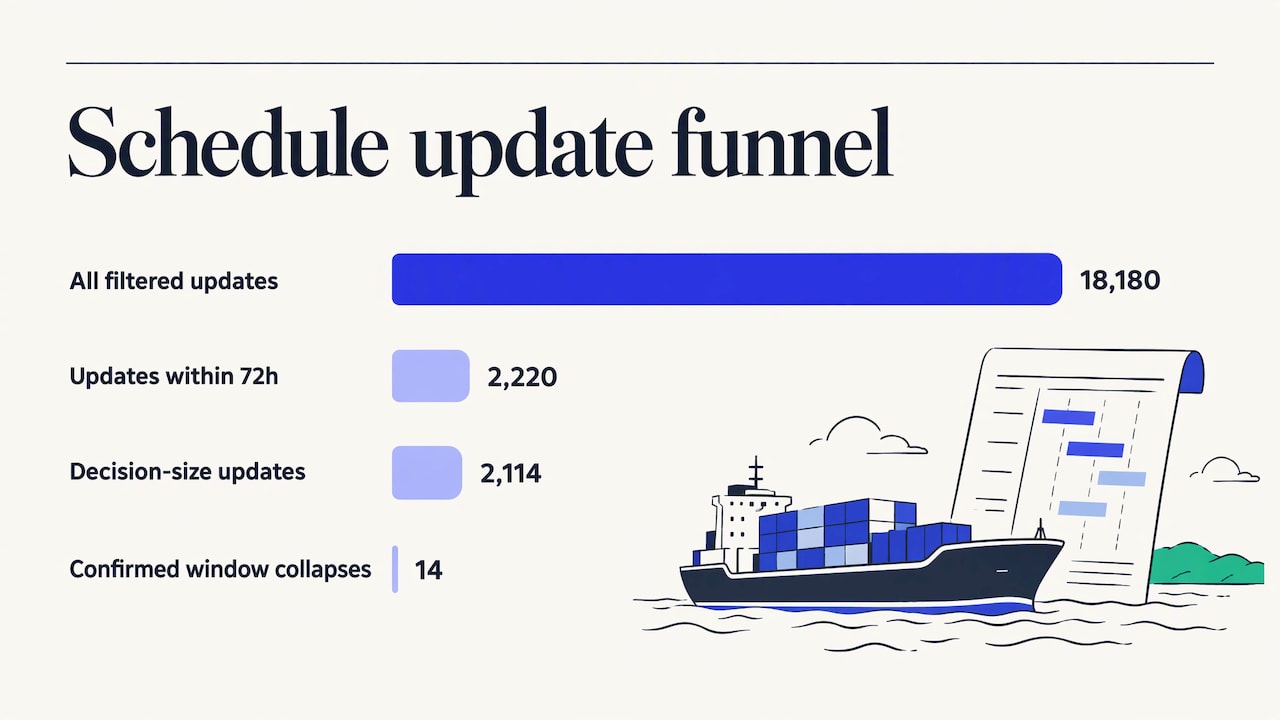
The same study points to the harder part. It found that 95.2% of changes inside the final 72 hours exceeded 24 hours, and 47.2% of decision events were adverse, meaning the window moved later or the cutoff moved earlier. Late changes tend to be large and to leave little room to adjust.
The lesson for a forwarder is about design. Changes far from cut-off can usually be handled in bulk, with a customer update and a note on the file. Changes inside the final 72 hours need a fast, specific response on the exact bookings affected. A system that cannot tell the two apart makes your team either miss the one that matters or drown in the rest.
Set thresholds by voyage phase
A workable pattern is to define different thresholds depending on how close the vessel is to the cargo cut-off: a loose tolerance when the sailing is weeks away, a tight one inside the last few days. Combine that with a threshold on the size of the change, for example only notifying customers when an arrival moves by a full day or more, so they hear from you when it matters and not every time an estimate drifts by a few hours. The exact numbers depend on your trades and customer promises, so set them from your own exception history and revisit them quarterly.
Guard against duplicate alerts
When several bookings share a vessel, one revision can trigger a dozen identical alerts. Group alerts by voyage so a single change produces a single task with the list of affected bookings attached. This one design choice does more for adoption than any amount of training.
Where the real gain is: connecting schedules to workflows
The DCSA explainer frames the benefit as replacing manual checking of carrier websites and reconciliation across formats with automatic retrieval from any conformant carrier. MSC names the same gains from its side: lower IT complexity because carrier-specific integrations disappear, faster updates with less manual work, and consistent visibility for every party.
Those are real, and they are the first half of the gain. The second half is what your team does with the data once it arrives. A forwarder whose TMS receives a revised ETA and then waits for someone to notice has automated the fetching but not the work. The margin shows up when the revised ETA triggers the next steps by itself: updating the shipment, flagging affected bookings, drafting the customer notice, adjusting downstream appointments and documents.
This is where an agentic TMS changes the equation. Workflow customization and AI agent orchestration inside the TMS mean schedule data does not stop at a dashboard. It starts a sequence your operations team has defined. The window for forwarders to get ahead of this is real, and it has a timeline: carriers are standardizing their schedule interfaces now, and the forwarders whose systems are ready to consume them will cut admin while others are still re-keying.

Schedule integration inside one platform versus a stack of tools
Many forwarders assemble the capability from pieces: a schedule data provider, a tracking provider, middleware to normalize status codes, and a TMS that receives the output. That can work, but each seam is a place for mapping errors, delayed updates and finger-pointing when a number is wrong.
The alternative is a TMS where rate management, air and ocean tracking, finances, operations and workflows live in one data model. Then a schedule change is visible to the same system that holds the booking, the cost estimate and the customer dashboard. FreightSuite is built this way, with all core features included without add-ons, which is why we position it as the alternative to legacy platforms such as CargoWise, Magaya, Descartes, Multifreight and Logi-Sys. For the engineering view of the standards-first approach, read our guide to sailing schedule integration for logistics engineers, and for the developer side of connecting external systems, logistics API integration.
What good looks like for an ocean forwarder
Picture a Monday morning at a forwarder moving containers from Asia to U.S. ports. Over the weekend, a carrier revised the arrival of a vessel on a transpacific service. In a manual shop, someone finds out when a customer asks. In an integrated shop, the TMS has already matched the change to the eleven bookings on that voyage, ranked them by days to cargo receiving cut-off, and opened tasks on the two that are inside 72 hours. The other nine receive a lighter-touch update.
Four things have to be true for that to happen: the carrier data is retrieved through a standard interface, the voyage and port references match your master data, the thresholds reflect how close each booking is to cut-off, and the workflow exists to act. Each is a one-time setup rather than a daily chore, and each is easier when the schedule, tracking and operations sit in one platform.
See it in your operation
If your team still checks carrier sites to confirm sailings, or you integrate carriers one at a time, look at how FreightSuite handles ocean shipments on the Ocean Freight TMS & Automation page, which covers rate management, ocean tracking, workflows and AI agent orchestration in one system. If your business also moves air or road freight, the same platform covers those modes, and you can start from the FreightSuite homepage. The choice is yours to make, and the forwarders who make it early will set the pace on speed and profitability.
FAQ
What is vessel schedule integration?
It is the automatic exchange of ocean carriers’ sailing timetables with your TMS or booking system. Departures, arrivals, vessels, voyages and cut-offs update without manual re-keying, and schedule changes can trigger alerts and workflows.
Do I need a separate integration for every carrier?
Not when carriers support the DCSA Commercial Schedules standard. According to DCSA, a system built for the standard retrieves data from any conformant carrier through the same interface. Carriers are adopting it in stages, so some will still use proprietary APIs or EDI for a while.
How is a vessel schedule different from container tracking?
A vessel schedule follows the ship and its port calls, and you use it for planning and booking. Container tracking follows your specific cargo through milestones after it starts moving. A good TMS holds both in the same shipment record.
How often should schedule data refresh?
DCSA says schedule data can be refreshed multiple times a day, and some port-side APIs update about every 15 minutes. In practice, check more often as a vessel nears cargo cut-off and less often weeks ahead, and set thresholds so only meaningful changes reach your team.
Which schedule changes need action?
The ones that move a cargo receiving window or cut-off for bookings still to be delivered. The TradeLanes study found most updates never forced a decision, while late, large changes were the ones that left little room to respond.
Sources
- Commercial Schedules | DCSA
- A guide to the DCSA Commercial Schedules Standard | DCSA
- Ocean Sailing Schedule API: Multi-Carrier Route Data
- Maersk Developer Portal: Ocean Commercial Schedules
- MSC’s Adoption of the DCSA Commercial Schedules API
- Scheduled Vessels API | PortConnect
- TradeLanes: vessel schedule changes data study

