TMS Accounting Integration: Freight Brokers’ IRS Audit Trail

TMS accounting integration connects transportation management data directly to accounting software, so invoices, carrier bills, and settlements move into the ledger without anyone retyping them. The result that matters most is automated, auditable transfer of transaction-level transport data into accounting software, so finance can reconcile and report without manual entry. Done correctly, it eliminates double entry and speeds invoicing while preserving the source documents examiners expect to see.
TL;DR:
- Choose a prebuilt connector when chart of accounts mappings already match, an API for bidirectional real time updates, or middleware for multiple systems and entities.
- Send invoices, bills, settlements, credit notes, accessorials, currency adjustments, and supporting documents with each record; totals alone hide margin drivers and weaken dispute investigations.
- Retain source documents, transaction identifiers, mapping history, and reconciliation evidence in a retrievable audit trail; examiners request native accounting backup files rather than exported spreadsheets.
- Clean customer and vendor records before mapping, test messy invoices with accessorials and currency adjustments, then align sync timing and monitor exceptions during rollout.
Table of Contents
- Key Benefits for Freight Brokers and Logistics Operators
- Exactly What Data and Documents Accounting Needs From the TMS
- Integration Architectures and How to Choose One
- Compliance and Auditability: What Regulators and IRS Guidance Require
- Practical Implementation Checklist: Plan, Map, Test, Reconcile, Go Live
- Common Pitfalls and Reconciliation Best Practices
- How to Evaluate an Integration Approach or Vendor
- A Cloud TMS Built With Finance Automation Native, Not Bolted On
- FAQ
- Sources
Key Benefits for Freight Brokers and Logistics Operators
Freight brokers live and die on margin per load, and margin visibility depends on finance getting clean data fast. When a TMS pushes transaction-level detail into accounting automatically, the operational upside shows up in several places at once:
- Eliminates double entry and reduces the posting errors that come from retyping invoice totals by hand
- Speeds invoicing and shortens the cash conversion cycle, since completed loads push to accounting the moment they close
- Keeps customer and vendor masters consistent across systems, which cleans up reporting and reduces reconciliation headaches
- Links source documents like rate confirmations and proof of delivery to each transaction, which speeds dispute resolution and sharpens margin analysis
A final invoice alone tells finance what was billed. Transaction-level detail tells finance why, which is the difference between knowing you lost money on a lane and knowing which accessorial or FX swing caused it. Our freight forwarding TMS explainer covers how these modules fit together operationally.
Exactly What Data and Documents Accounting Needs From the TMS
Accounting teams don’t need a summary. They need the full transaction chain, because that’s what supports reconciliation, audit response, and margin analysis down the line. At minimum, the sync should carry:
- Customer invoices, carrier bills, settlements, and credit notes
- Customer and vendor masters, item or service codes, GL codes, and tax codes
- Accessorials, surcharges, currency and FX adjustments, and cost-to-serve line detail
- Attachments including proof of delivery, rate confirmations, carrier invoices, and signed documents
Exporting only the final invoice drops the context that explains it. If a shipment carried a detention charge, a fuel surcharge, and an FX adjustment, the invoice shows one number while the underlying detail shows where the margin actually went. Finance teams that only receive the top-line figure lose the ability to investigate disputes or spot a pattern across lanes, and that gap tends to surface at the worst possible time, during an audit or a customer dispute.
Integration Architectures and How to Choose One
Several architectures are used for TMS-accounting integration, and each fits a different operating reality. Prebuilt connectors work best when posting rules already align with your chart of accounts, since they’re fast to deploy and require minimal configuration. API integrations suit operators who need customization, bidirectional updates, and real-time status changes flowing both directions. Middleware or ETL layers earn their keep when multiple systems need a central hub for transformations, especially for brokers running several TMS instances or multiple accounting entities.
Batch and CSV transfers still have a place for lower-volume operations, but event-driven syncing scales better once invoice volume climbs, because it reconciles continuously instead of in periodic lumps that can mask errors until month-end.
- Prebuilt connector: fastest to deploy, best when mapping rules already match
- API integration: most flexible, supports real-time events and two-way updates
- Middleware or ETL: best for multi-system environments needing centralized mapping
The decision rule that matters most: match the architecture to your actual operating model, not to whatever label sounds most modern. A small brokerage running a single TMS and accounting package may not need middleware built for a multi-entity enterprise.
Pro Tip: Map your busiest invoice type first. If that mapping holds up under volume, the rest of the integration gets far easier to validate.
Compliance and Auditability: What Regulators and IRS Guidance Require
This is where integration design stops being an IT preference and becomes a finance requirement. IRS guidance on automated records states that electronic records must be retrievable, readable, complete, and connected through an audit trail to the books and returns they support. That means an integration can’t just move totals. It needs to retain source documents, transaction identifiers, mapping history, and reconciliation evidence, not just the final ledger entry.
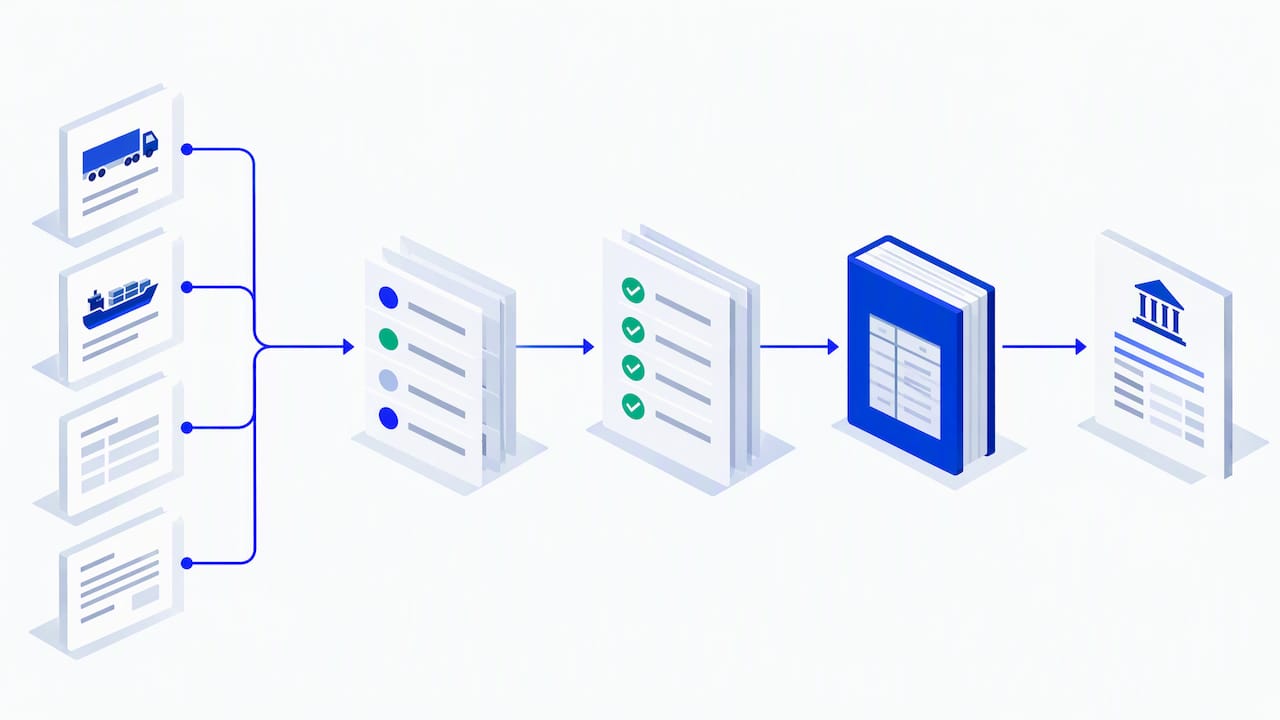
The IRS FAQ on electronic accounting software records adds a specific warning: converted spreadsheets can weaken the integrity testing examiners rely on, and SQL alone, while useful for querying and reconciliation, is not itself an accounting system. Examiners typically request native electronic accounting software backup files rather than exported spreadsheets, according to the IRS guidance, because native formats preserve the audit trail that a CSV export tends to strip out.
Regulatory shifts elsewhere in the industry can touch finance operations too. The FMCSA’s broker and freight-forwarder financial responsibility rule concerns financial responsibility filings and enforcement rather than specific software requirements, but it’s a reminder that compliance obligations shift independently of your tech stack. Validate your controls with counsel or a compliance adviser rather than assuming your integration setup already covers you. Our audit trail piece for operations teams goes deeper on keeping that trail intact.
Practical Implementation Checklist: Plan, Map, Test, Reconcile, Go Live
A reliable integration follows a sequence, not a shortcut. Skipping a step can surface later as a reconciliation mismatch, when nobody remembers why.
- Document your current order-to-cash and procure-to-pay flows, and list every required field accounting needs on each transaction type
- Clean and align your masters, meaning customers, vendors, items, tax codes, and GL codes, before you configure any mapping
- Authenticate the connection between systems, then configure mappings and posting rules and write them down somewhere your team can find later
- Test with representative invoices and carrier bills, including accessorials and FX adjustments, and reconcile totals against known results
- Run a controlled production rollout with monitoring, alerts, and a rollback plan in case something breaks under real volume
Our piece on fixing freight master data walks through step two in more depth, since dirty masters are a common reason integrations break after go-live.
Pro Tip: Run your reconciliation test on a messy invoice, not a clean one. If the integration handles a load with three accessorials and a currency adjustment correctly, it will handle everything simpler without issue.
Common Pitfalls and Reconciliation Best Practices
Most integration failures trace back to a handful of repeat offenders. Mismatched masters and duplicate customer or vendor records cause posting errors that compound over weeks before anyone notices. Missing accessorials or FX adjustments slip through when teams export only the final invoice instead of the full line-item detail. Sync frequencies that run out of step, say, invoices posting hourly while carrier bills post nightly, create temporary ledger imbalances that look like real discrepancies until someone traces the timing gap.
- Audit masters for duplicates and mismatches before every major sync change
- Export full line-item detail, not just invoice totals, to catch accessorials and FX adjustments
- Align sync frequencies across invoice and carrier-bill flows to avoid timing mismatches
- Build exception dashboards with automated alerts and a defined manual-capture process for anything that fails to sync
How to Evaluate an Integration Approach or Vendor
Whether you’re assessing a connector, an API, or a full platform, the same criteria apply regardless of brand. Ask whether the integration preserves transaction-level traceability and keeps attachments like PODs and rate confirmations tied to the record. Check which record types it actually supports, whether updates run bidirectionally, and whether status changes reflect in real time rather than on a delay.
- Mapping flexibility and error handling, including clear audit logs and built-in reconciliation tooling
- Security controls, data-retention policies, and documented support SLAs
- Published API documentation with sample workflows, similar to how Intuit’s billing implementation docs lay out defined API workflows rather than an unconfigured instant connection
- Evidence of an authorization flow, configurable sync preferences, and a sync dashboard for tracking exceptions, the way listed QuickBooks Online connector apps typically describe their setup
A Cloud TMS Built With Finance Automation Native, Not Bolted On
We built FreightSuite with finance automation, rate management, and AI agent orchestration included from the start, so the mapping, reconciliation, and audit-trail work covered above is built into the TMS. 
Whether you run ocean, air, road, or customs brokerage, our FreightSuite platform supports finance workflows as part of the TMS. Book a demo to see how FreightSuite handles finance workflows before you commit to a build.
FAQ
What is TMS software in logistics?
A transportation management system, or TMS, is software that freight brokers and logistics operators use to plan, execute, and track shipments across ocean, air, and road. It typically includes rate management, shipment tracking, and financial modules that connect to accounting software for invoicing and settlement.
What is the best accounting software for a travel company?
This question falls outside freight and logistics accounting, so there’s no single answer we can verify for travel-specific bookkeeping. Travel companies generally need software that supports multi-currency transactions and integrates with booking systems, similar to how logistics operators need accounting tools that integrate with a TMS.
What is TSheets called now?
TSheets was rebranded as QuickBooks Time after Intuit’s acquisition, and it now operates as a time-tracking tool within the QuickBooks ecosystem. It’s unrelated to TMS-accounting integration directly but may appear alongside QuickBooks-based freight accounting setups.
Can SQL be used for accounting?
SQL can support querying and reconciliation within an accounting workflow, but the IRS FAQ on electronic accounting records is clear that SQL by itself is not an accounting system. It works as a technical layer underneath a system of record, not as a replacement for one.

