Resolve Logistics Disputes in Minutes: Audit Trails for Ops Teams
An audit trail in logistics is the complete, time-stamped record of who touched a shipment, order, or invoice, and when, why, and how it changed. It exists to give operations teams a defensible history and to make disputes, chargebacks, and inventory mismatches resolvable in minutes instead of days. Most of these logs live inside a TMS, WMS, or ERP, with platforms like FreightSuite built to keep that history centralized and hard to falsify.
TL;DR:
- Audit trails must link each log entry to a master record, such as a shipment or order, to ensure they are actionable during disputes or audits.
- Searchability and linkage to relevant identifiers are vital for quick retrieval of records during operational or legal reviews.
- Implementing append-only, signed, or blockchain-based records helps prevent tampering and ensures the integrity of audit histories.
- Building discipline around minimal event schemas, role-based permissions, and regular reconciliation enhances the reliability of audit logs.
- Centralized systems like FreightSuite automate data collection, linking events across platforms, and reduce manual entry errors that could compromise audit integrity.
Table of Contents
- What an Audit Trail Records: Mandatory Fields and Metadata
- Where Audit Trails Pay Off in Daily Operations
- How Audit Trails Work Inside a TMS, WMS, or ERP
- Best Practices for Reliable, Searchable Audit Logs
- Compliance, Retention, and Evidentiary Value
- How a Modern TMS Keeps Your Logs Audit Ready
- See Audit-Ready Records in Action With FreightSuite
- Sources
- FAQ
What an Audit Trail Records: Mandatory Fields and Metadata
A usable audit trail is only as good as the metadata behind each entry. Logistics glossaries define the concept as a secure, time-stamped record that captures who did what, when, where, and why across a supply chain event, and that framing translates directly into a checklist of required fields:
- User identity, role, and the device or IP address the action came from
- Exact timestamp, plus GPS or location data when the event happens in the field
- A plain description of the action and the before and after values it changed
- A reason or comment field for anything outside routine handling
- Linkage to the shipment ID, SKU, purchase order, or document ID it affects
- The source system that generated the entry (TMS, WMS, EDI feed, mobile scan)
That last point matters more than it seems. A log entry with no link to a master record is just noise. One tied to a shipment ID and stamped as append-only or cryptographically hashed becomes evidence a customs officer or auditor can actually use.
Where Audit Trails Pay Off in Daily Operations
Audit trails earn their keep in a handful of recurring situations, and logistics teams that build strong logging habits tend to resolve these faster and with less finger pointing.
- Dispute resolution for damaged or missing goods. Timeline reconstruction, including original photos and time-stamped document uploads, lets a team pin down exactly where responsibility shifted during transshipment rather than guessing.
- Inventory reconciliation and supplier chargebacks. When a warehouse count does not match the system, the audit trail shows who adjusted the quantity and what triggered it, turning a shouting match into a five-minute lookup.
- Fleet operations. Route edits, fuel card transactions, and driver activity logs need to tie back to a trip ID and driver ID to be useful for both dispatch and compliance.
- Finance and billing. Invoice verification and chargeback reviews move faster when every rate change and approval sits in an audit-ready billing history instead of scattered email threads.
Each of these scenarios shares a common thread: the value only shows up when the log is searchable and tied to a real record, not buried in a server file nobody opens.
How Audit Trails Work Inside a TMS, WMS, or ERP
Every audit trail starts as raw events coming from multiple directions at once. A modern logistics stack pulls entries from:
- Web dashboards and mobile apps used by warehouse and dispatch staff
- Telematics and GPS feeds from trucks and containers
- EDI messages and API calls between carriers, brokers, and customers
- Document uploads such as bills of lading, proof of delivery, and customs paperwork
Oracle’s transportation management documentation describes how these systems let administrators select which events get audited rather than logging everything indiscriminately, which keeps the trail focused on what actually matters operationally and legally.
Capturing the event is only step one. The system then has to record the before and after state, link it to the master shipment or order record, and index it so someone can search by date range, user, or reference number without combing through raw logs. Searchability is not optional. Logistics glossaries stress that a trail must let a team query by shipment identifier and time window, because a log nobody can retrieve quickly is functionally useless during a dispute.
Tamper resistance closes the loop. Append-only logs, signed records, and in some cases blockchain anchoring stop a bad actor, or a well-meaning employee trying to cover a mistake, from quietly editing history. A guide to shipment status automation shows how automating status updates reduces the number of manual touchpoints that create these risky edits in the first place.
Best Practices for Reliable, Searchable Audit Logs
Getting an audit trail right is less about buying the fanciest software and more about discipline in how you configure it. A few rules separate the logs that hold up under scrutiny from the ones that collapse the moment someone asks a hard question.
- Define a minimal event schema up front: decide exactly which actions must be logged and which metadata fields are mandatory, rather than logging everything by default and drowning the useful entries.
- Enforce role-based permissions and approval gates so high-risk edits, like rate overrides or inventory write-offs, require a second signature before they post.
- Make audit entries immutable once written. Corrections should appear as new entries, never as edits to the original.
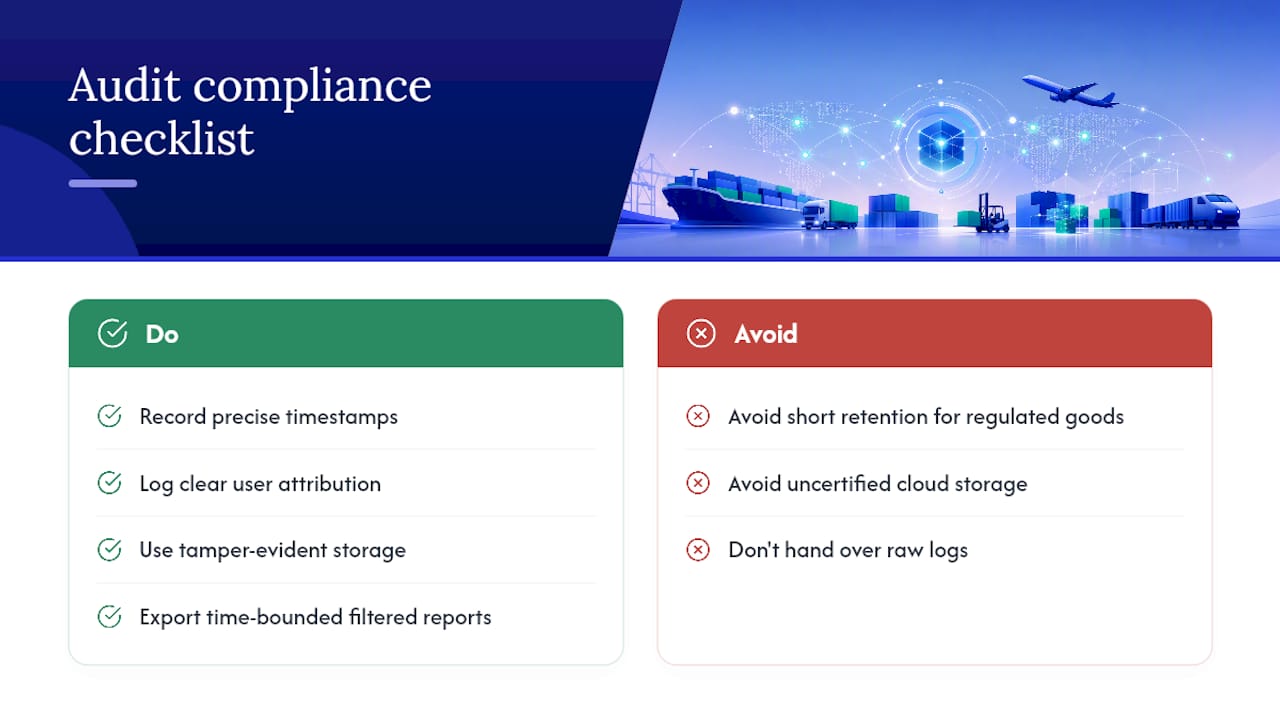
- Set clear retention and archival policies, and document the reasoning behind them, especially for regulated goods with longer legal exposure windows.
- Automate alerts for high-risk changes, following the same logic industry checklists recommend: flag unusual edits in real time instead of catching them during a quarterly review.
- Reconcile logs across TMS, WMS, and ERP regularly so a shipment’s story matches across every system that touched it.
Pro Tip: Schedule a monthly fifteen-minute review of flagged high-risk edits with your operations lead. Catching a pattern of late-night rate overrides in month one is far cheaper than explaining it to an auditor in month twelve.
Compliance, Retention, and Evidentiary Value
An audit trail’s evidentiary strength rests on three things: precise timestamps, clear user attribution, and records nobody can quietly edit after the fact. Regulated goods, especially anything crossing customs, tend to demand longer retention windows than routine domestic freight, since customs and regulated-shipment guides point to before and after values and tamper-evidence as the features that hold up during a formal audit.
If your logs live in the cloud, ask providers about certifications like SOC 2 and ISO 27001, since cloud storage is broadly acceptable for audit records only when encryption and access controls back it up. Before an audit or customs review, export a clean, time-bounded report filtered to the relevant shipment IDs or SKUs rather than handing over raw system logs an official has to parse manually.
How a Modern TMS Keeps Your Logs Audit Ready
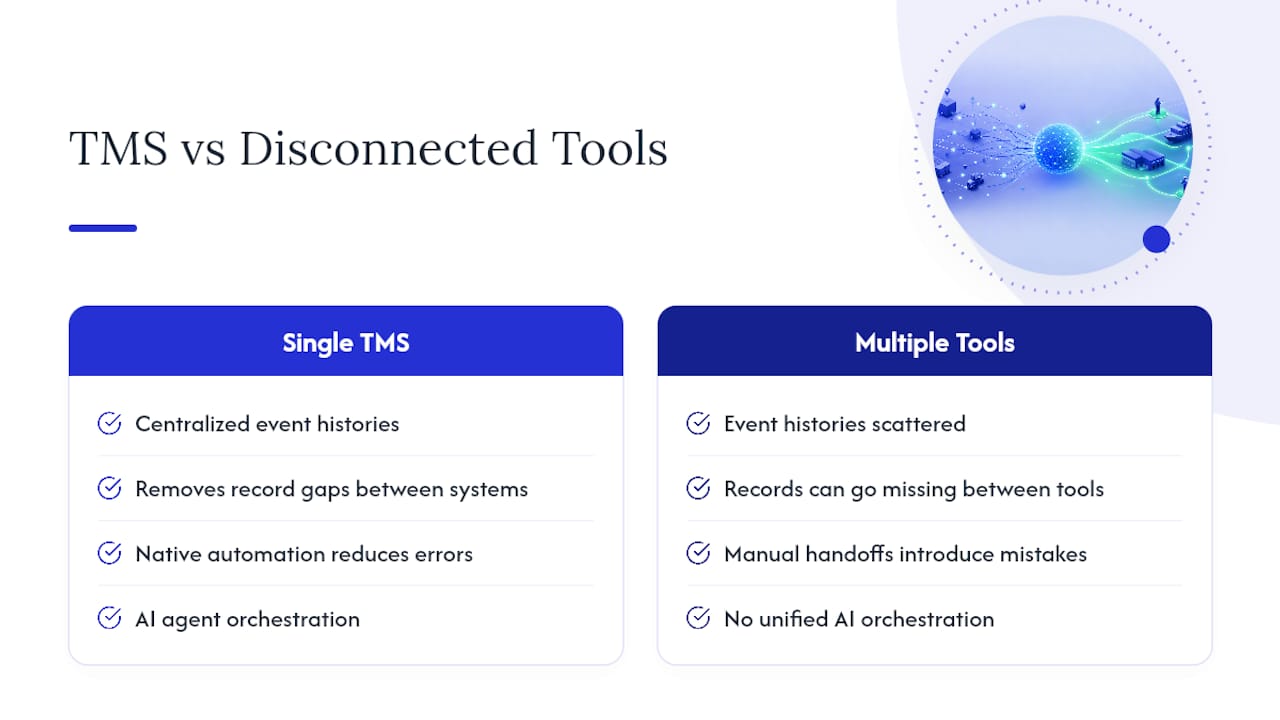
Most of the patterns above are easier to enforce inside a single platform than across five disconnected tools. A TMS that centralizes event histories, document timelines, and finance logs in one place removes the gaps where records go missing between systems. Native automation and AI agent orchestration cut down on manual data entry, which is where messy, contested log entries usually originate. Its guide to how a TMS tracks air shipments walks through how event linkage works in practice.
See Audit-Ready Records in Action With FreightSuite
This TMS platform offers an alternative to legacy systems for forwarders who need every shipment event, document, and finance record centralized in one searchable history instead of scattered across spreadsheets and email threads. Features such as rate management, air and ocean tracking, and invoice recognition can feed the same event log automatically, so teams spend less time reconstructing what happened and more time acting on it.

Fleet-side compliance adds another layer worth checking, and partners like OperatorCompliance focus specifically on driver and vehicle data capture if your audit needs to extend into that territory. For the freight forwarding side, FreightSuite’s finance team solutions show how invoice verification and audit-ready billing histories work when automation handles the manual entry that usually creates disputes in the first place. If you are evaluating a TMS built around traceability from day one, request a demo of FreightSuite and see how your own shipment data would look inside it.
Sources
- Oracle documentation — Audit in transportation
- Audit Trail for Logistics — WiseBI glossary
- Audit Trails — FleetX blog
- Audit Trail — DocShipper glossary and guide
FAQ
What Does an Audit Trail Check For?
An audit trail checks for who performed an action, what changed, when it happened, and whether the change matches expected approval steps. In logistics, that typically means verifying shipment status updates, inventory adjustments, and rate changes against the user and timestamp attached to each entry.
What Is an Example of an Audit Trail in Logistics?
A common example is a warehouse inventory adjustment: the system logs the user who made the change, the original and new quantity, the timestamp, and the reason code entered. Another is a rate override on a freight invoice, where the log preserves the original rate, the new rate, and the approver’s identity for later review.
What Is the Purpose of Audit Trails in Supply Chains?
The purpose is traceability, dispute resolution, and compliance. A solid trail lets teams reconstruct exactly what happened to a shipment or order, assign responsibility during transshipment disputes, and produce clean records for customs or financial audits.
What Is a System Audit Trail and How Does It Work?
A system audit trail is the automated log a platform like a TMS, WMS, or ERP generates every time a user or integration changes a record. It works by capturing the event, the before and after values, and linking that entry to the shipment, order, or document it affects, so the history stays searchable and, ideally, tamper-evident. FreightSuite builds this centralization into its core workflows rather than treating it as an add-on feature.

