Map EDI 214 Tracking Into Your TMS in 3–10 Days for Logistics Teams
ANSI X12 214 is the Transportation Carrier Shipment Status Message, the standard feed carriers use to report shipment events back to shippers and logistics providers. It delivers timestamped pickup, transit, exception, and delivery milestones, plus proof-of-delivery data, directly into your operations. Done right, EDI 214 tracking turns a raw data stream from segments like AT7 into automated status updates your team and your customers can act on immediately.
TL;DR:
- Correct mapping of segments like B10, AT7, MS1/MS2, and L11 is essential to accurately interpret shipment status and link data to internal records.
- AT7 status, reason, and timestamp codes must be normalized into a few key categories for effective automation of exception handling and workflow triggers.
- Implementing EDI 214 requires establishing a clear internal event model, choosing suitable connection methods, and running thorough testing before onboarding carriers.
- Automating the integration of 214 data into workflows significantly reduces manual tasks by enabling real-time updates for dock scheduling, customer notifications, and invoice reconciliation.
- Embedding EDI 214 tracking into a TMS with native support streamlines data ingestion and dramatically cuts implementation time compared to custom or legacy solutions.
Table of Contents
- What Does an EDI 214 Message Actually Contain?
- What Do the AT7 Status Codes Actually Mean?
- How Do Logistics Teams Put 214 Data to Work?
- How Do You Implement EDI 214 Without It Becoming a Mess?
- How Does FreightSuite Turn 214 Events Into Automated Action?
- Get EDI 214 Tracking Built Into Your TMS, Not Bolted On
- Where to Verify EDI 214 Behavior
- Sources
- FAQ
What Does an EDI 214 Message Actually Contain?
The 214 is built from a handful of segments, and mapping each one correctly is the difference between a status feed that works and one your team has to babysit manually. The transaction set exists specifically so carriers can transmit “dates, times, locations, route and identifying numbers,” according to X12’s own specification. Here’s what you’re actually parsing when a 214 lands in your system.
- B10 (Beginning Segment for Transportation Carrier Shipment Status Message): This is the header. B1001 through B1003 carry the shipment reference number, the PRO or shipment ID, and the SCAC (Standard Carrier Alpha Code) identifying which carrier sent the message. Treat B1002, the PRO/shipment ID, as your primary reconciliation key against internal shipment records.
- AT7 (Shipment Status Details): This segment carries the status code, the status reason code, and a date/time stamp. A single 214 frequently contains multiple AT7 loops, one for each event since the last transmission, and they need to be processed in the order the timestamps dictate, not the order they arrive in the file.
- MS1/MS2 (Equipment, Tag Identification, and Location): MS1 reports the city, state, and country where the event happened. MS2 identifies equipment, such as trailer or container numbers, tying the status update to a physical asset.
- AT8 (Shipment Weight, Packaging Form, and Quantity Data): This carries delivered-quantity and weight data, which becomes critical for reconciling proof-of-delivery discrepancies and processing claims.
- L11 and NM1: L11 carries reference identifiers, purchase order numbers, bill of lading numbers, and other cross-references. NM1 identifies the parties involved, shipper, consignee, or carrier contact. Insist that trading partners populate L11 consistently; it’s what lets your system match a 214 event to the right order without a human checking PRO numbers by hand.
Get the segment-level field definitions locked down before you write a single line of mapping logic. Guessing at element positions is how teams end up with silent mapping failures that only surface when a customer calls asking where their freight is.
What Do the AT7 Status Codes Actually Mean?
The AT7 segment is where the operational payoff lives, and it’s also where most EDI 214 tracking implementations either succeed or quietly fail. The status code and reason code combination inside AT7 tells you not just what happened, but why, which is what makes automated exception handling possible.
Here’s the standard progression most 214 feeds follow, and what each should trigger downstream:
- Pickup / origin scan (X1 or similar): Confirms the carrier has the freight. This should close out your dock scheduling task and start your transit clock.
- Departed origin terminal: The shipment is in linehaul. Update customer-facing tracking with an estimated next milestone.
- Arrived at destination terminal: Freight has reached the last terminal before final delivery. This is the trigger point for scheduling a delivery appointment.
- Out for delivery: The shipment is on the final truck. Notify the receiving location now, not after the fact.
- Delivered (with AT8 quantity data): Closes the shipment loop and should kick off invoice reconciliation.
- Exception codes (delay, refused, damaged, missed appointment): These carry a reason code that needs mapping to an internal escalation workflow.
Carriers routinely extend the base code set with proprietary reason codes that aren’t in the published specification. Rather than treating each one as a special case, normalize them into a small number of canonical buckets, weather delay, mechanical, access issue, refused, so your workflow logic only has to branch a handful of ways instead of dozens.
Pro Tip: Map exception reason codes before you map anything else when onboarding a new carrier. Exception mapping is what lets your team escalate a missed pickup or a refused delivery before the delivery window closes, not after a customer asks why their freight never showed up.
How Do Logistics Teams Put 214 Data to Work?
A 214 feed only matters if the events inside it trigger something. The segments and codes covered above become genuinely useful the moment they’re wired into real workflows instead of sitting in a log file.
- Inbound dock scheduling. A pickup or estimated-arrival event from AT7 can automatically reserve a door appointment at the destination facility, cutting the lag between “carrier says it’s coming” and “warehouse knows to expect it.”
- Customer-facing tracking. Mapping AT7 milestones directly to plain-language status updates, “picked up,” “in transit,” “out for delivery,” is how shipment tracking dashboards stay current without a coordinator manually checking carrier portals all day.
- Automated invoice and payment flows. A delivered status paired with AT8 quantity data can trigger invoice matching automatically, flagging a short delivery for review before payment goes out instead of after.
- Carrier performance and OTIF measurement. Because every AT7 event carries a timestamp, you can calculate on-time-in-full rates and carrier scorecards directly from 214 history instead of relying on carrier-reported summaries.
The pattern across all four is the same: 214 data stops being a reporting artifact and starts functioning as a trigger. That shift is what separates teams still checking carrier websites from teams running on automated shipment status workflows.
How Do You Implement EDI 214 Without It Becoming a Mess?
Start with a canonical internal event model before you touch a single carrier mapping. Decide what “delivered” means in your system, what fields are mandatory, and how you’ll store multiple AT7 events per shipment, before you try to reconcile the first partner’s quirks against it. Teams that skip this step end up rebuilding their data model every time a new carrier’s 214 looks slightly different from the last one.
From there, the rollout generally follows a predictable sequence:
- Choose your connection method. AS2, a VAN, SFTP, or a direct API each work, but confirm which one your target carrier actually supports before committing engineering time.
- Run the partner certification checklist. Most trading partners require a set of test cases and 997 functional acknowledgements before they’ll move a connection to production.
- Map exceptions to workflows, not just fields. Every reason code needs an owner and an action, whether that’s a notification, a reschedule, or a claim initiation.
- Reconcile against the 204 and 210. A 214 status event should tie back to the original 204 tender and eventually the 210 freight bill, so your system can verify the full shipment lifecycle rather than trusting the 214 in isolation.
- Run data quality checks before go-live. Confirm PRO numbers, SCACs, and L11 references are populating consistently across a batch of real test transactions, not just the sample file the carrier sent you.
A realistic benchmark is 3 to 10 business days per partner connection, depending on how complex that carrier’s mapping and testing requirements turn out to be. Simple, high-volume carriers with clean EDI practices move fast; regional carriers with heavily customized 214s take longer, and you should budget accordingly rather than promising stakeholders a uniform rollout timeline.
Pro Tip: Don’t wait for a partner’s “final” test file before building your exception logic. Build it against the published X12 214 specification first, then adjust for carrier quirks during certification. It’s far faster than rebuilding your workflow engine after go-live.
How Does FreightSuite Turn 214 Events Into Automated Action?
Inside FreightSuite, incoming AT7 events map directly into a shipment’s timeline the moment they arrive, so a status change shows up on the operations dashboard and the customer-facing view at the same time, without a separate manual sync step.
A few ways that plays out in practice:
- An exception reason code, say, a missed appointment or a weather delay, can automatically trigger a reroute suggestion or a rescheduling notification to the receiving warehouse.
- Delivered-quantity data from AT8, combined with proof-of-delivery confirmation, feeds directly into claims and invoice automation, flagging short shipments before payment goes out.
- Because the AI agent orchestration sits natively inside the TMS, teams don’t need a separate integration layer just to turn a status code into an action.
That’s the practical goal of EDI 214 tracking: not a cleaner report, but fewer manual touches between an event happening on the road and your team, or your customer, knowing about it.
Get EDI 214 Tracking Built Into Your TMS, Not Bolted On
Most legacy TMS platforms treat EDI 214 tracking as a data feed you have to interpret yourself, with mapping logic, exception workflows, and dashboards built by a systems integrator on the side. The system handles that ingestion natively, so AT7 status events, AT8 delivered-quantity data, and MS1/MS2 location updates flow straight into shipment timelines and automated workflows without a separate middleware project.

That means fewer implementation hours spent on custom mapping and fewer manual steps between a carrier’s status update and your team’s response. Whether you’re tracking freight by road, air, or ocean, the same AI-native orchestration layer handles exception routing and customer notifications without requiring a separate integration tool bolted onto your existing stack. If your team is still reconciling 214 data by hand or waiting on a legacy vendor to build a custom mapping, request a FreightSuite demo and see how EDI events turn into workflows on day one instead of after a months-long implementation cycle.
Where to Verify EDI 214 Behavior
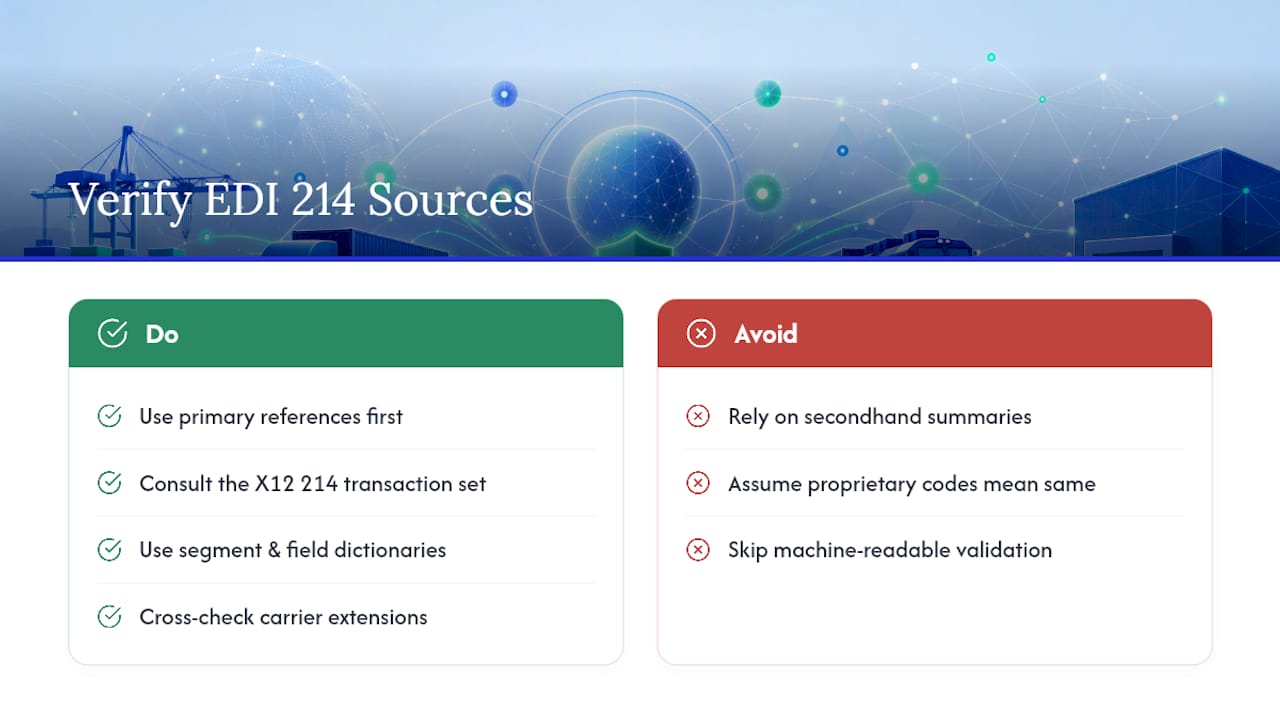
For anything mapping-critical, work from primary references rather than secondhand summaries. The X12 214 transaction set entry defines the standard itself, while segment and field-level dictionaries give you the machine-readable detail needed for validation rules. Cross-check any carrier’s proprietary extensions against these before assuming a code means what you think it does.
Sources
- 214 | X12
- EDI 214 - Transportation Carrier Shipment Status Message | Better EDI
- EDI 214: Transportation Carrier Shipment Status Message Transaction Set | 1 EDI Source
FAQ
What Does the EDI 214 Status Code Mean?
The status code inside the AT7 segment identifies a specific shipment event, pickup, departure, arrival, delivery, or exception, and it’s paired with a timestamp and a reason code that explains why the event happened, especially in delay or exception cases.
What Is the Difference Between EDI 210 and EDI 214?
EDI 214 reports shipment status events in near real time as they happen, while EDI 210 is the Motor Carrier Freight Details and Invoice, sent after delivery to bill for the shipment; teams typically reconcile 214 event history against the 210 to confirm the full shipment lifecycle.
What Is the Purpose of the EDI 214 Standard?
The 214 exists so carriers can transmit shipment dates, times, locations, route information, and identifying numbers back to shippers and logistics providers, giving them a standardized way to track freight without relying on manual status calls.
What Is the Difference Between EDI 204 and EDI 214?
EDI 204 is the Motor Carrier Load Tender, sent by a shipper to offer a load to a carrier, while EDI 214 is the carrier’s status response once that load is moving, reporting pickup, transit, and delivery events against the original tender.
How Do You Track Shipments Using EDI 214?
You track shipments by mapping incoming AT7 status events, along with MS1/MS2 location data and AT8 delivered-quantity fields, into your TMS or ERP’s shipment timeline, then triggering automated notifications or workflows off each event as it arrives, which is how native EDI 214 tracking is built to work.

