Bill of Lading OCR: How to Compare Tools in 2026

Bill of lading OCR reads the text on a scanned, faxed or photographed BOL and turns it into characters a computer can store. Bill of lading automation goes further: it validates those fields, routes exceptions to a person and passes clean data into your TMS or ERP. For a US freight forwarder, the practical choice is among standalone extraction tools, document platforms with usage-based pricing, and a TMS that treats documents as part of the shipment file. This guide compares those options on the criteria that decide whether your team actually stops retyping.
TL;DR
- OCR is only the first step. The savings come from validation, exception handling and a clean handoff to your TMS or accounting system.
- Standalone extraction tools are quick to start, but every export is another integration your team must keep running.
- Published pricing varies widely: some vendors list credit-based plans, others quote by volume, so compare cost per processed page, not the monthly headline.
- A TMS with document capture built in removes the handoff entirely, which is the approach FreightSuite takes.
- Test every tool on your own worst documents (faxed dock copies, handwritten edits, carrier-specific layouts) before you sign.
Table of Contents
- What bill of lading OCR actually does
- Why template-based OCR struggles with freight documents
- The options forwarders actually have
- How pricing works, and why the headline number misleads
- Beyond the BOL: packing lists, commercial invoices, air waybills and rate sheets
- What to demand on validation, review and integration
- Where FreightSuite fits
- A practical test before you choose
- Common mistakes buyers make
- FAQ
- Sources
What bill of lading OCR actually does
A bill of lading is the contract of carriage, the receipt for the cargo and, in the case of an order bill, a document of title. It carries the data your operations and finance teams re-key every day: shipper, consignee, notify party, carrier, vessel and voyage, ports, container and seal numbers, cargo description, pieces, weight and freight terms. On US domestic road shipments the same job involves BOL and PRO numbers, NMFC item and freight class.
OCR converts the visible text on the page into machine-readable characters. That is useful, but it is not yet data. A string of characters that says “20,450” does not know whether it is gross weight in kilograms, a container count or a postal code. This is why one bill of lading automation guide separates the layers: OCR captures the text, and automation adds validation, exception routing and matching against other records before anything is handed to an ERP or TMS.
The distinction matters for buyers because vendors use the term “OCR” for both. A tool that returns raw text and a tool that returns a validated shipment record are different products with very different labor consequences.
Why template-based OCR struggles with freight documents
Bills of lading do not come in one layout. An ocean carrier’s original B/L looks nothing like a house bill issued by a forwarder, a sea waybill, an air waybill or a domestic LTL straight BOL. Add faxed dock copies, carbon-copy forms, stamps and handwritten corrections, and a rules-based reader that expects a field in a fixed position will fail on the first unfamiliar carrier.
Older OCR systems solved this with templates: one per carrier, one per layout. That works until your carrier mix changes, which in forwarding it does constantly. Modern tools use machine learning or large language models to read the document by meaning rather than position. They find “consignee” because of how the page is structured, not because it sits at coordinates 120,340.
That shift is real, but it does not remove the need for review. Any tool that reads a messy scan will occasionally misread a digit in a container number, and a wrong container number is not a cosmetic error. It can mean a failed customs filing, a misdirected release or a disputed invoice. The better question to ask a vendor is not “how accurate are you?” but “what happens to the field you are unsure about?”
The options forwarders actually have
There are three broad routes. Each suits a different kind of operation.
| Route | What it does well | Where it costs you |
|---|---|---|
| Standalone BOL extraction tool | Fast to trial, upload a file and see fields; often exports to Excel, CSV or JSON | Your team owns the connection into the TMS, and corrections live in a separate system |
| General document-automation platform | Flexible across document types; APIs for custom workflows; human-review options | Usage-based pricing that scales with pages, plus integration work and a technical owner |
| TMS with document capture built in | Extracted data lands directly on the shipment, the job costing and the invoice | You are choosing a TMS, so the decision is bigger than a document tool |
Standalone extraction tools
A crowded group of vendors offers bill of lading parsing as a focused product. You upload a PDF, scan or photo, and receive fields such as BOL number, parties, ports, container and seal numbers, commodity lines and weight. Many accept documents by email forwarding or API and export to spreadsheets or structured formats.
The appeal is speed. You can run twenty of your own documents through a trial in an afternoon. The weakness appears afterward. The extracted record sits outside the system where you book, cost and invoice the shipment, so somebody has to move it, and somebody has to reconcile it when a correction is made in one place and not the other. For a small team with a narrow need, such as feeding a data warehouse, that is acceptable. For a forwarder trying to cut admin across every file, it simply relocates the manual step.
General document-automation platforms
Platforms such as Affinda and super.AI sit one level up. They handle many document types, not only bills of lading, and they expose APIs so a development team can wire extraction into an internal workflow. That flexibility suits companies with engineering capacity and a long tail of unusual documents.
It also changes the buying conversation. You are no longer purchasing a finished freight workflow. You are purchasing a capability and building the workflow around it: mapping fields, defining validation rules, deciding who reviews exceptions and keeping the integration alive when your TMS changes. Budget for that work, not only for the license.
A TMS with document capture built in
The third route removes the seam. When the TMS itself reads the incoming document, the extracted fields populate the shipment, trigger the next workflow step and feed charges and invoices without an export in between. The reader never leaves one system to check another.
This is the model FreightSuite is built around. FreightSuite is a cloud-based, agentic TMS for freight forwarders and logistics companies, with automated document management, invoice recognition, workflow customization and AI agent orchestration included in the core platform rather than sold as add-ons. We cover the philosophy behind this in our piece on logistics document automation without a rip and replace.
How pricing works, and why the headline number misleads
Document tools rarely price like a TMS. Most charge by volume, and the unit is not always a document.
As published on its pricing page, super.AI offers a free Starter plan with 25,000 starting credits for one to three users, a Growth plan at $140 per month for 100,000 credits and up to 25 users, and custom Enterprise pricing starting at 500,000 credits per month. The same page states that processing uses 200 credits per page, that unused credits do not roll over and that annual billing saves 20%. Do the arithmetic and the unit that matters becomes visible: the pricing is per page, not per bill of lading, and a multi-page house bill with attachments consumes credits fast. You can read the details on the super.AI pricing page.
Affinda takes a different approach. Its pricing page says platform pricing is based on processing volume and the commercial model you choose, that its trial includes 200 credits for two weeks, and that quotes are shaped around expected usage, deployment, support and add-ons. In other words, you will not know your real cost until you describe your volume.
FreightSuite does not publish a price, so we will not put a number on it here. A demo is where we scope it against your shipment volume and the modules you need.
When you compare, normalize everything into one figure: cost per fully processed shipment file, including the review time your staff spends on exceptions and the engineering time to maintain integrations. A tool that looks cheap per page can be the expensive one once a developer is on the payroll to babysit it.

Beyond the BOL: packing lists, commercial invoices, air waybills and rate sheets
Buyers who search for bill of lading OCR usually have a wider document problem. The BOL is the most visible paper, but a forwarder’s file also holds a packing list, a commercial invoice, an air waybill, a carrier freight invoice and rate sheets that arrive as spreadsheets or PDFs.
Packing list extraction is conceptually similar: part numbers, descriptions, quantities, weights, carton counts and PO references pulled from supplier formats that never match. Dedicated tools such as packinglistocr.com exist for this narrow case. Commercial invoices matter more than most teams admit, because their values, HS codes and origin data feed customs filings. An error on the invoice becomes an error in the entry. Specialized logistics extraction products, for example Veryfi’s freight and customs document offering, pitch the same capability across bills of lading, customs forms and freight invoices.
Air waybills add their own wrinkle. MAWB, HAWB, sea waybill and ocean bill of lading are not interchangeable, and each carries different fields and different legal weight. A reader that treats them all as “shipping documents” will mix master and house references, which is precisely the data that later breaks tracking and billing.
Rate sheets are a different species. They are not evidence of a shipment but inputs to pricing. Digital rate sheets only create value when the rates land in a structured rate table that quoting and costing can query. Capturing a carrier’s PDF as text and leaving it in a folder changes nothing. This is why rate management belongs in the same system as operations and finance, rather than in a separate extraction tool.
What to demand on validation, review and integration
Vendor accuracy claims are marketing until you test them on your own paper. Whatever number appears on a landing page, the controls around the number are what protect you. Ask each vendor these questions, and write down the answers.
First, does every extracted field carry a confidence score, and what happens below the threshold? The right answer is that uncertain values are held for a person to confirm instead of flowing straight into the shipment record or a customs filing. Second, does the system check extracted data against something else, such as the booking, the purchase order or the carrier invoice, or does it simply output what it read? Third, do corrections feed back so the same mistake is not made next week? Without that loop, you are paying a permanent review tax.
Integration deserves the same scrutiny. Ask whether the tool pushes records to your TMS by API or webhook, or only exports a file. Ask who maintains the mapping when you add a new field. Ask what happens to the original image: it should stay linked to the shipment, because auditors and customers will ask for it.
For electronic bills of lading the control question sharpens. If your documents move through eBL platforms, the issue is who can release, amend or surrender a title document and how that is logged. We lay out the checks in six TMS controls for eBL management.
The accounting side matters as well. Extracted charges that cannot reconcile to the ledger only move the problem downstream. How a TMS ties documents to postings and audit trails is covered in our guide to TMS accounting integration.
Where FreightSuite fits
The ground is shifting beneath forwarding operations. Volumes per employee are expected to rise, margins stay under pressure, and the work that used to justify headcount, reading documents and keying them in, is exactly the work software now does. The question for a forwarder is no longer whether to automate document capture but where the automation should live.
Our answer is inside the TMS. FreightSuite brings automated document management and invoice recognition together with rate management, air and ocean tracking, finances, workflows and AI agent orchestration, all native to one platform. A document that arrives is read, attached to the right job and checked against the workflow that governs that job, so your operations team reviews exceptions instead of retyping fields.
The modules map to how forwarders actually work. Ocean teams can see what the platform does for ocean freight TMS and automation, and the air, road and customs capabilities follow the same pattern; the customs brokerage TMS page is the one to read if commercial invoice quality is your bottleneck. If you want to see how your own bills of lading, packing lists and invoices would move through the system, the quickest route is to book a demo with FreightSuite and bring a stack of your ugliest documents.
This is not the right fit for everyone. If you only need to dump BOL fields into a spreadsheet for analytics and you are happy with your current TMS, a standalone tool is the lighter choice. If you are replacing or modernizing the core system anyway, buying document capture separately means paying twice for the same seam.
A practical test before you choose
Run the same pilot on every option. It takes a week and settles most arguments.
Pull fifty documents from the last quarter. Include clean digital PDFs, but weight the sample toward the ones that caused trouble: faxed dock copies, scans with stamps, handwritten changes, multi-page house bills, and at least a few from carriers that do not follow a standard layout. Add a handful of packing lists and commercial invoices from different suppliers, and a few air waybills if you move air freight.
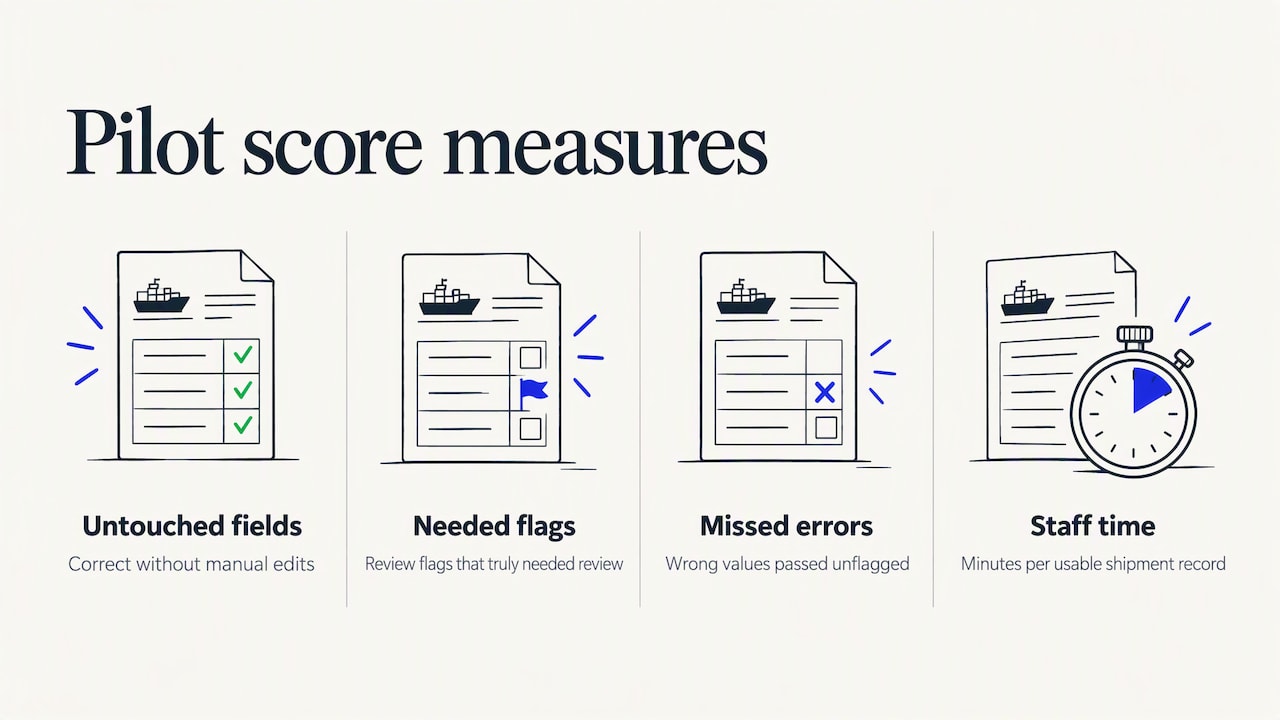
Score each tool on four measures: fields correct without touching, fields flagged for review that really needed review, errors that passed unflagged, and minutes of staff time per document from arrival to a usable shipment record. The third measure is the one that hurts you. A tool that flags too much is annoying. A tool that confidently passes wrong values is dangerous.
Then price the result honestly. Multiply review minutes by your loaded hourly rate, add license cost per processed file, and add the engineering or implementation hours to connect it. Compare the totals, not the demos.
Finally, check the downstream view. A clean extraction is worth little if reporting still disagrees with finance. A single authoritative data map is what keeps dashboards and ledgers aligned, which we discuss in our note on fixing TMS BI reports.
Common mistakes buyers make
The first mistake is buying on the demo document. Vendors choose clean samples. Your risk lives in the exceptions.
The second is treating accuracy as a single number. A 99% field-level rate sounds excellent until you realize a ten-field document then has roughly a one in ten chance of at least one error if mistakes are independent. What matters is whether the errors are caught before they reach a customer or a customs authority.
The third is ignoring ownership. Someone has to review exceptions, tune the rules and own the integration. If nobody has that job, the tool decays.
The fourth is solving the document problem in isolation. Document capture feeds quoting, operations, customs and billing. Our operations-team page on freight forwarding ERP shows how those functions connect, and the same logic applies when you are deciding where capture belongs.
FAQ
What is the difference between bill of lading OCR and bill of lading automation?
OCR converts the visible text on a document image into machine-readable characters. Automation uses that text, adds validation and exception routing, and delivers structured data to your TMS or ERP. You want the second, because the first still leaves a person to interpret and enter the data.
Can OCR read handwritten or faxed bills of lading?
Modern AI-based readers handle many faxed, photographed and annotated documents far better than template OCR, but results vary by tool and by the quality of the scan. Test with your own worst documents and insist on confidence scoring, so uncertain handwritten values go to a person instead of straight into the shipment file.
How much does bill of lading OCR cost?
It depends on the model. super.AI, for example, publishes a Growth plan at $140 per month with credits consumed per processed page, while Affinda quotes by volume and deployment. FreightSuite does not publish a price, so ask for a demo quote based on your volume.
Do I need separate tools for packing lists, commercial invoices and air waybills?
Not necessarily. Some products specialize in one document type, while platforms and TMS-native capture handle several. The deciding factor is where the data needs to end up: if it lands in the same system that runs your shipments, billing and customs, one workflow beats several connected tools.

