5 TMS Selection Criteria Freight Forwarders Can Test Live
Score a TMS first on these five criteria: mode fit, optimization depth, integration and data, total cost model, and vendor viability. These are the dimensions that consistently separate systems that work in daily operations from those that look strong in a demo, according to the 2026 buyer’s guide. We built our approach around exactly this discipline: a weighted scorecard, scripted demos on your own lanes, and a focused proof of concept before anyone signs a contract.
TL;DR:
- Run live consolidation and continuous move scenarios on your lanes, rates, and recent shipments, including exceptions, rather than accepting vendor demos.
- Shortlist three to five vendors, then test two or three representative lanes against predefined KPIs in a proof of concept lasting two to four weeks.
- Cloud and SaaS deployments typically take 6 to 16 weeks, while enterprise systems can take 6 to 18 months, with carrier onboarding often driving delays.
- Test integrations with 90 days of real shipment history; mismatched ERP data and weak testing are leading technical causes of implementation failure.
- Model three years of costs, including transaction charges and percentage of freight fees, which can rise with revenue rather than actual platform use.
Table of Contents
- What to test in vendor conversations and demos
- The selection workflow: from requirements to proof of concept
- Implementation realities that should shape your evaluation
- Practical guidance from running FreightSuite deployments
- How user experience and interface design affect adoption
- Scalability and performance as your freight volume grows
- Customization and configuration without custom code
- Compliance and security standards to confirm before you sign
- Support and training that match your operating hours
- Reporting and analytics that operations teams actually use
- How FreightSuite aligns to these five criteria
- FAQ
- Sources
What to test in vendor conversations and demos
Every vendor will tell you their platform handles your freight. The scorecard exists so you stop taking their word for it and start forcing proof.
Start with mode and network fit. Confirm the platform natively handles the modes you actually move, not a bolted-on module acquired years ago and never rebuilt. Ask which carrier networks and EDI connections ship out of the box versus which require custom development. A forwarder running ocean and air needs native support for both, not a system that treats one mode as an afterthought.
Optimization depth separates real route and rate engines from spreadsheets with a UI. Do not accept a canned demo script. Hand the vendor your own lanes, your own rate cards, and a sample of recent shipments, then ask them to run consolidation and continuous-move scenarios live. The Supply Chain Desk buyer’s guide is explicit on this point: optimization should be tested on real freight, not vendor samples, because sample data is built to flatter the engine.
Integration and data is where most failures actually originate. Ask which EDI sets ship natively, which ERP writebacks are included, and critically, who owns the connector after go-live, the vendor or a third-party integrator billed separately. Panorama Consulting’s analysis identifies mismatched ERP master data and thin integration testing as the most frequent technical cause of implementation failure, which makes this line item worth more scrutiny than most buyers give it.
Total cost and commercial model requires modeling three years out, not just the license quote. Watch for percent-of-freight pricing that scales against your revenue rather than your usage, and per-transaction fees that look small until volume climbs. A system that charges a percentage of freight spend can become dramatically more expensive as you grow, which inverts the economics you thought you were buying into.
Viability and operating model rounds out the five. Request references from forwarders in your own segment and size range, ask for specific roadmap commitments with dates attached, and check recent acquisition or ownership history. A platform that just changed hands may change its roadmap, its support model, or its pricing within a year.
- Confirm native mode coverage before anything else: a system strong in ocean but weak in air will cost you twice.
- Demand live optimization runs on your lanes and rates, never a prebuilt demo script.
- Pin down connector ownership in writing: vendor-owned integrations reduce finger-pointing later.
- Model total cost of ownership across three years, including per-transaction and percent-of-freight structures.
- Ask for references in your exact segment, not generic enterprise logos.
The selection workflow: from requirements to proof of concept
A disciplined process beats an ad hoc one every time, and it does not need to take months to run properly.
- Document your freight profile before contacting a single vendor: modes, volumes, carrier mix, current pain points, and a must-have list of five to eight non-negotiable capabilities.
- Build a weighted scorecard against the five criteria, adjusting weights to your profile. A forwarder heavy in ocean consolidation might weight optimization depth at 30%, integration at 25%, cost model at 20%, mode fit at 15%, and viability at 10%.
- Narrow your long list to three to five vendors using the scorecard, then invite three to four finalists to scripted demos. The Supply Chain Desk guide notes that fewer than three candidates risks a weak comparison, while more than five dilutes the evaluation and burns time you do not have.
- Script every demo around your own lanes, rates, and at least one exception scenario, such as a rate override or a failed tender, so you see how the system behaves under friction rather than under ideal conditions.
- Scope a focused proof of concept on two or three representative lanes, define two or three measurable KPIs in advance, cap the duration at two to four weeks, and check references from current customers in your segment before signing anything.
Treat integrations, carrier onboarding, and data migration as the actual project, not a line item underneath it. The same guide warns that services budget should often match or exceed license cost once that work is properly scoped.
Implementation realities that should shape your evaluation
The vendor that wins your scorecard still has to deliver a working system on a reasonable timeline, and that depends on factors many buyers only discover after signing.
Timelines vary sharply by platform type. Cloud and SaaS TMS platforms typically go live in 6 to 16 weeks, mid-market systems run 3 to 6 months, and enterprise deployments stretch 6 to 18 months. Carrier onboarding and integration complexity are the biggest variables inside those ranges, not the software itself.
Carrier EDI onboarding alone commonly takes 2 to 8 weeks per carrier. Prioritize your top 20 carriers for parallel onboarding rather than sequencing them one at a time, since sequential onboarding is the single most common cause of slipped go-live dates.
- Build a data readiness checklist before kickoff: master data alignment, address validation, and historical rate accuracy all need review ahead of migration.
- Insist on integration testing against production-like data samples, not clean demo data, since mismatched ERP master data is the leading technical cause of failed rollouts.
- Keep operations, not IT alone, owning the project, since operations understands the exception handling that breaks workflows in practice.
- Favor a phased pilot on a handful of lanes over a big-bang cutover, then scale once the pilot proves out your KPIs.
Pro Tip: Run your integration test with at least 90 days of real historical shipment data, not a sample file the vendor provides, so master data mismatches surface before go-live instead of after.
Practical guidance from running FreightSuite deployments
Years of forwarder deployments have taught us which clauses and structures actually prevent problems later, and we build these into how we recommend forwarders approach both the RFP and the rollout.
On contracts, we advise including specific uptime commitments (99.9% or better stated explicitly, not implied), a defined data ownership clause confirming you retain your shipment and rate data on exit, and a security standard reference appropriate to your region rather than a vague “industry best practice” phrase that commits the vendor to nothing.
On user roles, we recommend starting with three tiers: operations users who execute bookings and track shipments, finance users who handle invoicing and credit control, and an administrator role that manages carrier rates and workflow configuration. Narrow role definitions at launch reduce training time and cut down on permission errors in the first 90 days.
On rollout, a phased replacement plan beats a single cutover almost every time: pilot on two or three lanes for three to four weeks, expand to a full mode once KPIs hold, then migrate remaining modes in sequence rather than simultaneously.
- Include explicit uptime and data-ownership clauses in every TMS contract, not just a general service-level reference.
- Start with three user role tiers (operations, finance, admin) to simplify adoption.
- Pilot two to three lanes before expanding mode by mode, rather than attempting a single full cutover.
How user experience and interface design affect adoption
A powerful optimization engine is worth little if your operations team avoids using it. Interface evaluation deserves the same rigor as feature checklists, because the system your team actually uses daily is the one with the lowest friction, not necessarily the one with the longest feature list.
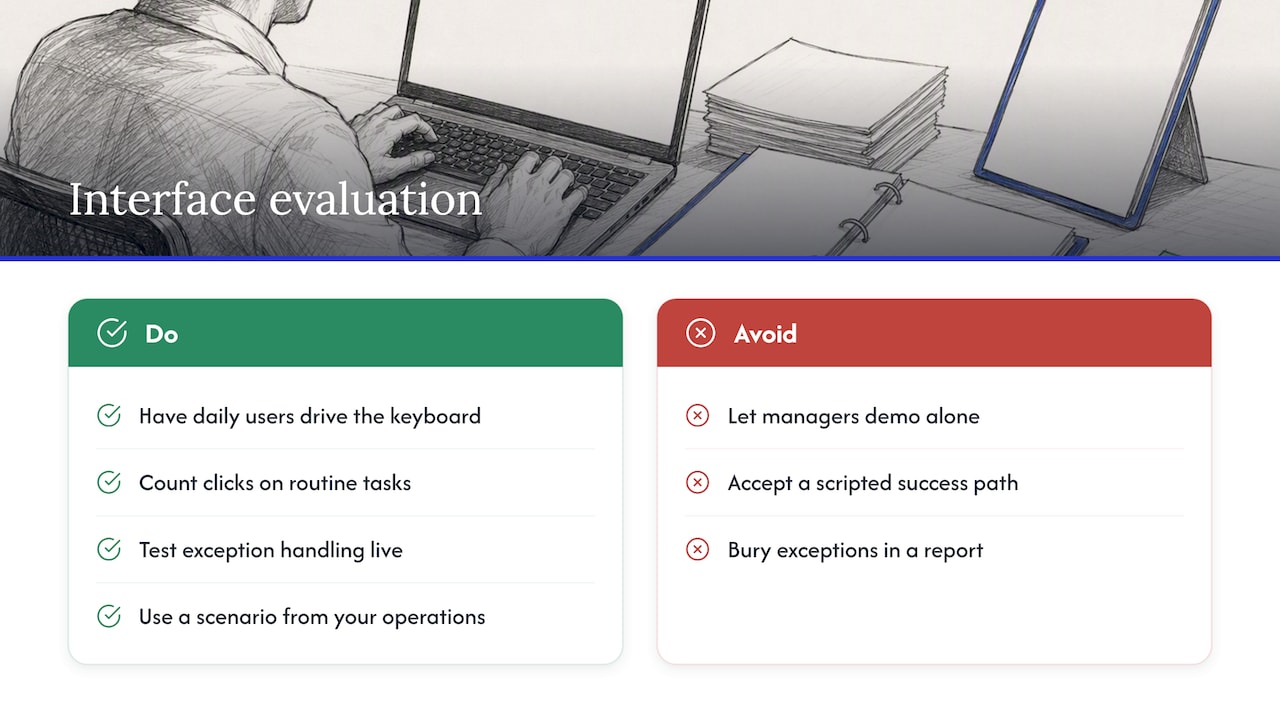
During demos, have the people who will use the system daily, not just managers, drive the keyboard. Watch how many clicks it takes to book a shipment, override a rate, or pull a customer status update. A system that requires navigating four screens for a routine task will slow operations down even if the underlying logic is sound.
Pay attention to how exceptions surface. A forwarder’s day is built around exceptions: delayed vessels, failed carrier tenders, customs holds. The interface should surface these prominently rather than burying them in a report someone has to remember to run. Ask the vendor to demonstrate exception handling live, using a scenario from your own operations rather than a scripted success path.
Mobile and dashboard access matter differently depending on your team structure. Customer-facing dashboards that let your clients self-serve on shipment status reduce inbound calls to your operations desk, which is a measurable time saving even before you touch optimization or cost.
Scalability and performance as your freight volume grows
A system that performs well at your current volume may behave very differently once you double your shipment count or add a new mode. Performance under load is one of the harder things to evaluate in a sales demo, since demo environments are rarely stressed the way production systems are.
Ask vendors directly how their platform performs during peak season spikes, when shipment volumes and exception rates both climb simultaneously. Request specifics on how the system handles concurrent users during month-end invoicing runs, which is often when cloud-based platforms show the most strain.
Architecture matters more than marketing language here. A platform built natively for multi-tenant cloud scaling behaves differently under load than one with legacy on-premise roots retrofitted for the cloud. Ask plainly which category the vendor’s platform falls into, and ask for it in writing rather than accepting a verbal assurance.
If you plan to add modes, carriers, or geographies within the next two years, say so during evaluation. A vendor’s answer to a growth scenario you describe concretely will tell you more than a generic claim that the platform “scales.”
Customization and configuration without custom code
Every forwarder has workflows shaped by years of operational habit, specific customer requirements, and the quirks of particular trade lanes. A TMS that cannot flex to those realities will fight your team daily.
The distinction that matters is between configuration and customization. Configuration means adjusting workflows, fields, and approval chains through settings a trained administrator can manage. Customization means custom code that only the vendor’s development team can touch, which usually means a change request, a wait, and often a fee.
Ask vendors to show you how a workflow change is made, live, during the demo. If the answer involves logging a ticket and waiting weeks, that is a meaningful constraint on how responsive the system will be to your operational reality once you are live and discovering edge cases your original requirements did not anticipate.
Document rules, approval thresholds, and credit control parameters are common areas where forwarders need flexibility without engineering involvement. Confirm these are configurable natively, since a platform that requires vendor intervention for routine adjustments will slow your team down exactly when speed matters most.
Compliance and security standards to confirm before you sign
Security and compliance questions are easy to skip past in a sales process focused on features, but they carry real operational and legal weight once your shipment and financial data lives inside a vendor’s infrastructure.
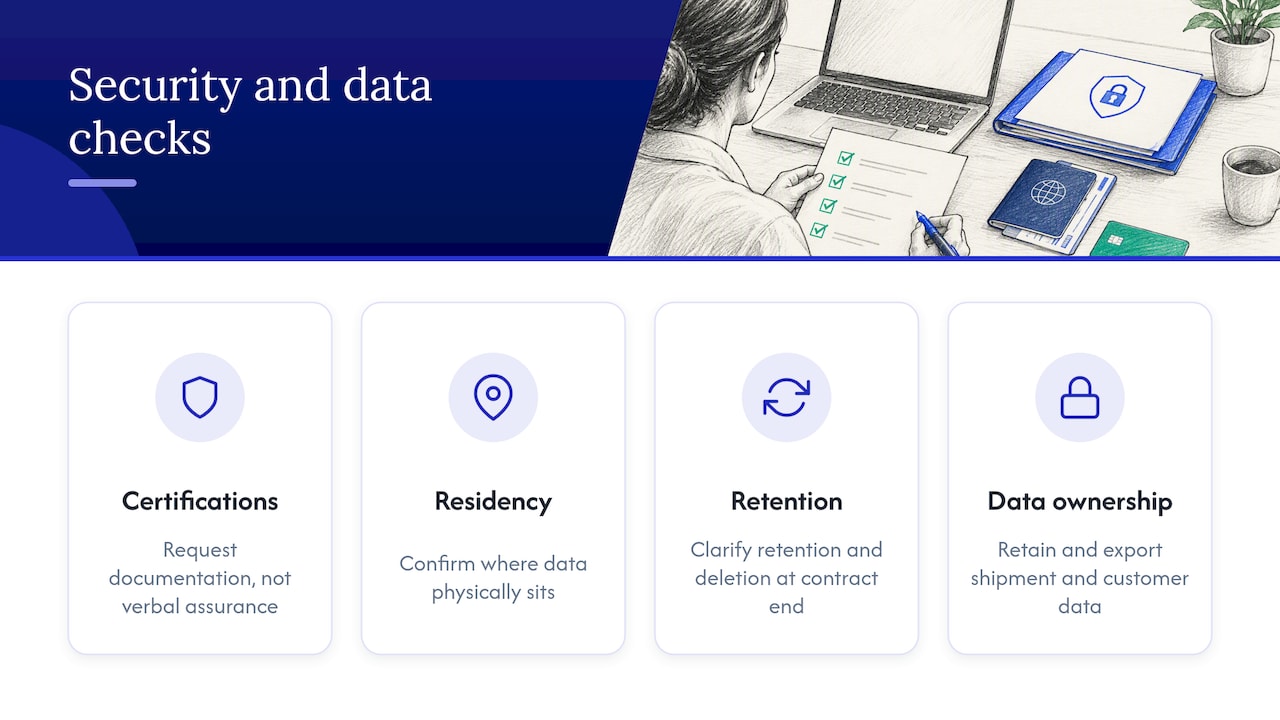
Ask which security certifications the vendor holds and ask for documentation, not a verbal assurance. Confirm data residency, where your data physically sits, matters for forwarders operating across multiple regulatory jurisdictions. Ask how the vendor handles data retention and deletion when a contract ends, since you want clear contractual language stating you retain and can export your own shipment and customer data.
Customs and trade compliance functionality deserves specific attention if your operations include brokerage work. Confirm how the platform supports documentation accuracy and regulatory filing requirements relevant to your trade lanes, and ask for a concrete example of how it has handled a compliance update in the past rather than a general claim of readiness.
Uptime and incident response also sit under this umbrella. Ask what the vendor’s incident communication process looks like when something goes wrong, and how quickly you are notified versus discovering an outage on your own.
Support and training that match your operating hours
A forwarder running shipments across time zones needs support that matches that reality, not a help desk that closes when your evening shift is handling an urgent exception.
Ask about support hours relative to your own operating schedule, and ask specifically how escalations are handled outside standard hours. A ticket queue with a 24-hour response promise is a very different experience than a live escalation path during an active shipment exception.
Training structure affects how quickly your team reaches full productivity. Ask whether training is role-based, matching the operations, finance, and administrator tiers your team will actually use, or whether it is a single generic session covering every feature regardless of who needs what. Role-based training tends to produce faster, more confident adoption because each group learns only what is relevant to their daily work.
Ongoing training matters as much as initial onboarding. Ask how the vendor handles training for new hires six months after go-live, when your original implementation team may have moved on. A platform with self-service training resources, recorded sessions, or an accessible knowledge base reduces the burden on your own staff to informally train every new team member.
Reporting and analytics that operations teams actually use
Reporting is often demoed as a dashboard full of charts, but the real test is whether the reports answer the questions your operations and finance teams ask daily.
Ask vendors to build a report live using your own data categories: margin by lane, carrier performance by on-time percentage, or exception volume by customer. A system with genuinely flexible reporting will let you construct this without a developer, while a system with rigid, pre-built reports will struggle or require a change request.
Confirm whether analytics update in near real time or on a batch delay. For operations making same-day decisions about carrier allocation or exception handling, a report that is hours or a day behind loses much of its operational value even if the underlying data is accurate.
Export flexibility matters for forwarders who need to feed data into accounting software or a separate business intelligence tool. Confirm the platform supports clean data export in formats your finance team can actually use, and ask how the vendor handles BI integration when reporting needs exceed what the native dashboards provide.
How FreightSuite aligns to these five criteria
We built FreightSuite as the agentic alternative to legacy platforms, with native mode coverage across ocean, air, and road freight, plus customs brokerage support, all included out of the box rather than sold as add-ons. Rate management, financial controls, workflow automation, and AI agent orchestration ship natively, which means fewer third-party connectors to own and fewer surprise costs in your total cost model.

If you are building your scorecard now, request a demo scripted around your own lanes and rates, ask us for a proof of concept on two or three lanes, and request an implementation timeline review before you finalize your shortlist.
FAQ
What are the most important TMS selection criteria?
The five criteria that consistently separate strong fits from poor ones are mode and network fit, optimization depth, integration and data, total cost and commercial model, and vendor viability, according to the 2026 buyer’s guide. A weighted scorecard built around these five dimensions keeps the evaluation objective rather than driven by demo polish.
How long does a typical TMS implementation take?
Timelines depend heavily on platform type: cloud and SaaS systems typically go live in 6 to 16 weeks, mid-market platforms take 3 to 6 months, and enterprise deployments can run 6 to 18 months — understanding whether to use in-house shipping or 3PL services vs in-house shipping can significantly affect these timelines. Carrier EDI onboarding and ERP integration complexity are usually the biggest factors in where a given project lands in that range.
How many vendors should be on a TMS shortlist?
A shortlist of several vendors, narrowed to a manageable number of finalists for scripted demos, tends to produce the best comparison quality according to Supply Chain Desk’s buyer’s guide. Fewer candidates risks missing a better fit, while more than five dilutes the depth of evaluation your team can realistically give each one.
What causes most TMS implementations to fail?
Panorama Consulting’s analysis identifies mismatched ERP master data and insufficient integration testing on production-like samples as the most frequent technical causes of failure. Testing integrations against real historical data before go-live, rather than clean demo data, catches these mismatches early.

