6 Steps to a Mapping First QuickBooks Logistics Integration
The fastest, safest path for most logistics teams is QuickBooks Online paired with a native connector or direct API when one exists for your transportation management system. When that is not available, a validated file bridge, typically IIF for QuickBooks Desktop, staged and dedupe checked before go-live, gets you there without corrupting your ledger. The three realistic approaches are native connectors, direct API integration, and middleware or file-based bridges. Each trades speed for flexibility differently, but all three fail the same way when mapping and validation get skipped.
TL;DR:
- Choose a tested native connector for standard billing; use a direct API when delivery events must create invoices within minutes and development support is available.
- QuickBooks Desktop integrations are batch based; route every IIF file through validation and deduplication because Desktop cannot recognize invoices it has already imported.
- Create a canonical data dictionary before setup: map fuel surcharges and detention to dedicated accounts, and keep IFTA calculations in the TMS or a dedicated tool.
- Test in a sandbox, then run the old and new billing processes in parallel for one full billing cycle, reconciling totals daily before switching.
Table of Contents
- Integration approaches: native connectors, APIs, middleware, and file bridges
- Step-by-step integration checklist: plan, map, stage, test, and go live
- QuickBooks Online vs Desktop: technical differences and integration implications
- Data mapping and chart-of-accounts guidance for logistics charge types
- Common pitfalls and validation strategies to avoid broken accounting
- FreightSuite practitioner playbook: canonical data maps, BI fixes, and payment automation
- Timeline and typical costs for common integration approaches
- Security and compliance considerations for integrating logistics data with QuickBooks
- Scalability and performance impacts of different integration methods
- Case studies or examples of successful QuickBooks logistics integrations
- FreightSuite: a direct option to deliver integrated accounting and operations
- FAQ
- Sources
Integration approaches: native connectors, APIs, middleware, and file bridges
Choosing among these four approaches comes down to how much customization your billing structure needs versus how fast you need to move. There is no universally correct answer here, only trade-offs that fit your fleet’s billing complexity and your team’s technical bench strength.
Native connectors are the fastest option when your TMS vendor has already built and tested one. Configuration can often take days rather than weeks, because the mapping logic between common fields, like load number, customer, and charge type, has already been worked out by someone else. The catch is customization. A native connector handles the eighty percent case well: standard freight charges, standard customers, and standard terms. It tends to struggle with unusual accessorial structures, multi-entity accounting, or carriers that need charges split across several QuickBooks classes. Integration patterns documented in accounting and TMS projects show that native connectors are consistently the quickest to deploy but the least flexible when a business’s chart of accounts deviates from the vendor’s assumptions.
Direct API integration gives you real-time, bi-directional sync and the most control over exactly what happens to each record. This is the right call when invoice timing matters, for example, when you want a load marked delivered in your TMS to trigger an invoice draft in QuickBooks within minutes rather than at the end of a nightly batch. The requirement is real development capacity. Someone on your team, or a contractor, needs to understand QuickBooks’ API object model, handle authentication token refreshes, and build idempotency logic so that a retried webhook does not create a duplicate invoice. QuickBooks Online’s API and webhook support makes this approach viable for cloud-based TMS platforms, but it is rarely a weekend project.
Middleware or low-code ETL platforms sit between these two extremes. They give you prebuilt QuickBooks connectors plus a visual mapping layer, so you are not writing raw API calls, but you still get enough flexibility to join multiple systems: your TMS, a fuel card provider, a driver settlement tool, and QuickBooks all in one workflow. Low-code platforms built for QuickBooks Online integrations can connect to thousands of other applications, which matters if your accounting workflow touches more than just dispatch data. The trade-off is configuration time. You are building orchestration logic yourself, even if the building blocks are prebuilt.
File-based bridges, usually IIF exports for QuickBooks Desktop, remain the pragmatic choice when your TMS has no public API and you are not ready to move off Desktop. This is common among smaller trucking operations and in dispatch-centric platforms like ITS Dispatch, where a validated IIF export pipeline with dispatcher-led workflows bridges the gap safely. The pattern works, but only with discipline: every file that reaches QuickBooks Desktop needs to pass through validation and deduplication first, because Desktop has no native concept of “this invoice was already imported.”
Four questions help you choose quickly:
- Does your TMS vendor offer a tested native connector? If yes, start there and evaluate its mapping flexibility against your chart of accounts.
- Do you need real-time invoice creation tied to delivery events? If yes, a direct API is worth the development investment.
- Do you need to join three or more systems into one accounting workflow? If yes, middleware earns its added configuration time.
- Are you running QuickBooks Desktop with a TMS that has no API? If yes, a validated file bridge is your realistic path, not a workaround to abandon later.
Step-by-step integration checklist: plan, map, stage, test, and go live
Every successful integration we have seen follows roughly the same sequence, regardless of which of the four approaches a team chooses. Skipping steps is where most projects go sideways, not technology limitations.
- Align stakeholders before touching software. Get operations, finance, and IT in the same room (or the same call) to agree on what “done” looks like: which charge types matter, which reports finance needs, and who owns data quality after launch.
- Build a data dictionary. Map every field your TMS produces, load number, customer, charge type, accessorial code, driver, to a specific QuickBooks object and GL code. This document becomes your source of truth and should outlive the integration project itself.
- Set up a QuickBooks sandbox and a TMS staging queue. Never test against your live company file. QuickBooks Online provides developer sandbox environments specifically for this; Desktop users should create a duplicate test company file.
- Implement mapping transforms for the hard cases. Accessorials, fuel surcharges, driver settlements, and IFTA entries rarely map one-to-one. Decide now whether accessorials post as itemized lines or aggregate into a single surcharge total, and document the rule.
- Run round-trip validation tests. Push a sample load through the full cycle, dispatch to invoice to QuickBooks posting, and confirm the numbers match at every step. Include dedupe checks and reconciliation reports in this pass, not as an afterthought.
- Go live in parallel, not cold. Run your old process and the new integration side by side for one full billing cycle, reconciling daily, before retiring the manual workflow. Keep a short, defined rollback window in case something breaks.
Pro Tip: Keep a processed-ledger log of every invoice reference and timestamp that has passed into QuickBooks. It takes an afternoon to build and it is the single cheapest safeguard against duplicate postings.
The data dictionary step deserves more attention than most teams give it. Configuration guidance for accounting and TMS integrations treats these projects as configuration efforts first and technology deployments second, which matches what we see in practice: the software rarely breaks on its own, but an unmapped accessorial code or an inconsistent customer name format will quietly corrupt your reconciliation within the first week.
Staging is not optional even for small fleets. A TMS staging queue, however simple, lets you hold records before they touch your live QuickBooks file, giving you one last checkpoint to catch a malformed invoice or a charge posted to the wrong class. For Desktop environments specifically, dispatcher-led IIF validation workflows show a reliable pattern: a Ready-to-Import folder watched by a validator script that strips duplicates and sanity-checks totals before any file reaches QuickBooks.
The go-live plan is where discipline pays off. A parallel run means your billing team is doing double work for a few weeks, which feels inefficient in the moment, but it is the only way to catch mapping errors before they compound across a full billing cycle. Daily reconciliation during that window, comparing TMS-generated totals against QuickBooks postings, line by line if needed, turns a potential month-end crisis into a five-minute fix caught on day two.
QuickBooks Online vs Desktop: technical differences and integration implications
The edition you run changes your entire integration architecture, not just the user interface. This decision should happen before you select a connector or write a single mapping rule.
QuickBooks Desktop still persists across a large share of trucking operations, often because it was the system of record before the TMS existed, or because accounting teams are comfortable with its reporting. Desktop relies on IIF file imports for most third-party data, which means integrations are inherently batch-oriented rather than real-time, and hosting is typically local or on a hosted remote desktop rather than native cloud. Guidance on QuickBooks setup for trucking companies confirms that Desktop environments commonly lean on file-based import as the practical bridge when a TMS cannot speak to QuickBooks directly.
QuickBooks Online changes the equation. It supports a public API and webhooks, meaning a delivery event in your TMS can trigger an invoice draft within minutes instead of waiting for an end-of-day batch import. It also supports multi-user collaboration without file-locking issues, live bank feeds for faster reconciliation, and cloud access that does not depend on anyone being at a specific workstation.
The practical differences show up here:
- Invoice timeliness: Online’s real-time API posting can cut the lag between delivery confirmation and invoice generation from a daily batch to minutes; Desktop’s IIF cycle is inherently end-of-day or manual.
- Driver settlement automation: Online’s webhook support allows settlement calculations to trigger automatically on load completion; Desktop requires a separate export and import step for each settlement run.
- Multi-user access: Online supports concurrent users working the same company file from different locations; Desktop’s file-locking model makes this harder for distributed finance teams.
- Bank reconciliation speed: Online’s live bank feeds let you match deposits against invoices same-day; Desktop reconciliation typically happens in batches tied to statement downloads.
For teams not ready to migrate off Desktop, the bridge pattern still works, but it needs governance. That means a shared folder structure with clear ownership, a validator step before any file import, and a documented process for who reviews exceptions. Treating Desktop as a permanent architecture rather than a stopgap is reasonable for many smaller carriers, provided the file validation discipline is as strict as it would be for an API-based system.
Data mapping and chart-of-accounts guidance for logistics charge types
Your chart of accounts is only useful if every charge type in your TMS lands in a predictable, consistent place in QuickBooks. This is where most reconciliation headaches originate, and it is fixable with a short list of mapping rules decided once, upfront.
Core revenue and expense categories in trucking and logistics typically break down this way:
- Line haul revenue: maps to a primary freight revenue account, usually split by division or truck class if you need granular profitability reporting.
- Fuel surcharge: often kept as a separate income line from line haul so finance can track fuel pass-through margin independently.
- Detention and layover: map to dedicated accessorial revenue accounts rather than folding into line haul, since these charges have different billing triggers and dispute rates.
- Lumper fees: typically an expense pass-through, often billed back to the customer as a reimbursed accessorial, which means it needs both an expense and an offsetting revenue entry.
- General accessorials: decide upfront whether these aggregate into one surcharge line per invoice or post itemized; aggregation is simpler to reconcile, itemization gives better visibility into which accessorial types are growing.
Classes, locations, and items in QuickBooks let you slice this data without multiplying your account list. Use classes for truck or division-level reporting, locations for terminal or regional breakdowns, and items for the actual billable charge types. This keeps your chart of accounts from ballooning into hundreds of near-duplicate accounts just to track performance by truck.
Poor data hygiene, especially inconsistent naming and unmapped accessorials, is the most frequent root cause of integration failures. Building a canonical data dictionary before you integrate anything is the single highest-leverage step in this entire process.
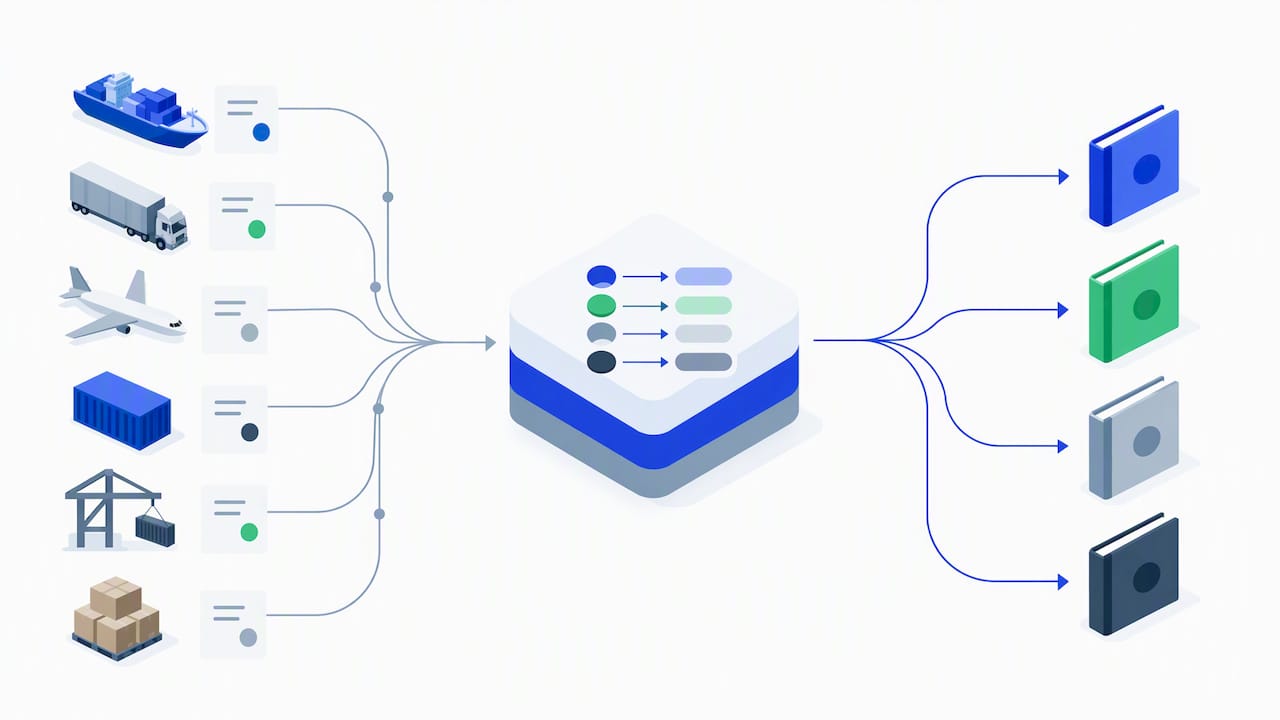
Rounding rules deserve a written policy too, even a one-line one: round at the line-item level or at the invoice total, but pick one and apply it everywhere, since inconsistent rounding across hundreds of invoices compounds into real reconciliation variance by month-end. Tax handling follows the same logic: if certain accessorials are taxable in your jurisdiction and others are not, that distinction needs to live in your data dictionary, not in someone’s memory.
IFTA is a special case worth calling out separately. Keep the actual mileage and fuel tax calculations inside your TMS or a dedicated IFTA tool, where the jurisdiction-by-jurisdiction math belongs, and post only the resulting tax liability to QuickBooks as a ledger entry. Trying to recreate IFTA calculation logic inside QuickBooks itself adds complexity with no corresponding benefit.
A single authoritative data map pays off beyond accounting too. A canonical mapping approach also fixes BI and operational reporting, because the same transaction landing in the same GL structure and class schema every time is what makes dashboards trustworthy in the first place.
Common pitfalls and validation strategies to avoid broken accounting
Most integration failures trace back to a small set of repeatable mistakes, and each has a straightforward fix if you catch it before go-live.
Data hygiene failures top the list. When “Fuel Surcharge,” “FSC,” and “Fuel Surch.” all exist as separate items because different dispatchers typed them differently, your reconciliation reports will never balance cleanly. The fix is a canonical naming standard enforced at the TMS level, not cleaned up after the fact in QuickBooks.
Duplicate invoices are the second most common issue, especially with file-based bridges or retried API calls. A processed-ledger file that logs every imported invoice reference and timestamp prevents re-imports, and it is a lightweight safeguard that takes little effort to maintain once built.
Mis-mapped accessorials quietly distort revenue reporting without triggering an obvious error. Detention charges posted to a generic “other income” account instead of a dedicated detention line will not break anything visibly, but they will make your margin analysis wrong. Run sample reconciliations and variance reports monthly during the first quarter after go-live to catch drift early.
API and webhook issues show up as missed or duplicated postings when a network hiccup causes a retry. Build idempotency tokens into every webhook call, so a retried request is recognized and ignored rather than processed twice, and plan for rate limiting on high-volume days.
A short list of automated checks catches most of these before they reach your books:
- Dedupe check: does this invoice reference already exist in the processed ledger?
- Variance report: does the TMS-reported total match the QuickBooks-posted total within a defined tolerance?
- Orphan record scan: are there TMS records with no corresponding QuickBooks entry after a defined time window?
- Naming audit: do all items and accounts match the canonical naming standard, with zero near-duplicates?
Pro Tip: Run your variance report weekly for the first two months after go-live, then monthly after that. Problems that show up weekly almost always trace back to a mapping rule someone forgot to apply consistently.
FreightSuite practitioner playbook: canonical data maps, BI fixes, and payment automation
A single authoritative data map is the difference between accounting that reconciles cleanly and operational dashboards nobody trusts. When every transaction type has one defined path into your general ledger and one defined class and location structure, the same data that drives your invoices also drives trustworthy business intelligence. FreightSuite’s approach to canonical data mapping is built specifically around this principle: fix the mapping once, and both the accounting and the operational reporting problems tend to resolve together.
Payment automation follows a similar logic. Credit control and applied payments work best when payment status is visible to operations, not locked away in a finance-only view. A dispatcher deciding whether to release a load to a customer with an outstanding balance needs that information in real time, which means the payment status needs to surface wherever operations actually works, not just in a finance report generated after the fact.
A few patterns worth building into any webhook-based integration:
- Idempotency tokens on every webhook payload so a retried event is recognized and discarded rather than double-processed.
- Transaction source IDs attached to every record, so you can always trace a QuickBooks entry back to its originating TMS event.
- A replay window defined for failed webhook deliveries, with an acknowledgment workflow that flags posting failures to operations rather than letting them fail silently.
- A staging environment separate from production for every test cycle, no exceptions, even for small mapping changes.
For readers wanting deeper background on how a modern TMS models shipments, rates, and finances before diving into integration specifics, our explanation of how a freight forwarding TMS works covers the foundational data model these integrations depend on.
Timeline and typical costs for common integration approaches
Timelines vary substantially by approach, and the honest answer is that most of the variation comes from mapping complexity, not the technology itself. A native connector with a straightforward chart of accounts can be configured in days. The same connector, applied to a fleet with a dozen accessorial types and multi-entity accounting, can stretch into weeks simply because the mapping decisions take longer to make and test.
Direct API integrations require the most upfront investment, since someone needs to build authentication handling, idempotency logic, and error recovery before the first transaction ever posts. This is development work, not configuration work, and it should be budgeted accordingly against your internal IT capacity or a contractor’s time.
Middleware sits in the middle: faster than custom API development because the connectors are prebuilt, slower than a native connector because you are still building orchestration logic yourself.
File-based bridges for QuickBooks Desktop are often the quickest to start but carry ongoing operational cost. Every export cycle needs a human or a script to validate the file before import, which is a smaller one-time cost but a recurring one, week after week, for as long as the bridge stays in place.
Whichever approach you choose, budget real time for the testing and validation phase. Teams that treat go-live as the finish line, rather than the start of a parallel-run reconciliation period, are the ones who discover mapping errors three weeks later buried in a month-end close.
Security and compliance considerations for integrating logistics data with QuickBooks
Financial data moving between your TMS and QuickBooks needs the same access discipline you would apply to any sensitive system, not an exception carved out because “it’s just an integration.”
Authentication tokens for API connections should be scoped as narrowly as possible, limited to the specific QuickBooks objects the integration actually needs to touch, and rotated on a defined schedule rather than left static indefinitely. Store credentials in a secrets manager, not in a configuration file sitting in a shared drive.
Role-based access matters just as much on the TMS side. Not every dispatcher needs the ability to edit a charge type after it has synced to QuickBooks, and locking that down prevents accidental or intentional alteration of records after the fact.
For file-based bridges, the shared folder structure carrying IIF exports needs the same access controls as any financial document repository, because an unencrypted shared folder holding customer billing data is a real exposure, not a theoretical one.
Audit trails deserve explicit attention. Every posting, whether it arrives through an API, middleware, or a file import, should be traceable back to its source record, with a timestamp and a reference ID. This is not just good practice, it is often what makes an eventual accounting review or tax inquiry straightforward rather than painful.
Scalability and performance impacts of different integration methods
How well an integration holds up as your load volume grows depends heavily on which approach you chose at the start, and this is worth thinking through before volume forces the issue.
Native connectors generally scale fine for standard transaction volumes but can hit friction points when a fleet’s growth introduces complexity the connector was not built for, like a new accessorial structure or a second QuickBooks company file for a new entity.
Direct API integrations handle volume growth well when built with proper rate limiting and retry logic from the start, since QuickBooks Online’s API enforces its own throughput limits and a poorly built integration will start failing silently once you cross them.
Middleware platforms tend to scale gracefully because the orchestration logic is designed for multi-system complexity from day one, though cost can scale with transaction volume depending on the platform’s pricing model.
File-based bridges scale the least gracefully. A validation and dedupe process that works fine for fifty invoices a day can become a bottleneck at five hundred, simply because someone still needs to review exceptions manually. This is often the point where trucking operations outgrow a pure file-bridge approach and start evaluating API-based alternatives.
Case studies or examples of successful QuickBooks logistics integrations
Successful integrations across different logistics business types share a common thread regardless of fleet size or freight type: the teams that avoided reconciliation chaos were the ones that treated data mapping as a project in its own right, not a checkbox before go-live.
A trucking operation moving from a dispatch-centric platform without a public API, for instance, benefits from the IIF-based bridge pattern: dispatcher-led workflows that move load data into a validated staging queue before export consistently outperform ad hoc manual exports, because the validation step catches errors before they ever touch QuickBooks Desktop.
A freight forwarder running multi-entity accounting across ocean and air divisions faces a different challenge: the mapping needs to account for class and location segmentation from the outset, since retrofitting that structure after transactions have already posted means reclassifying potentially thousands of historical entries.
A 3PL working with partner fulfillment networks, such as those built on platforms like MoreShores’ e-commerce logistics integrations, illustrates a related pattern: wherever multiple parties touch a shipment before it reaches accounting, the data dictionary needs to specify exactly which system is the source of truth for each charge type, so reconciliation does not turn into a multi-party dispute every month.
FreightSuite: a direct option to deliver integrated accounting and operations
If building and maintaining a custom integration sounds like more ongoing work than your team wants to own, consider platforms where rate management, shipment tracking, financial management, and accounting connections live natively in one system instead of being stitched together after the fact. That means less time spent maintaining mapping rules between separate platforms and fewer places where a dispatch event and a billing event can drift out of sync.

For logistics and freight forwarding teams evaluating this path, a few things matter in practice:
- Core features, including finance and workflow automation, may be included out of the box without add-on modules.
- Implementation support can include mapping templates and migration assistance, helping to avoid starting from a blank page when moving historical data.
- AI agent orchestration may be built into some platforms natively rather than as a separate integration layer.
We built our finance-focused solutions page specifically for teams evaluating integrated accounting and operations together, and it is the right place to see how the pieces fit for your fleet. If you want to see it against your own chart of accounts and charge types, request a demo and we will walk through a sandbox setup built around your actual data.
FAQ
Is QuickBooks Desktop going away in 2027?
Intuit has phased out new Desktop subscription sales in stages rather than announcing a single shutdown date, and existing Desktop users with active subscriptions generally retain support for the duration of their term. Logistics teams running Desktop today should plan their integration architecture with an eventual move to QuickBooks Online in mind, since Online is where API and webhook support continues to expand.
What are the best QuickBooks integrations for logistics companies?
The best fit depends on whether your TMS offers a tested native connector, which is usually the fastest deployment, or whether you need custom mapping for complex accessorial structures, which favors middleware or a direct API build. For trucking and freight forwarding specifically, prioritize whichever option gives you clean mapping for accessorials, driver settlements, and IFTA entries rather than choosing based on setup speed alone.
Why don’t accountants like QuickBooks for logistics operations?
Accountants’ frustrations with QuickBooks in logistics settings usually trace back to integration gaps rather than the software itself: unmapped accessorial charges, inconsistent item naming, and duplicate invoices from poorly validated imports create reconciliation headaches. A canonical data dictionary and validated staging process before go-live resolve most of these complaints.
What is TSheets called now?
TSheets was rebranded to QuickBooks Time after Intuit’s acquisition, and it now operates as Intuit’s time-tracking product within the broader QuickBooks product family. Logistics teams using it for driver hours should map time entries into QuickBooks the same way they would any other payroll-adjacent data source, with consistent naming and clear ownership.
How long does it take to integrate a TMS with QuickBooks?
Timelines range from days for a native connector with simple mapping to several weeks for a direct API build or a fleet with complex accessorial structures. Budget extra time for parallel-run validation after the initial build, since that phase is where mapping errors actually surface.

