No Rip and Replace: Logistics Document Automation for Forwarders
Logistics document automation turns incoming bills of lading, proofs of delivery, invoices, and customs paperwork into verified, structured data, so shipments clear faster and disputes get resolved in hours instead of weeks. It works because it replaces manual re-keying and email chasing with AI-powered extraction and verification. Operations teams cut cycle time, finance teams stop bleeding margin to billing errors, and customs and brokerage teams stay ahead of compliance deadlines instead of scrambling to meet them.
TL;DR:
- Automated verification of bills of lading reduces delays by catching discrepancies like mismatched weights and missing hazard codes before dock arrival.
- Prioritizing invoice automation can save significant labor hours and prevent costly billing errors, especially when error frequency is high and formats vary widely.
- Confidence scoring and human review thresholds improve extraction accuracy, with research showing up to 92.8% SKU matching accuracy during validation.
- Linking automation to existing systems requires scoped pilots, master data alignment, and exception handling, not replacing the entire logistics software stack.
- Compliance depends on adhering to strict government protocols, including structured metadata for customs submissions and maintaining audit trails for regulatory and audit purposes.
Table of Contents
- Where Logistics Document Automation Creates the Biggest Wins
- Which Logistics Documents Should You Automate First?
- How Does Logistics Document Automation Actually Work?
- Connecting Automation to Your TMS, WMS, or ERP
- What Compliance Requirements Apply to Automated Logistics Documents?
- How Do You Measure ROI on Logistics Document Automation?
- Your 90-Day Pilot Plan for Logistics Document Automation
- How FreightSuite Fits Into Your Document Automation Plan
- Sources
- FAQ
Where Logistics Document Automation Creates the Biggest Wins
The gap between a forwarder running on spreadsheets and one running on AI-powered document automation shows up first in the places that hurt the most: disputed invoices, delayed manifests, and customer service teams chasing PODs by phone. Automation solutions do not fix every process at once; improving safety and compliance in transportation operations requires dedicated tools like those found in Transport & Logistics Safety | Workplace Safety Software. They tend to earn their keep fastest in a handful of high-friction spots.
Bills of lading are the obvious starting point. Automated systems verify BOL data against booking confirmations the moment a document lands, catching mismatched weights, incorrect consignee details, or missing hazmat codes before they trigger a delay at the dock.
Proof of delivery processing follows close behind. Instead of a driver’s scrawled signature sitting in an inbox for two days, an automated logistics documentation workflow captures the POD, flags exceptions like damage notes or short shipments, and routes them to claims immediately.
On the finance side, freight invoice capture with automated auditing catches billing leakage that manual review misses. Carriers routinely bill accessorial charges that were never agreed to, and a human auditor checking hundreds of invoices a week will miss a meaningful share of them.
Customs work benefits just as directly. Automating manifest data entry and preparing documents for e-Manifest submission reduces the last-minute scramble that causes missed filing windows.
- Bills of lading: automated three-way matching against bookings and rate confirmations
- Proof of delivery: exception flagging for damage, shortages, and signature mismatches
- Freight invoices: line-item auditing against contracted rates and accessorials
- Customs manifests: pre-validated data ready for ACE submission
- Carrier onboarding: automated parsing of quote sheets and rate cards into usable pricing data
Which Logistics Documents Should You Automate First?
Not every document deserves the same attention on day one. The right starting point depends on four factors: how many of a document type you process, how expensive an error is when it slips through, how much the format varies from sender to sender, and whether a regulator requires a specific format.
High-volume, high-error-cost documents win every time. A freight invoice error might cost you $200 in overbilling. A missed customs deadline can cost a shipment its arrival window entirely.
- Invoices first. They arrive constantly, formats vary wildly by carrier, and billing errors compound fast when nobody is auditing every line.
- Bills of lading second. High volume, moderate format variability, and errors here cascade into delivery problems.
- Proofs of delivery third. Lower complexity to extract but high value for dispute resolution speed.
- Customs documents fourth. Lower volume for many forwarders but the highest regulatory stakes, so pilot them once your extraction accuracy is proven elsewhere.
Hold off automating low-volume, legally bespoke contracts, like one-off charter agreements or custom-negotiated service agreements. The format variability is too high and the volume too low to justify the model tuning it would take.
Pro Tip: Run your pilot on the document type your team complains about most in weekly ops meetings. That complaint is usually a reliable signal of both volume and error cost, and an early win there builds internal buy-in fast.
How Does Logistics Document Automation Actually Work?
Automated logistics documentation starts with capture. Documents arrive as scanned paper, emailed PDFs, portal uploads, or EDI feeds, and a workable system has to ingest all four without forcing every partner onto a single format.
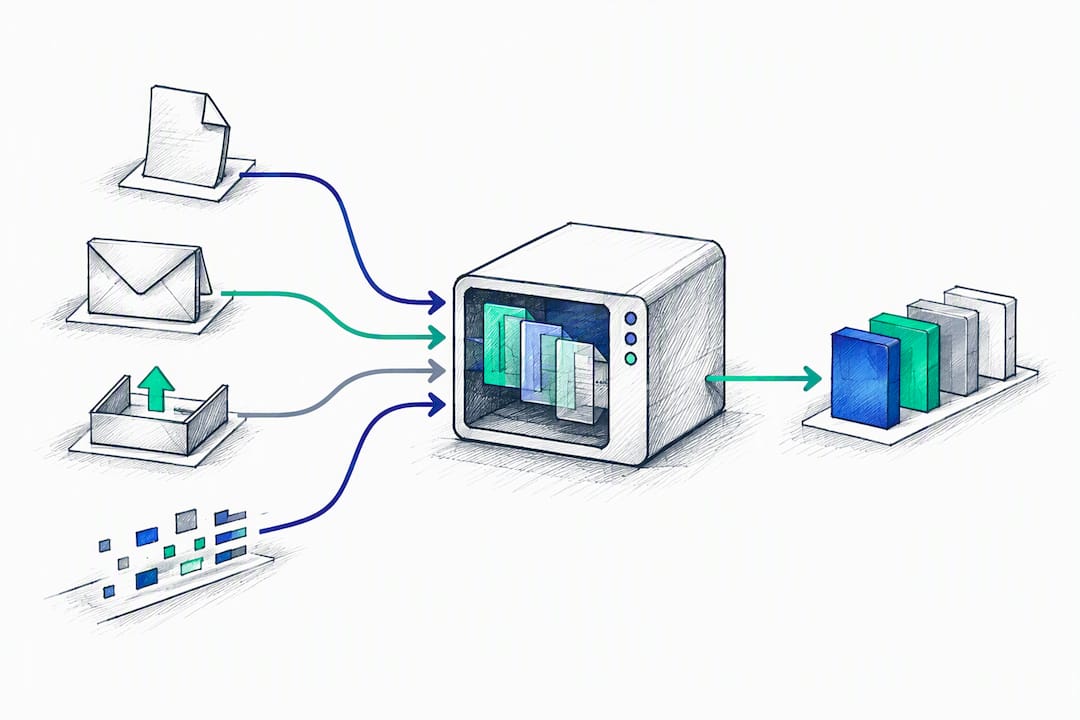
From there, intelligent document processing (IDP) takes over. Modern IDP differs from older OCR because it is template-agnostic. It does not need to be trained on a specific carrier’s invoice layout to extract the right fields; it recognizes what a “container number” or “HS code” looks like contextually, even in a document it has never seen before.
Extracted data then needs schema mapping, translating whatever the document says into the exact fields your TMS, WMS, or ERP expects, and, for customs work, into the structured formats government systems require. That is not optional for cross-border shipments: CBP’s Document Imaging System (DIS) specifies XML schema and defined submission protocols like secure web services, sFTP, and EDI for electronic document transmission, which means a system producing only a human-readable PDF summary is not actually compliance-ready.
The step most vendors skip talking about is confidence scoring. A well-built system does not treat every extracted field as equally trustworthy. Research on confidence-gated multimodal LLM verification found that routing low-confidence fields to human review, rather than auto-accepting everything, achieved 85.4% document-level extraction accuracy and 92.8% Top-1 accuracy on SKU alignment under constrained compute.
- Capture: scanned paper, emailed PDFs, portal uploads, EDI
- Classification: template-agnostic OCR and IDP models
- Mapping: schema alignment to TMS/WMS/ERP and government formats
- Verification: LLM-based semantic checks with confidence gating
- Routing: automatic acceptance above threshold, human review below it
Edge processing, running extraction locally rather than in the cloud, matters mainly for latency and data privacy in high-security customs environments. Most freight forwarders will find cloud processing sufficient, but it is worth asking any vendor where your document images are physically processed before you sign.
Connecting Automation to Your TMS, WMS, or ERP
The biggest mistake in logistics process improvement is treating document automation as a separate tool bolted onto your stack. It works far better as a layer that feeds your existing systems, not a replacement for them. Integrators consistently find that connecting automation to improve specific steps of the value chain outperforms wholesale system replacement.
- Design a scoped pilot. Pick one document type, define three or four KPIs up front, and pull 100 to 200 real sample documents, including messy ones, not just clean examples.
- Choose your integration pattern. APIs and EDI connectors work for most TMS and ERP platforms; customs workflows may need a direct portal-to-ACE flow alongside your primary submission method.
- Align master data first. SKU and material mapping has to match your enterprise catalog before extraction, or you get technically accurate data that is useless downstream. Building in a reconciliation step with candidate matching against your master catalog avoids the mismatches that cause chargebacks later.
- Test with exception handling built in. Monitor auto accepted fields against manually reviewed ones for the first several weeks, and log every confidence score for audit purposes.
- Plan the change management. Define who owns exception review, what the SLA is for flagged documents, and how the team gets trained before go-live, not after.
Pro Tip: Set two confidence thresholds instead of one, an auto-accept threshold and a lower “monitor” threshold where fields get filled but flagged for spot-checking. Anything below that second threshold routes to a human. This catches drift in extraction quality before it becomes a customer-facing problem.
What Compliance Requirements Apply to Automated Logistics Documents?
Regulatory acceptance is where a lot of otherwise good automation projects fall apart, usually because nobody checked what the government system actually expects the output to look like.
CBP requires carriers to file e-Manifests before arrival, and ACE supports both portal and EDI submission methods, with master data stored in ACE accounts to speed up future manifest creation. CBP’s own guidance recommends carriers maintain more than one submission method in case one channel goes down.
For document images specifically, CBP’s Document Imaging System expects XML metadata alongside the image itself, following a defined submission protocol and schema. A scanned PDF with no structured metadata attached will not satisfy DIS requirements even if a human could read it fine.
On the transport side, FMCSA and the Department of Transportation permit electronic records and signatures for regulatory recordkeeping, provided the electronic method preserves the required information and its intended use, consistent with E-SIGN Act principles.
- Retain original document images, not just extracted data, for audit purposes
- Log confidence scores and extraction metadata alongside every processed field
- Build tamper-evidence into your audit trail, not just a timestamp
- Confirm your XML output matches current DIS schema before going live on customs workflows
- Keep a secondary ACE submission method active in case your primary channel fails
How Do You Measure ROI on Logistics Document Automation?
The metrics that matter are the ones finance will actually ask about in a budget review, not vanity numbers about documents processed.
Track end-to-end processing time per document type, exceptions per 1,000 documents, cost per document processed, and average dispute resolution time. Cost per document should include labor time, not just software fees, because that is where the real savings usually hide.
A useful worked example: if your team processes 2,000 invoices a month and automation cuts average handling time from six minutes to ninety seconds, that is roughly 150 labor hours saved monthly, before counting the soft savings from faster payment cycles and fewer late-payment disputes with carriers.
- Cycle time: measure per document type, not as a blended average
- Exception rate: track exceptions per 1,000 documents, not raw exception counts
- Cost per document: include labor time and software cost together
- Dispute resolution time: measure from flag to close, not from flag to first response
During the pilot, watch extraction accuracy and exception rates closely. Post-scale, shift focus toward cost per document and cycle time trends, since that is what sustains executive support for wider rollout. A well-scoped project along these lines is exactly the kind of case that reduces freight errors measurably once it moves past the pilot stage.
Your 90-Day Pilot Plan for Logistics Document Automation
A 90-day pilot is long enough to prove real value and short enough to keep stakeholders engaged. Before you start, confirm three things: a clear goal statement, 100 to 200 sample documents, and system access for whoever is configuring the pilot.
- Weeks 1 to 2: Define success metrics, pull sample documents, and map current manual process time as your baseline.
- Weeks 3 to 5: Configure extraction models and schema mapping, then run against historical documents to check accuracy before touching live data.
- Weeks 6 to 8: Go live on a limited document flow with human review on every field, not just flagged ones, to build a real accuracy baseline.
- Weeks 9 to 11: Shift to confidence-gated review only, comparing exception rates and cycle time against your baseline.
- Week 12: Present go or no-go results, including cost per document and dispute resolution improvements, to stakeholders.
| Pilot phase | Primary focus | Key decision point |
|---|---|---|
| Weeks 1 to 2 | Baseline and scope | Which document type and what does success look like |
| Weeks 3 to 5 | Configuration and testing | Is extraction accuracy high enough on historical data |
| Weeks 6 to 8 | Live run with full review | Are confidence scores tracking with actual accuracy |
| Weeks 9 to 11 | Confidence-gated live run | Is exception rate low enough to reduce review load |
| Week 12 | Go or no-go decision | Does the business case justify scaling |
If the pilot succeeds, the next step is defining SLAs for exception handling, writing a runbook for the operations team, and scheduling the wider roll-out across additional document types.
How FreightSuite Fits Into Your Document Automation Plan
Most of the friction in logistics document automation projects comes from stitching together a separate extraction tool, a separate workflow layer, and a TMS that was never built to talk to either one. FreightSuite closes that gap by building document automation, AI agent orchestration, and rate, tracking, and finance tools into a single Agentic TMS, out of the box, without add-ons.

That means invoice recognition, automated document workflows, and customer dashboards live inside the same system you already use for rate management and shipment tracking, rather than requiring a separate integration project to connect them. For ocean freight teams specifically, the Ocean Freight TMS & Automation capabilities extend that same native automation into container tracking and carrier documentation without a rip-and-replace migration.
If you are scoping a pilot along the lines described above, the practical next step is to see the platform against your own document types rather than a generic demo. Request a walkthrough at FreightSuite and bring a sample of your messiest invoices or BOLs. That is usually the fastest way to find out whether a given extraction model can actually handle your carrier mix.
Sources
- ACE DIS XML Implementation Guide (CBP)
- Research on structured extraction and material matching (RRA-Logis) | MDPI
FAQ
What Are Some Examples of Automation in Logistics?
Common examples include automated bill of lading verification, proof of delivery exception flagging, freight invoice auditing, and customs manifest preparation for e-Manifest submission. Carrier onboarding and rate-sheet parsing are increasingly automated too, since they involve repetitive data extraction from varied document formats. FreightSuite builds several of these workflows natively into its Agentic TMS, rather than requiring separate tools.
What Are the 7 C’s of Logistics?
Definitions vary slightly by source, but a common version lists the right product, right customer, right quantity, right condition, right place, right time, and right cost. These principles focus on getting goods delivered accurately and efficiently rather than describing any specific technology or document process.
Will Supply Chain Management Be Replaced by AI?
AI is changing how supply chain management teams work, automating document processing, exception handling, and routine decision-making, but it is not eliminating the need for human judgment on exceptions, negotiations, or strategic sourcing decisions. The more realistic shift is toward AI-powered tools handling repetitive document and data work while people focus on relationships and exceptions that require context.
What Are the Most Common Documents Used in Logistics?
The most frequently processed documents are bills of lading, proofs of delivery, freight invoices, and customs manifests or declarations. Purchase orders, packing lists, and certificates of origin also come up often, particularly for cross-border shipments requiring customs clearance.
How Much Does FreightSuite Cost?
FreightSuite does not publish standard pricing publicly. Current pricing details are available by requesting a demo directly through the FreightSuite website.

