How Long Does a TMS Implementation Really Take?
Most focused cloud TMS rollouts finish within a few months. Mid-market projects commonly take several months. Enterprise, multi-ERP programs typically run half a year or longer. Where your project lands depends on one thing more than any other: how clean your data is and how many systems you need to connect to it.
The TMS implementation guide from SupplyChainDesk puts it plainly: user adoption and data readiness drive implementation speed far more than the software you pick. A vendor demo looks the same whether your rate tables are a mess or immaculate. Your calendar will not.
The single biggest safeguard against a rocky go-live:
- Run a parallel operation, 2 to 4 weeks minimum, processing every load in both the old and new system with weekly invoice reconciliation before you cut over completely.
Key Takeaways
A TMS implementation timeline is determined primarily by data readiness and integration count, not by company size alone, and a 2 to 4 week parallel run is the most reliable safeguard against a failed cutover.
| Point | Details |
|---|---|
| Cloud rollouts move fastest | Focused cloud TMS projects typically finish in 6 to 12 weeks with dedicated daily users. |
| Data cleanup starts before kickoff | Audit rate tables and customer records ahead of discovery to avoid migration delays. |
| Parallel run is non-optional | Run 2 to 4 weeks minimum with weekly invoice reconciliation before full cutover. |
| Staffing beats headcount | A part-time sponsor plus a committed PM and daily users move faster than a large, disengaged team. |
| Track KPIs through day 90 | Monitor invoice accuracy, tender acceptance, and loads per dispatcher through formal sign-off. |
| FreightSuite follows this structure | FreightSuite’s onboarding uses pilot lanes, parallel-run reconciliation, and staffed hypercare through day 90. |
Table of Contents
- TMS Implementation Timeline by Company Size
- What Are the Phases of a TMS Implementation?
- What Does an 8-Week Cloud TMS Rollout Look Like?
- What Slows Down or Speeds Up a TMS Rollout?
- Who Do You Need on a TMS Implementation Team?
- What Happens After Go-Live?
- How FreightSuite Applies This Playbook
- Ready to Scope Your Own Rollout Timeline?
- Sources
- FAQ
TMS Implementation Timeline by Company Size
Your budget conversation and your calendar conversation are really the same conversation. A freight brokerage running one core lane structure through a cloud platform is not comparable to a multi-entity forwarder juggling five ERPs and a dozen carrier EDI connections, and pretending otherwise is how projects blow past their target date.
Small shippers can sometimes go live in about two months with hands-on onboarding, according to BrokerPro TMS’s timeline guide, while larger organizations often need three to six months depending on integrations and customization.
A single cutover weekend works fine for a small operation with one core workflow. Once you’re touching multiple business units, currencies, or carrier networks, phase your rollout by lane or region instead. Complexities like multiple ERP systems, cross-border operations, and custom exception workflows can extend timelines.
What Are the Phases of a TMS Implementation?
Every credible rollout follows the same skeleton, even when the calendar length varies wildly. Understanding the phases matters because each one has a specific owner and a specific exit criteria, not because the phases are novel.
- Discovery and scoping (1 to 4 weeks). You and the vendor define goals, baseline KPIs like tender acceptance rate and invoice accuracy, and lock scope and contract milestones. Owner: project sponsor and vendor account lead. Exit criteria: signed scope document and baseline metrics captured.
- Data migration (1 to 6+ weeks). Extraction, cleanup, mapping, and test loads happen here, and this phase eats more schedule than any other when historical data is messy. Owner: IT plus vendor data team. Exit criteria: test load reconciles cleanly against source records.
- Configuration and build. Workflow setup, rule books, and rate tables get built to match your actual operation, not a generic template. Owner: operations lead with vendor configuration specialist. Exit criteria: configuration matches signed-off requirements document.
- Integration. Prioritize by business impact: ERP and accounting connections first, then carrier EDI/API feeds, then visibility tools. Owner: IT and vendor integration team. Exit criteria: each connection passes a defined test script.
- Testing and UAT. Scripted tests plus real load scenarios run by actual dispatchers and ops staff, not just IT. Exit criteria: documented acceptance sign-off from operations.
- Pilot and parallel run. Cloud rollouts need 2 to 4 weeks; enterprise programs need 4 or more, per the BestCarrierTMS implementation checklist. Reconcile invoices and settlements weekly during this window.
- Cutover and hypercare. A documented go/no-go checklist precedes the cutover weekend, followed by a hypercare period with escalation paths and daily metrics review.
Pro Tip: Freeze non-critical changes to your legacy system the moment parallel run starts. A moving target on the old side makes reconciliation nearly impossible on the new one.
What Does an 8-Week Cloud TMS Rollout Look Like?
A cloud implementation compresses the same phases into a tighter window because the platform requires less custom infrastructure. Here’s a schedule you can hand to a project sponsor as a working draft.
Week 0 (pre-kickoff): Export sample data sets, designate your daily users, and agree on baseline KPIs, tender acceptance, invoice accuracy, and loads handled per dispatcher, with the vendor.
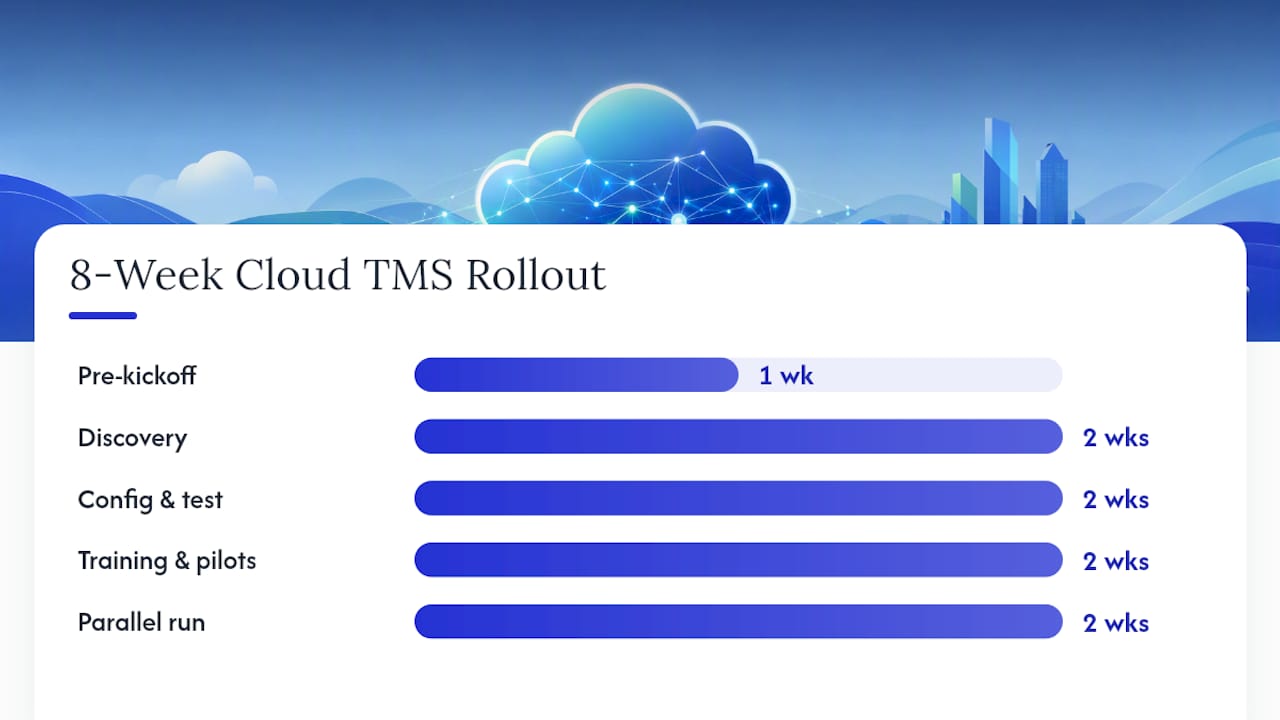
Weeks 1 to 2: Discovery sessions, full data export, field mapping, and initial configuration begin in parallel rather than sequentially.
Weeks 3 to 4: Configuration reaches completion, historical data loads into the system, and initial integration tests run against your accounting and carrier connections.
Weeks 5 to 6: Training for daily users happens alongside pilot lanes running real loads. Configuration gets refined based on what those pilot lanes reveal.
Weeks 7 to 8: Full parallel run with weekly reconciliation, a formal go/no-go meeting once the run proves stable, then cutover.
A few things separate teams that hit week 8 from teams that slip to week 12:
- Users designated in Week 0 actually show up for training in Weeks 5 and 6
- Data cleanup starts before the kickoff call, not during Week 1
- Pilot lanes get chosen for representative complexity, not just convenience
What Slows Down or Speeds Up a TMS Rollout?
Two projects with the same vendor and the same contract value can finish months apart. The gap almost always traces back to a handful of variables you can audit before you sign anything.
Data readiness tops the list. Run a quick audit of your rate tables, customer records, and carrier files before discovery even starts. If more than a small fraction of records need manual cleanup, budget extra weeks in the migration phase now rather than discovering it mid-project.
Integration complexity compounds fast. A single accounting API connection adds days. A carrier EDI network with dozens of trading partners, plus real-time visibility feeds, adds months. API connections generally move faster than legacy EDI setups because there’s less back-and-forth mapping required.
Other variables worth scoring honestly:
- Custom exception-handling workflows built around edge cases your team has never documented
- How many daily users can actually attend training sessions without disrupting operations
- Whether your cutover window lands during a seasonal peak
Analyst frameworks from firms like Gartner offer structured ways to score vendor integration support during discovery, which helps you catch complexity before it becomes a schedule surprise.
Who Do You Need on a TMS Implementation Team?
Staffing this wrong is the fastest way to turn an 8-week plan into a 14-week scramble. You don’t need a massive team. You need the right people committing real hours, not just attending kickoff calls.
- Project sponsor: Owns budget and priority decisions, roughly 10% time commitment throughout.
- Project manager: Runs the day-to-day schedule and vendor communication, 50 to 100% depending on project size.
- IT/integration lead: Owns data mapping and connection testing, heaviest load during migration and integration phases.
- Operations stakeholders: Daily users who test workflows and flag exceptions, need protected time during UAT and pilot phases, not just a calendar invite.
- Finance representative: Validates invoice accuracy and rate logic during parallel run, critical but often overlooked.
Insist your vendor provides a written integration playbook, dedicated parallel-run support, and staffed hypercare coverage, not just a support ticket queue. Cadence matters as much as headcount: daily triage stand-ups for the first 14 days after go-live, weekly status meetings throughout, and a hard go/no-go checkpoint before every cutover.
What Happens After Go-Live?
Hypercare is where projects either stabilize or quietly unravel. The first 30 days set the tone for the rest of the relationship with your new system.
Run daily issue triage for at least the first two weeks, then shift to weekly retrospectives once ticket volume drops. Track these KPIs from day one:
- Invoice accuracy rate against your pre-implementation baseline
- Tender acceptance rate
- Loads handled per dispatcher per day
- Billing cycle time from shipment completion to invoice sent
- Dispute rate on customer or carrier invoices
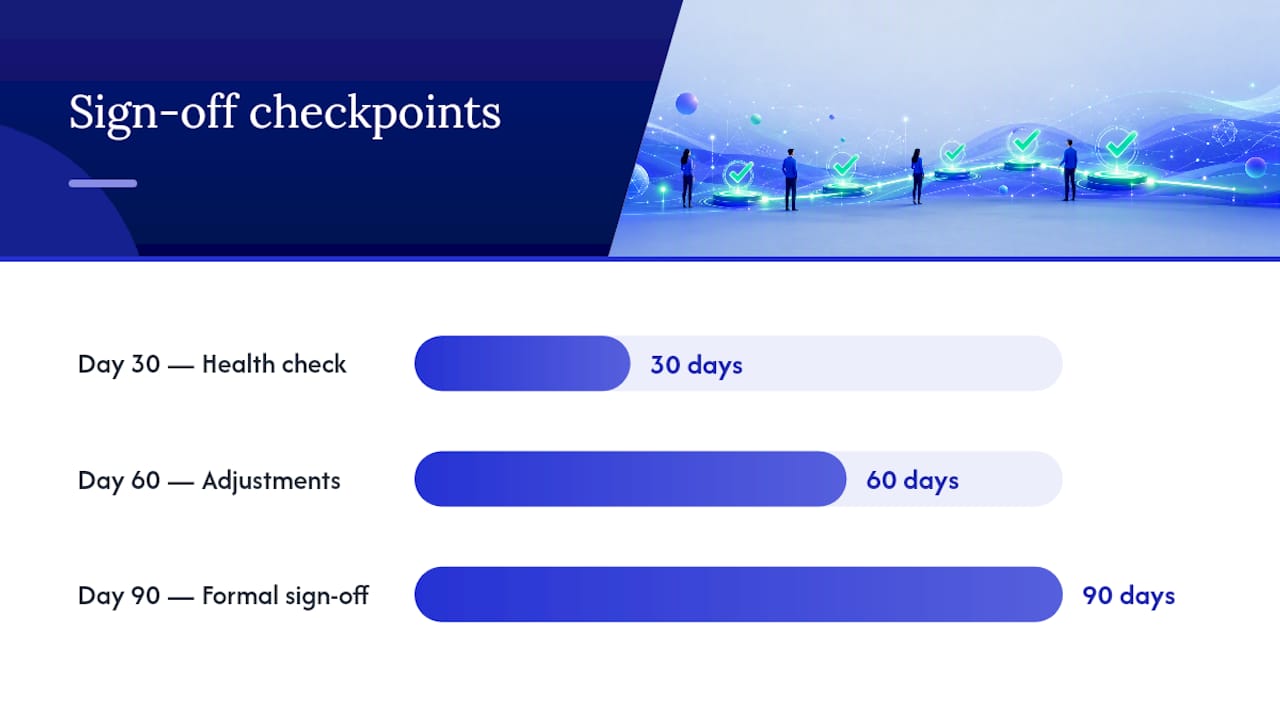
Structure sign-off in three checkpoints. Day 30: a health check comparing actual KPIs against baseline targets. Day 60: adjustments to configuration or workflows based on real operational patterns. Day 90: formal sign-off that closes the implementation project and transitions to standard support.
Pro Tip: Document your day-30 KPI snapshot even if numbers look rough. It becomes your negotiating leverage with the vendor if hypercare support needs to extend past the contracted window.
How FreightSuite Applies This Playbook
FreightSuite built its onboarding process around the same phased structure this article walks through, because forwarders and logistics companies asking about implementation timelines are really asking whether their operation will survive the transition intact.
- Pilot lanes get configured with representative complexity, not the easiest lane in the network, so early KPI data actually predicts full rollout performance.
- Parallel run support includes weekly reconciliation reviews between FreightSuite’s team and your finance staff, aligned with the invoice recognition and credit control features built into the platform.
- Hypercare escalation paths stay staffed through the day-90 sign-off window rather than dropping to a generic ticket queue after week two.
FreightSuite’s rate management and AI agent orchestration were built for the exact configuration and exception-handling challenges that stretch enterprise timelines. Forwarders managing cross-border freight can review how the platform handles ocean and air freight data fields before discovery even begins, which shortens the mapping phase considerably.
Ready to Scope Your Own Rollout Timeline?
FreightSuite runs on the same phased approach this article outlines, cloud-speed onboarding with pilot lanes, a real parallel run, and staffed hypercare, built specifically for freight forwarders and logistics companies who cannot afford a chaotic cutover.

If your rollout involves multiple carrier networks or complex rate structures, tools like Haullytics cover carrier-side readiness worth reviewing before you finalize scope. For your own project, three things are worth asking any vendor during a demo: how they handle pilot lanes, whether they provide a written integration playbook, and what parallel-run support looks like in practice.
FreightSuite’s pricing plans are structured around company size and integration count, matching the same variables that drive your timeline. Forwarders running road freight operations can also check road freight capabilities against their current workflow before scoping a project. The fastest way to get a real answer for your specific situation is to book a demo and ask for a pilot lane proposal built around your actual lanes and data.
Sources
- TMS implementation checklist (2026) · BestCarrierTMS
FAQ
What Is a TMS Implementation?
A TMS implementation is the structured process of configuring, migrating data into, integrating, and rolling out a transport management system, typically covering discovery, data migration, configuration, testing, pilot run, and cutover.
What Is the Timeline for a TMS Implementation?
Cloud rollouts typically take a few months, mid-market projects last several months, and enterprise or multi-ERP programs commonly take half a year or longer depending on data readiness and integration count.
Is SAP an ERP or a TMS?
SAP is primarily an ERP (enterprise resource planning) platform; some SAP modules offer transportation functionality, but purpose-built TMS platforms like FreightSuite handle freight-specific workflows such as rate management and carrier tendering more directly.
Who Owns TMS Logistics Decisions?
TMS ownership typically sits with logistics or supply chain operations leadership, with IT and finance as key stakeholders during implementation and a project sponsor accountable for budget and scope decisions.
How Long Should a Parallel Run Last?
Run your parallel period for 2 to 4 weeks at minimum, processing every load in both systems with weekly invoice and settlement reconciliation before committing to full cutover.

