Freight Forwarding Document Management Setup Guide

Freight forwarding document management setup is the process of organizing, automating, and validating all shipping paperwork to reduce errors, cut delays, and give your operations team real-time visibility. The industry runs on documents: bills of lading, commercial invoices, customs declarations, certificates of origin, and proof of delivery each carry legal and financial weight. Get the setup wrong and a single missing field on a customs form can hold a container at port for days. Get it right and you create a document control system in logistics that pays for itself fast. For mid-to-large volume freight forwarders, automation ROI typically exceeds implementation cost within 60 days.
What types of documents does freight forwarding document management cover?
The freight documentation process spans four core document categories, and each one has a distinct owner, purpose, and compliance requirement.
Shipping documents include bills of lading, invoices, customs forms, and proof of delivery, each serving specific operational and legal purposes that require distinct management approaches. Understanding that distinction is the first step toward building a system that actually works.
The four primary categories are:
- Bill of lading (BOL). The legal contract between shipper and carrier. It defines cargo ownership, routing, and delivery terms. The carrier issues it; the consignee must present it to claim goods.
- Commercial invoice. The financial record of the transaction. Customs authorities use it to assess duties and taxes. The exporter generates it, and it must match the packing list exactly.
- Customs documentation. Includes import/export declarations, certificates of origin, and phytosanitary certificates where applicable. Customs brokers typically prepare these, but the freight forwarder is responsible for accuracy.
- Proof of delivery (POD). Confirms the shipment reached its destination in the agreed condition. Carriers or drivers generate it at the point of handoff. Finance teams rely on it to trigger invoicing.
Each document type also feeds a different downstream function. Bills of lading drive shipment tracking and carrier liability. Invoices feed financial reporting workflows. Customs forms determine regulatory compliance. PODs close the operational loop and release payment. A cargo document management system that treats all four the same will create bottlenecks at every handoff point.
What tools and technologies do you need for document management?
The right technology stack for freight forwarding document management depends on three integration layers: your transport management system (TMS), your data sources, and your document processing engine.

| Layer | Function | Key consideration |
|---|---|---|
| TMS | Central hub for shipment data and document generation | Must support native document templates and workflow triggers |
| ERP or accounting system | Financial document reconciliation and reporting | Needs real-time sync with TMS to avoid duplicate data entry |
| Document automation engine | OCR, data extraction, and validation | Should handle unstructured formats like PDFs and scanned images |
| API integration layer | Connects carriers, customs portals, and client systems | Determines how fast data moves between parties |
| Client portal | Gives customers self-service access to their documents | Reduces inbound queries and supports client onboarding |
The TMS sits at the center of this stack. It is the system that knows when a shipment event occurs, which documents that event requires, and which parties need to receive them. A TMS without native document workflow capabilities forces your team to manage documents manually outside the system, which is where errors multiply.
EDI limitations create visibility gaps because EDI only reflects planned data, not real-time shipment status. Sourcing data directly from carriers and sensors improves accuracy. This matters for document management because a document generated from stale EDI data can misrepresent cargo status, creating compliance and financial risk.
Pro Tip: Before evaluating any document automation tool, map every document type your team currently handles and identify which ones require data from external sources like carrier APIs or customs portals. Tools that cannot pull live data from those sources will require manual intervention at exactly the wrong moment.
Freightsuite addresses this by building air and ocean tracking, workflow automation, and document management natively into a single TMS. That native integration removes the API stitching that typically creates data lag and validation failures in multi-tool setups.
How do you automate document processing step by step?
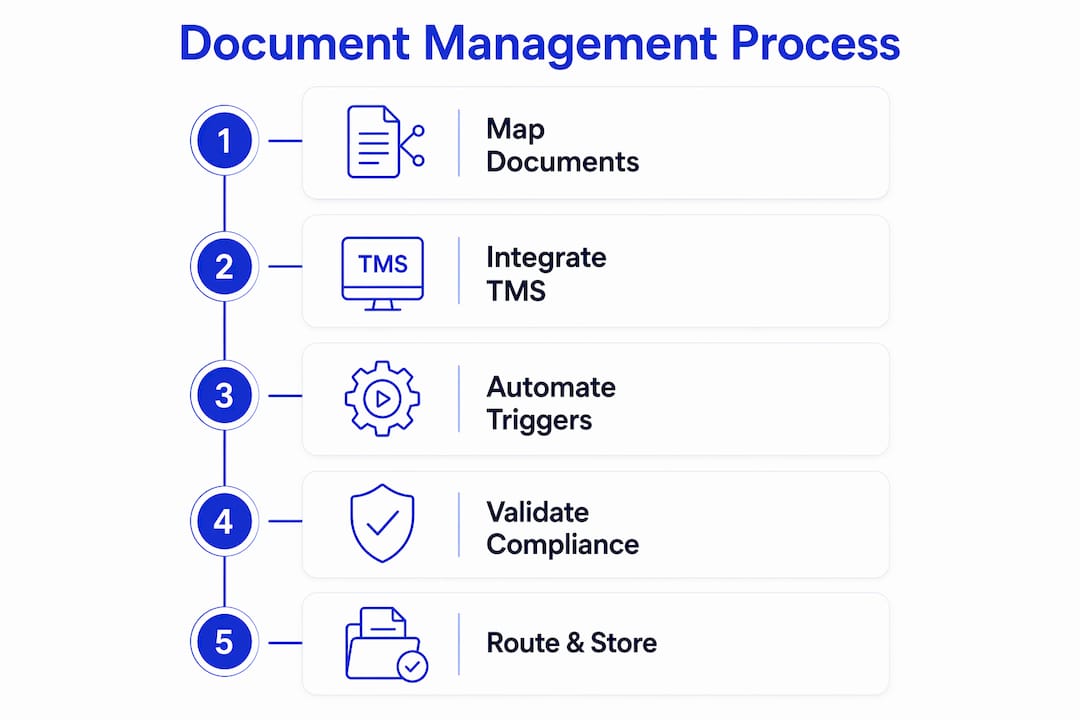
Automation works best when you treat it as a workflow design problem, not a software installation. The steps below apply whether you are setting up document automation for the first time or rebuilding a process that has grown too manual.
-
Map your document flows. List every document type your team handles, who creates it, who receives it, and what triggers its creation. A shipment booking triggers a BOL. A custom filing triggers a declaration. A delivery triggers a POD. Without this map, automation has no logic to follow.
-
Identify high-impact document types first. Automating proof of delivery or invoices first demonstrates rapid ROI and builds team confidence before you tackle more complex customs workflows. Start where the volume and friction are highest.
-
Build standardized templates. Create master templates for each document type with locked fields for regulatory data and editable fields for shipment-specific data. Standardization is what makes automation repeatable. Without it, every document becomes a one-off.
-
Configure triggers and routing logic. Define the shipment events that fire each document workflow. A booking confirmation triggers the BOL generation. A customs filing deadline triggers a compliance check. Routing logic determines who receives each document and in what format.
-
Add compliance validation layers. Automated compliance checks hold flagged documents for review before submission, preventing auto-submission of documents with known errors. This layer is what separates a document automation system from a document generation system.
-
Build a human-in-the-loop exception process. Exception management requires a pre-defined human review process to handle validation failures efficiently. Without it, failed documents sit in a queue with no owner and no resolution timeline.
Pro Tip: Run your first automation pilot on proof of delivery documents. PODs have a clear trigger (delivery confirmation), a defined recipient (finance team), and a measurable outcome (invoice release). That clarity makes them the fastest document type to automate and the easiest to demonstrate value with.
The operations team benefits most from steps four and five. When triggers and validation run automatically, operations staff spend time on exceptions rather than routine document routing, which is where their judgment actually adds value.
What are the most common pitfalls in freight document management setup?
Most freight document management projects fail not because of technology but because of process decisions made before any technology is selected.
- Digitizing a broken process. Automating inefficient manual workflows accelerates the inefficiency rather than removing it. Fix the document lifecycle first. Identify where data is duplicated, where approvals are redundant, and where handoffs create delays. Then automate the corrected process.
- Skipping unified data architecture. A consistent data framework across systems aligns cost, service metrics, and shipment events with consistent shipment identifiers to remove disconnected data silos. Without it, the same shipment appears differently in your TMS, your ERP, and your customs portal, and reconciliation becomes a manual job.
- Ignoring exception volume. Teams often design for the happy path and assume exceptions are rare. In freight forwarding, exceptions are routine. Customs holds, carrier data mismatches, and missing signatures happen on a significant share of shipments. Your exception workflow needs as much design attention as your standard workflow.
- Implementing everything at once. A phased approach, starting with one document type or one trade lane, produces faster results and lower risk than a full rollout. Early wins build internal support and reveal integration issues before they affect your entire shipment volume.
“Document management is more than retrospective reporting. It should function as a real-time operational intelligence layer that enables proactive exception management, not just a record of what already happened.”
The freight operations visibility best practices that separate high-performing forwarders from average ones come down to this: they treat documents as live data, not static files. A bill of lading is not just a PDF. It is a data object that should update your TMS, notify your client portal, and trigger your finance workflow the moment it is issued.
Key Takeaways
A well-designed freight forwarding document management setup connects document creation, validation, and routing into a single automated workflow that serves operations, finance, and compliance simultaneously.
| Point | Details |
|---|---|
| Start with document mapping | List every document type, its trigger, its owner, and its downstream recipient before selecting any tool. |
| Automate high-friction documents first | Proof of delivery and invoices deliver the fastest ROI and build team confidence early. |
| Build compliance validation in | Automated checks that hold flagged documents prevent regulatory errors before submission. |
| Use unified data architecture | Consistent shipment identifiers across TMS, ERP, and customs systems eliminate reconciliation work. |
| Design exception workflows deliberately | Pre-defined human review steps prevent failed documents from creating invisible backlogs. |
Why document management is the operational layer most forwarders underinvest in
I have worked with freight forwarders across air, ocean, and road who have invested heavily in rate management and customer portals while leaving their document workflows almost entirely manual. The pattern is consistent: documents are treated as an output of the shipment process rather than an active part of it. That framing is the root cause of most operational bottlenecks I see.
Real-time document ingestion transforms document management from a reactive process into a proactive one. When a document is generated, normalized, and validated the moment a shipment event occurs, your team can act on exceptions before they become delays. When documents are processed in batches at end of day, you are always managing yesterday’s problems.
The forwarders who get this right share one habit: they run a focused pilot on a single document type, measure the result in days, and use that proof point to expand the program. A pilot on proof of delivery documents, for example, can show measurable impact on invoice cycle time within weeks. That speed matters because it builds the internal case for broader investment.
The window for building a real competitive advantage through document automation is real, and it has a timeline. As AI-native platforms become the standard, forwarders still running manual document workflows will face a growing cost and speed gap against those who have automated. The choice is yours to make now, before that gap widens further.
— Annabel
How Freightsuite supports your document management workflow
Freightsuite is built as an AI-native TMS, which means document automation, compliance validation, and workflow triggers are not add-ons. They are part of the core platform. Freight forwarders using Freightsuite manage their air freight documents, road freight paperwork, and ocean shipment records from a single system without stitching together separate tools.

The platform connects operations, finance, and client-facing workflows so that a document generated at booking automatically routes to the right team, triggers the right compliance check, and appears in the client portal without manual intervention. For forwarders ready to move beyond legacy document handling, Freightsuite’s core platform offers a practical starting point with measurable results.
FAQ
What is freight forwarding document management setup?
Freight forwarding document management setup is the process of organizing, automating, and validating all shipping documents, including bills of lading, customs forms, and invoices, to reduce errors and improve operational efficiency.
Which documents should you automate first?
Automate proof of delivery and invoices first. These document types have clear triggers, defined recipients, and measurable outcomes, making them the fastest to implement and the easiest to demonstrate ROI with.
How does a TMS support cargo document management?
A TMS acts as the central hub that connects shipment events to document generation, routing, and validation. Without native document workflow capabilities in a TMS, teams manage documents manually outside the system, which increases error rates.
What is a compliance validation layer in document automation?
A compliance validation layer is an automated check that reviews documents for known errors before submission. It holds flagged documents for human review rather than auto-submitting them, which prevents regulatory penalties and customs delays.
How do you avoid the automation trap in freight document management?
Map and fix your document lifecycle before automating it. Digitizing a broken process accelerates inefficiency rather than removing it, so workflow redesign must come before technology selection.

